
Sony CDX-CA850: Labelling a CD
Labelling a CD: Sony CDX-CA850
Table of contents
- Welcome !
- Table of Contents
- Location of controls Card remote commander RM-X113
- Main unit
- Precautions Notes on discs
- Getting Started Resetting the unit
- Detaching the front panel
- Setting the clock CD Player CD/MD Unit (optional) Playing a disc
- Playing tracks repeatedly Display items Playing tracks in random order
- Labelling a CD
- Locating a disc by name Selecting specific tracks for playback
- Radio Storing stations automatically
- Receiving the stored stations Storing only the desired stations
- Tuning in a station through a RDS list Overview of RDS
- Automatic retuning for best reception results
- Receiving traffic Presetting RDS stations with announcements AF and TA setting
- Tuning in stations by programme type
- Setting the clock DAB (optional) automatically Overview of DAB
- Basic operations of DAB
- Presetting DAB services Presetting DAB services automatically manually
- Tuning in DAB programme through a list
- Locating a DAB service by programme type (PTY) Switching multi-channel audio and DRC
- By pressing buttons Other Functions Using the rotary commander Inserting the supplied lithium battery
- By rotating the control Changing the operative direction By pushing in and rotating the control
- Adjusting the sound Changing the sound and characteristics display settings Quickly attenuating the sound
- Setting the equalizer Adjusting the equalizer curve
- Selecting the spectrum analyzer Setting the Dynamic Soundstage Organizer (DSO)
- Labelling a Motion Display Additional Information Maintenance
- Removing the unit
- Specifications
- CD/MD playback Troubleshooting General Radio reception
- Error displays/Messages Error displays RDS Messages
Tips
• Simply overwrite or enter “” to correct or erase a
Labelling a CD
name.
• There is another way to start labelling a CD: Press
— Disc Memo (For a CD unit with the
(LIST) for 2 seconds instead of performing steps 2
CUSTOM FILE function)
and 3. You can also complete the operation by
pressing (LIST) for 2 seconds instead of step 5.
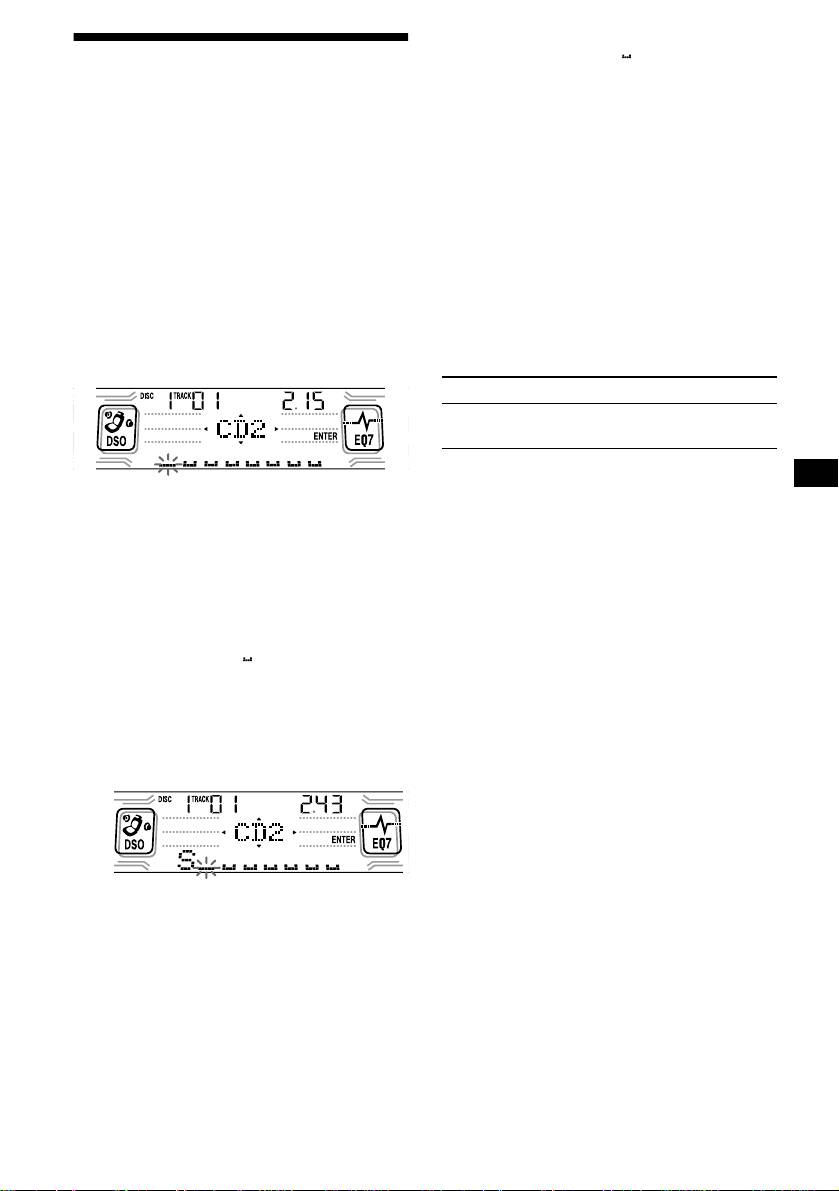
You can label each disc with a custom name
• You can label CDs on a unit without the CUSTOM
(Disc Memo). You can enter up to 8 characters
FILE function if that unit is connected along with a
for a disc. If you label a CD, you can locate the
CD unit that has the function. The Disc Memo will be
disc by name (page 12).
stored in the memory of the CD unit with the
CUSTOM FILE function.
1 Start playing the disc you want to label
Note
in a CD unit with the CUSTOM FILE
Repeat/shuffle play is suspended until the Name Edit
function.
is complete.
2 Press (MENU), then press either side
Viewing the Disc Memo
of (DISC) repeatedly until “Name Edit”
appears.
As a display item, the Disc Memo always takes
priority over any original CD TEXT information.
3 Press (ENTER).
To Press
View (DSPL/PTY) during CD/CD
TEXT disc playback
Tip
The unit will repeat the disc during the
To find out about other items that can be displayed,
labelling procedure.
see page 10.
4 Enter the characters.
Erasing the Disc Memo
1
1 Press the (+)*
side of (DISC)
repeatedly to select the desired
1 Press (SOURCE) repeatedly to select
character.
“CD.”
A t B t C ... t 0 t 1 t 2 ... t +
2 Press (MODE) repeatedly to select the
2
t – t
... t *
t A
CD unit storing the Disc Memo.
*
3 Press (MENU), then press either side
*1 For reverse order, press the (–) side of
of (DISC) repeatedly until “Name Del”
(DISC).
appears.
*2 (blank space)
2 Press the (+) side of (SEEK) after
4 Press (ENTER).
locating the desired character.
The stored names will appear.
5 Press either side of (DISC) repeatedly
to select the disc name you want to
erase.
The stored names will appear.
6 Press (ENTER) for 2 seconds.
The name is erased.
If you press the (–) side of (SEEK), you
Repeat steps 5 and 6 if you want to erase
can move back to the left.
other names.
3 Repeat steps 1 and 2 to enter the
7 Press (MENU) twice.
entire name.
The unit returns to normal CD play mode.
5 To return to normal CD play mode,
Notes
press (ENTER).
• When the Disc Memo for a CD TEXT disc is erased,
the original CD TEXT information is displayed.
• If you cannot find the Disc Memo you want to erase,
try selecting a different CD unit in step 2.
11


