
Sony CDX-CA750 RU: Setting the clock CD Player CD/MD Unit (optional) Playing a disc
Setting the clock CD Player CD/MD Unit (optional) Playing a disc: Sony CDX-CA750 RU
Table of contents
- Welcome !
- Table of Contents
- Location of controls
- Card remote commander RM-X114
- Precautions Notes on discs
- Getting Started Resetting the unit
- Detaching the front panel
- Setting the clock CD Player CD/MD Unit (optional) Playing a disc
- Playing tracks repeatedly Display items Playing tracks in random order
- Labelling a CD
- Locating a disc by name Selecting specific tracks for playback
- Radio Storing stations automatically
- Receiving the stored stations Storing only the desired stations
- Tuning in a station through a RDS list Overview of RDS
- Automatic retuning for best reception results
- Receiving traffic Presetting RDS stations with announcements AF and TA setting
- Tuning in stations by programme type
- Setting the clock DAB (optional) automatically Overview of DAB
- Basic operations of DAB
- Presetting DAB services Presetting DAB services automatically manually
- Tuning in DAB programme through a list
- Locating a DAB service by programme type (PTY) Switching multi-channel audio and DRC
- Other Functions Using the rotary commander
- Adjusting the sound characteristics Quickly attenuating the sound
- Changing the sound and display settings
- Setting the equalizer Setting the Dynamic Soundstage Organizer (DSO)
- Selecting the spectrum analyzer Labelling a Motion Display
- Additional Information Maintenance
- Removing the unit
- Specifications
- Troubleshooting
- Error displays/Messages
01GB02CD-EUA.fm masterpage:Right
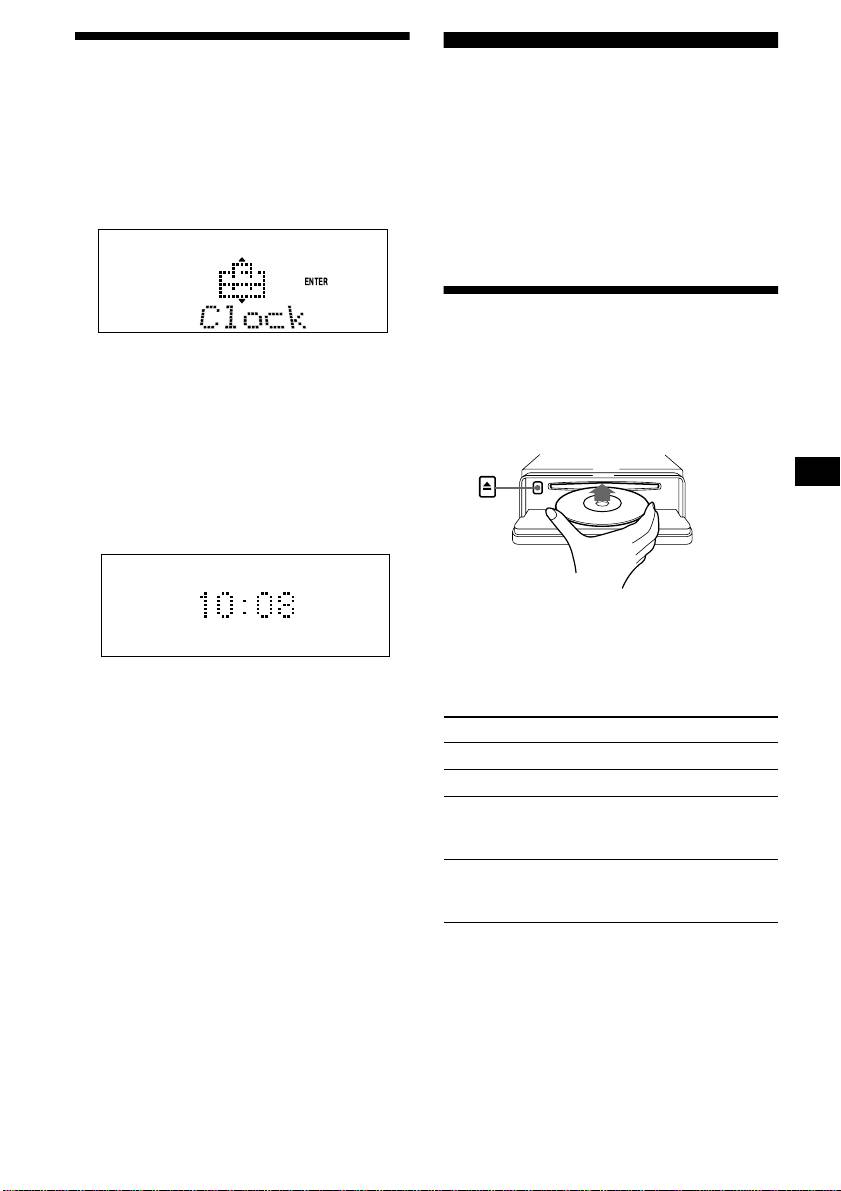
Setting the clock
CD Player
The clock uses a 24-hour digital indication.
CD/MD Unit (optional)
Example: To set the clock to 10:08
In addition to playing a CD with this unit, you
1 Press (MENU), then press either side
can also control external CD/MD units.
of (DISC/PRESET) repeatedly until
Note
“Clock” appears.
If you connect an optional CD unit with the CD TEXT
function, the CD TEXT information will appear in the
display when you play a CD TEXT disc.
Playing a disc
1Press (ENTER).
(With this unit)
The hour indication flashes.
2Press either side of (DISC/PRESET)
1 Press (OPEN) and insert the disc
to set the hour.
(labelled side up).
3Press the (+) side of (SEEK).
The minute indication flashes.
4Press either side of (DISC/PRESET)
to set the minute.
2 Press (ENTER).
2 Close the front panel.
Playback starts automatically.
The clock starts. After the clock setting is
If a disc is already inserted, press (SOURCE)
completed, the display returns to normal play
repeatedly until “CD” appears to start playback.
mode.
Tips
To Press
• You can set the clock automatically with the RDS
Stop playback (OFF)
feature (page 19).
• When D.Info mode is set to on, the time is always
Eject the disc (OPEN) then Z
displayed (page 26).
Skip tracks
(SEEK) (./>)
–Automatic
[once for each track]
Music Sensor
Fast-forward/
(SEEK) (m/M)
reverse
[hold to desired point]
–Manual Search
continue to next page t
9
CDX-CA750X/CA750
3-228-151-21 (1)
