
Sony CDX-CA750 RU: Removing the unit
Removing the unit: Sony CDX-CA750 RU
Table of contents
- Welcome !
- Table of Contents
- Location of controls
- Card remote commander RM-X114
- Precautions Notes on discs
- Getting Started Resetting the unit
- Detaching the front panel
- Setting the clock CD Player CD/MD Unit (optional) Playing a disc
- Playing tracks repeatedly Display items Playing tracks in random order
- Labelling a CD
- Locating a disc by name Selecting specific tracks for playback
- Radio Storing stations automatically
- Receiving the stored stations Storing only the desired stations
- Tuning in a station through a RDS list Overview of RDS
- Automatic retuning for best reception results
- Receiving traffic Presetting RDS stations with announcements AF and TA setting
- Tuning in stations by programme type
- Setting the clock DAB (optional) automatically Overview of DAB
- Basic operations of DAB
- Presetting DAB services Presetting DAB services automatically manually
- Tuning in DAB programme through a list
- Locating a DAB service by programme type (PTY) Switching multi-channel audio and DRC
- Other Functions Using the rotary commander
- Adjusting the sound characteristics Quickly attenuating the sound
- Changing the sound and display settings
- Setting the equalizer Setting the Dynamic Soundstage Organizer (DSO)
- Selecting the spectrum analyzer Labelling a Motion Display
- Additional Information Maintenance
- Removing the unit
- Specifications
- Troubleshooting
- Error displays/Messages
01GB02CD-EUA.fm
masterpage:Left
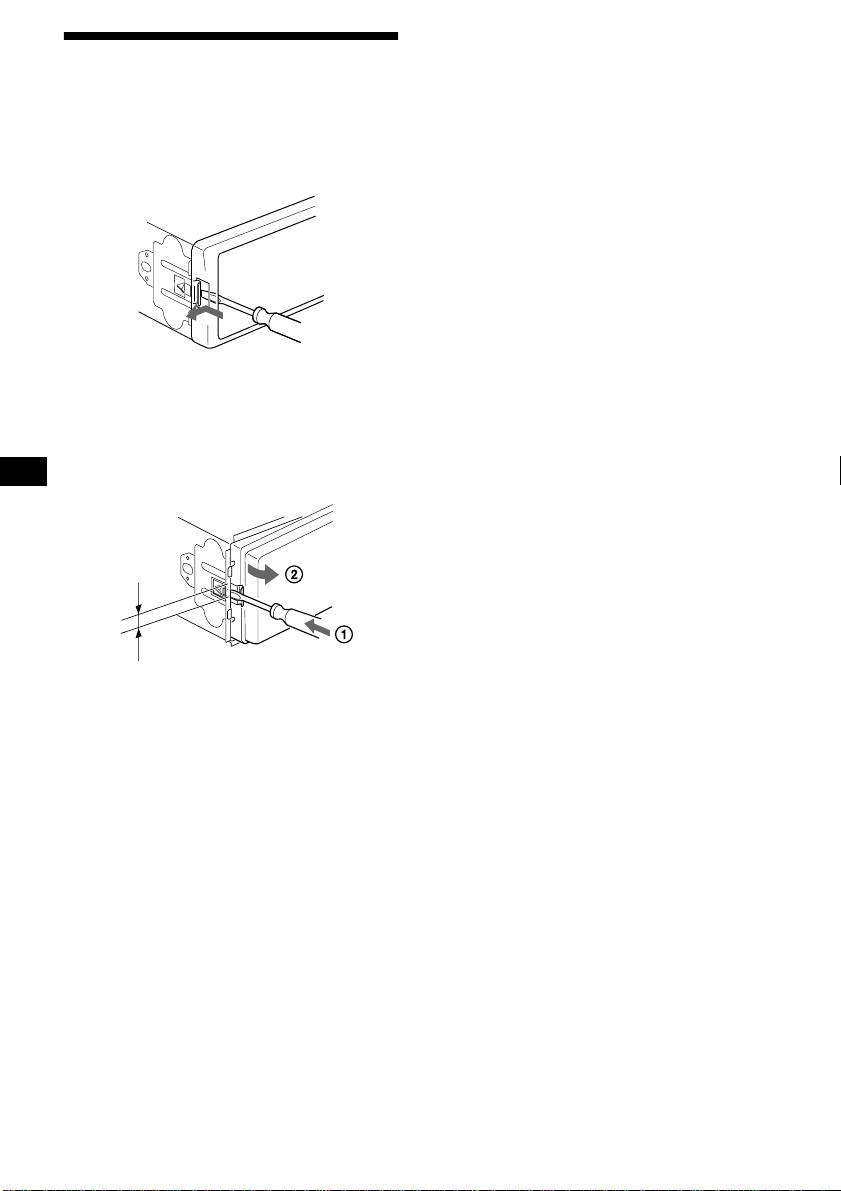
Removing the unit
1 Remove the front cover
1Detach the front panel (page 8).
2Press the clip inside the front cover
with a thin screwdriver.
3Repeat step 2 for the other side.
2 Remove the unit
1Use a thin screwdriver to push in
the clip on the left side of the unit,
then pull out the left side of the unit
until the catch clears the mounting.
4 mm
2Repeat step 1 for the right side.
3Slide the unit out of its mounting.
30
CDX-CA750X/CA750
3-228-151-21 (1)
Top 10 manuals
100.00
NZXT HALE90 1000W99.99
Samsung SM-R38099.97
AEG BSB 18C99.97
Dell 2700W99.97
Smeg KSEC70X99.96
Beurer HDE 4099.96
Pyramida KH 50 v.299.96
MSI CSM-H81M-P3299.96
AEG HR 562799.95
Melissa 640-048