
Sony CDX-CA750 RU: Precautions Notes on discs
Precautions Notes on discs: Sony CDX-CA750 RU
Table of contents
- Welcome !
- Table of Contents
- Location of controls
- Card remote commander RM-X114
- Precautions Notes on discs
- Getting Started Resetting the unit
- Detaching the front panel
- Setting the clock CD Player CD/MD Unit (optional) Playing a disc
- Playing tracks repeatedly Display items Playing tracks in random order
- Labelling a CD
- Locating a disc by name Selecting specific tracks for playback
- Radio Storing stations automatically
- Receiving the stored stations Storing only the desired stations
- Tuning in a station through a RDS list Overview of RDS
- Automatic retuning for best reception results
- Receiving traffic Presetting RDS stations with announcements AF and TA setting
- Tuning in stations by programme type
- Setting the clock DAB (optional) automatically Overview of DAB
- Basic operations of DAB
- Presetting DAB services Presetting DAB services automatically manually
- Tuning in DAB programme through a list
- Locating a DAB service by programme type (PTY) Switching multi-channel audio and DRC
- Other Functions Using the rotary commander
- Adjusting the sound characteristics Quickly attenuating the sound
- Changing the sound and display settings
- Setting the equalizer Setting the Dynamic Soundstage Organizer (DSO)
- Selecting the spectrum analyzer Labelling a Motion Display
- Additional Information Maintenance
- Removing the unit
- Specifications
- Troubleshooting
- Error displays/Messages
01GB02CD-EUA.fm
masterpage:Left
Precautions
Notes on discs
• If your car was parked in direct sunlight, allow
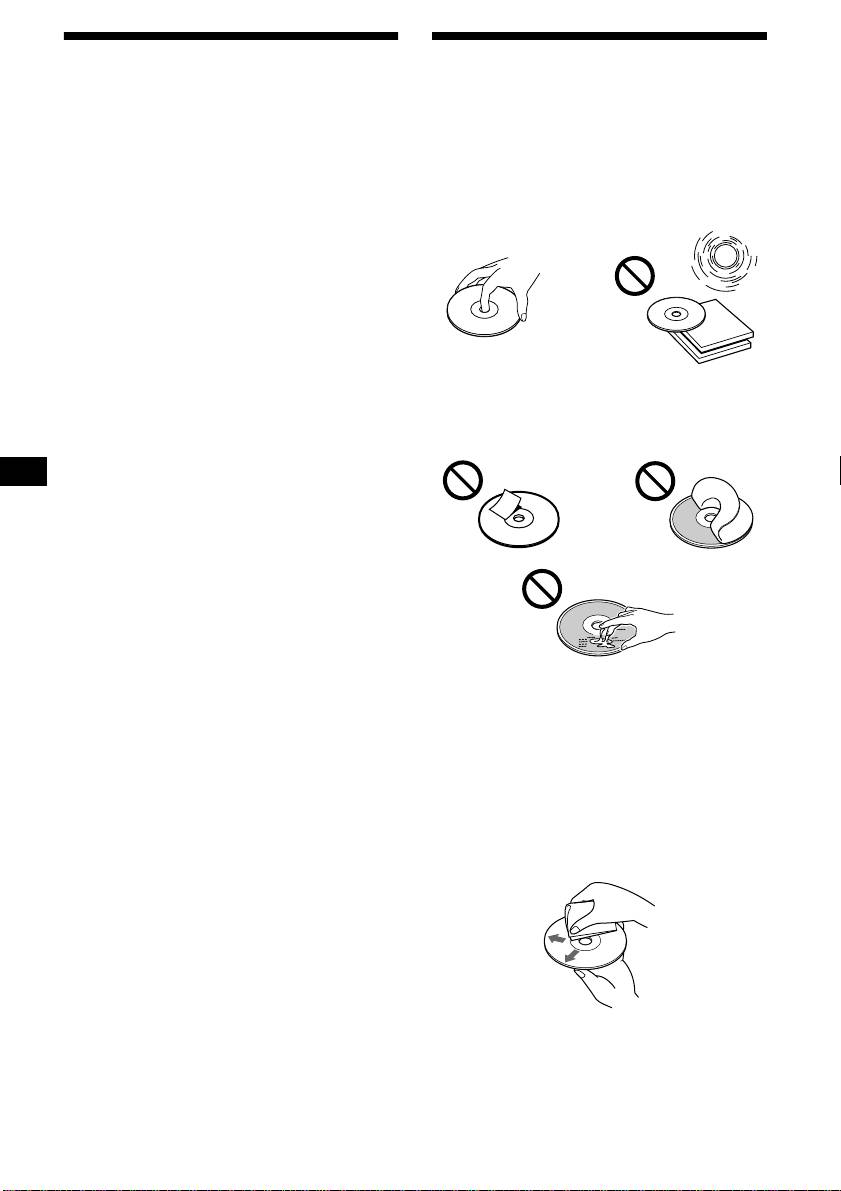
• To keep the disc clean, do not touch the surface.
the unit to cool off before operating it.
Handle the disc by its edge.
• Power aerials will extend automatically while
• Keep your discs in their cases or disc
the unit is operating.
magazines when not in use.
Do not subject the discs to heat/high
If you have any questions or problems
temperature. Avoid leaving them in parked cars
concerning your unit that are not covered in this
or on dashboards/rear trays.
manual, please consult your nearest Sony dealer.
Moisture condensation
On a rainy day or in a very damp area, moisture
condensation may occur inside the lenses and
display of the unit. Should this occur, the unit
will not operate properly. In such a case, remove
the disc and wait for about an hour until the
moisture has evaporated.
• Do not attach labels, or use discs with sticky
ink/residue. Such discs may stop spinning
To maintain high sound quality
when used, causing a malfunction, or may ruin
the disc.
Be careful not to splash juice or other soft drinks
onto the unit or discs.
• Discs with non-standard shapes (e.g., heart,
square, star) cannot be played on this unit.
Attempting to do so may damage the unit. Do
not use such discs.
• You cannot play 8 cm CDs.
• Before playing, clean the discs with a
commercially available cleaning cloth. Wipe
each disc from the centre out. Do not use
solvents such as benzine, thinner, commercially
available cleaners, or antistatic spray intended
for analog discs.
6
CDX-CA750X/CA750
3-228-151-21 (1)
