
Sony TA-FE520R: Speaker System Hookups
Speaker System Hookups: Sony TA-FE520R
Table of contents
Getting Started
Tape deck, DAT deck, or MD deck
Tape deckAmplifier
Speaker System Hookups
TAPE1/DAT
OUTPUT
INPUT
RECOUT
IN
LINE LINE
L
L
Ç
Overview
R
R
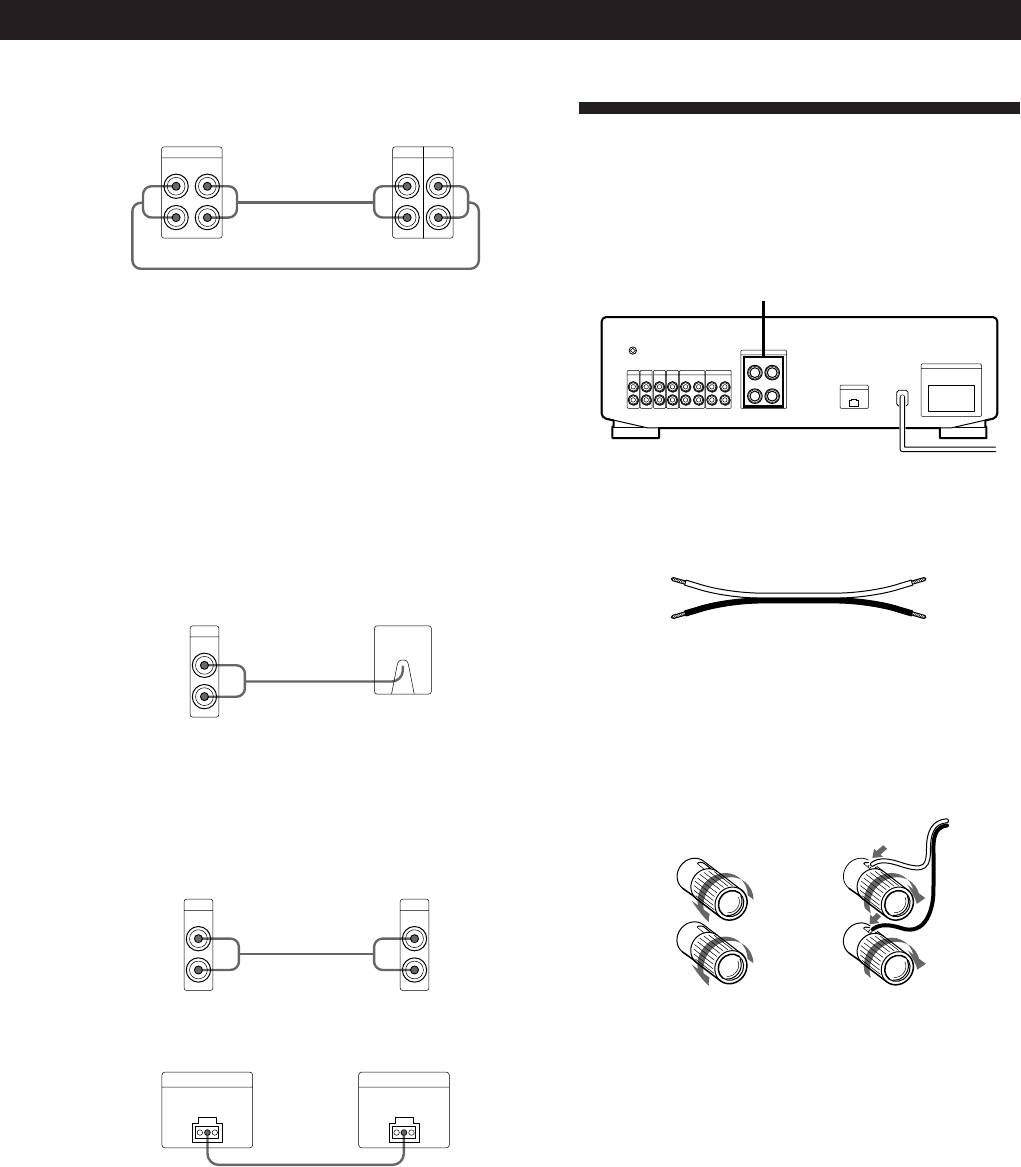
Here you learn how to connect speakers to the
amplifier.
ç
SPEAKERS
Use the configuration above to connect the OUTPUT and
INPUT jacks of:
—a tape deck or DAT deck to the TAPE1/DAT jacks.
y
S
I
G
N
A
L
G
N
D
IMPEDANCE USE 4 - 16 Ω
SPEAKERS
RL
—a tape deck or MD deck to the TAPE2/MD jacks.
AC OUTLET
PHONO
TUNER
CD
AUX TAPE2/MD
TAPE1/DAT
+
+
SWITCHED 100W MAX
IN
IN
IN IN
IN
REC OUT
RECOUT
IN
L
EON CONTROL
R
–
–
IN
Turntable
1 Remove the shorting plugs from the PHONO jacks before
connecting the cables (but not unless you connect a
turntable).
Do not attach the shorting plugs to any set of the RECOUT
What cords will I need?
jacks. Doing so may stop output from the amplifier or
Speaker cord (not supplied) (1 for each speaker)
cause the unit to malfunction.
(+)
(+)
2 Connect the audio connecting cords.
Amplifier
Turntable
(–)
(–)
PHONO
IN
L
Twist the stripped ends of the cord about 15mm. Be sure to
Ç
match the speaker cord to the appropriate terminal on the
R
components: + to + and – to –. If the cords are reversed, the
sound will be distorted and will lack bass.
Note
Hookups
To prevent hum, connect the earth lead to SIGNAL GND (y)
on the amplifier.
]
TV or video deck
]
Amplifier
TV or video deck
AUX
OUTPUT
IN
LINE
L
L
Ç
}
}
R
R
EON CONTROL (TA-FE520R only)
Amplifier
Tuner
EON CONTROL
EON CONTROL
IN
OUT
Ç
If your tuner is equipped with an EON CONTROL OUT
terminal, connect it to the EON CONTROL IN terminal on
the amplifier to allow use of the EON (Enhanced Other
Networks) function of the RDS (Radio Data System) (see
page 8).
EN
5
