
Sony DSC-QX10: Charging the battery
Charging the battery: Sony DSC-QX10
Table of contents
- Owner’s Record
- WARNING CAUTION
- AC Adaptor
- For Customers in Europe
- Notice
- Disposal of Old Electrical & Electronic Equipment (Applicable in the European Union and other European countries with separate collection systems)
- Disposal of waste batteries (applicable in the European Union and other European countries with separate collection systems)
- About the camera Name of main parts Check the supplied items
- DSC-QX10 DSC-QX100
- Charging the battery
- Inserting a memory card
- Installing “PlayMemories Mobile”
- Connecting the camera and a smartphone via Wi-Fi
- Connecting the camera and a smartphone via Wi-Fi (continued)
- iPhone
- Attaching the camera to a smartphone
- Attaching the camera to a smartphone (continued)
- Removing the smartphone attachment
- Shooting images
- Terminating
- Refer to the Help Guide
- Q & A
- Q & A (continued)
- Specifications
- Battery life and number of images that can be recorded
- Trademarks
- Notes on using the camera
- On use and care
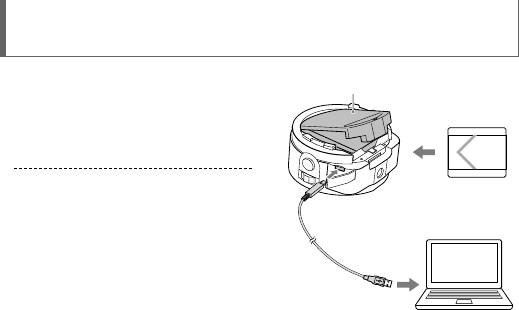
Charging the battery
Charge the battery before using
Battery cover
the camera. To charge, use the
micro USB cable (supplied)
to connect the camera to a
computer.
Turn off the power when the
battery is being charged.
If you do not have a computer,
use the AC adaptor AC-UD10 or
AC-UD11 (both sold separately). The
AC-UD11 (sold separately) may not
be available in some countries/
regions.
12
Top 10 manuals
100.00
NZXT HALE90 1000W99.99
Samsung SM-R38099.97
AEG BSB 18C99.97
Dell 2700W99.97
Smeg KSEC70X99.96
Beurer HDE 4099.96
Pyramida KH 50 v.299.96
MSI CSM-H81M-P3299.96
AEG HR 562799.95
Melissa 640-048