
Sony DSC-QX10: Attaching the camera to a smartphone
Attaching the camera to a smartphone: Sony DSC-QX10
Table of contents
- Owner’s Record
- WARNING CAUTION
- AC Adaptor
- For Customers in Europe
- Notice
- Disposal of Old Electrical & Electronic Equipment (Applicable in the European Union and other European countries with separate collection systems)
- Disposal of waste batteries (applicable in the European Union and other European countries with separate collection systems)
- About the camera Name of main parts Check the supplied items
- DSC-QX10 DSC-QX100
- Charging the battery
- Inserting a memory card
- Installing “PlayMemories Mobile”
- Connecting the camera and a smartphone via Wi-Fi
- Connecting the camera and a smartphone via Wi-Fi (continued)
- iPhone
- Attaching the camera to a smartphone
- Attaching the camera to a smartphone (continued)
- Removing the smartphone attachment
- Shooting images
- Terminating
- Refer to the Help Guide
- Q & A
- Q & A (continued)
- Specifications
- Battery life and number of images that can be recorded
- Trademarks
- Notes on using the camera
- On use and care
Attaching the camera to a smartphone
GB
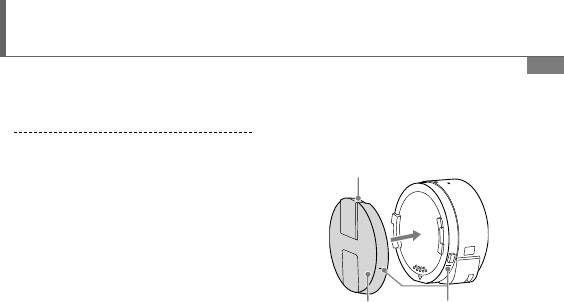
Attach a smartphone after fixing
the camera to the smartphone
attachment (supplied).
Fix the camera to the attachment.
Sony mark
Put the camera into the slot of the
attachment, aligning the index,
then rotate the attachment until
it clicks.
Index (-)Smartphone
Attachment
Continued
19
Top 10 manuals
100.00
NZXT HALE90 1000W99.99
Samsung SM-R38099.97
AEG BSB 18C99.97
Dell 2700W99.97
Smeg KSEC70X99.96
Beurer HDE 4099.96
Pyramida KH 50 v.299.96
MSI CSM-H81M-P3299.96
AEG HR 562799.95
Melissa 640-048