
Sony DEV-3: Quick Start Guide 1 Installing the battery pack 2 Turning on the power 3 Adjusting the diopter
Quick Start Guide 1 Installing the battery pack 2 Turning on the power 3 Adjusting the diopter: Sony DEV-3
Table of contents
- Quick Start Guide 1 Installing the battery pack 2 Turning on the power 3 Adjusting the diopter
- 4 Adjusting the eyepiece position 5 Setting up this product
- Using the product
- Notes on use
ENG
2
Quick Start Guide
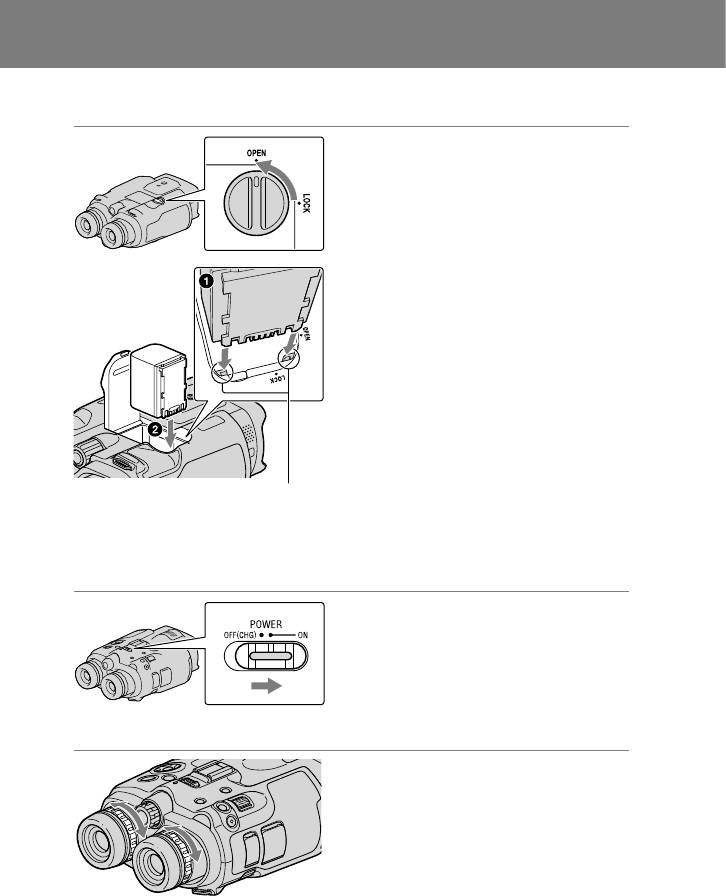
1 Installing the battery pack
Turn the battery cover lock to OPEN
and open the battery cover.
Align the battery with the groove in
the battery compartment (), and
slide the battery until it clicks ().
Close the battery cover and turn the
battery cover lock to LOCK.
Align the battery
with the groove.
Please be sure to charge the battery pack before use.
2 Turning on the power
Set the POWER switch to ON by
pressing the green button.
3 Adjusting the diopter
Adjust the diopter until you can see a
clear image with each eye by turning
the diopter adjustment dial.
If this product is used by more than one
person, adjust the diopter each time the
user changes.
Adjust the diopter for each eye separately.
Top 10 manuals
100.00
NZXT HALE90 1000W99.99
Samsung SM-R38099.97
AEG BSB 18C99.97
Dell 2700W99.97
Smeg KSEC70X99.96
Beurer HDE 4099.96
Pyramida KH 50 v.299.96
MSI CSM-H81M-P3299.96
AEG HR 562799.95
Melissa 640-048