
Sony DEV-3: 4 Adjusting the eyepiece position 5 Setting up this product
4 Adjusting the eyepiece position 5 Setting up this product: Sony DEV-3
Table of contents
- Quick Start Guide 1 Installing the battery pack 2 Turning on the power 3 Adjusting the diopter
- 4 Adjusting the eyepiece position 5 Setting up this product
- Using the product
- Notes on use
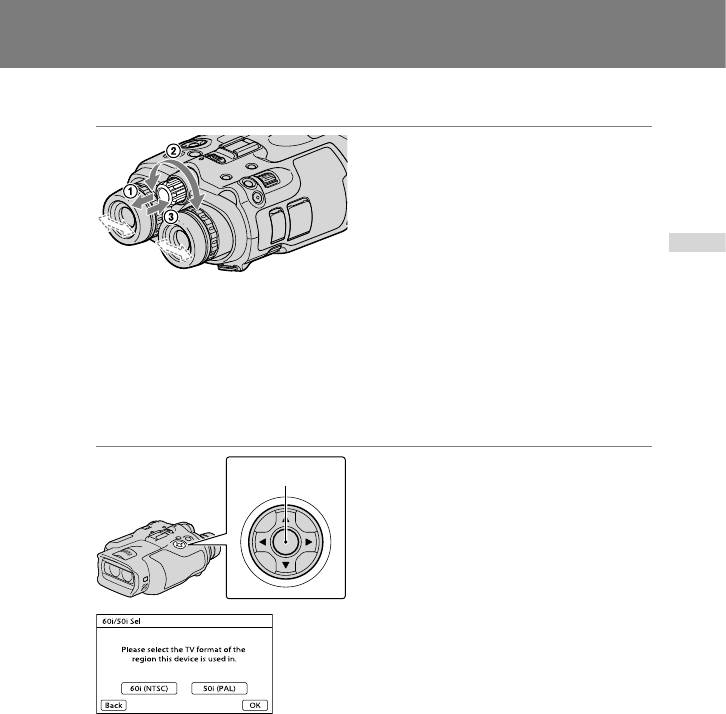
4 Adjusting the eyepiece position
Pull out the IPD ADJ dial.
Adjust the width between the left
and right viewfinder to fit your eyes
using the IPD ADJ dial.
Adjust the width so that left and right
ENG
images overlap.
Make sure that the image in the
viewfinder does not look like it has a
double image.
If this product is used by more than one
person, adjust the width each time the
user changes.
Push the IPD ADJ dial back into this
product.
5 Setting up this product
Set the language, area, summer
Enter button
time, date & time format, and date
& time using the ////Enter
button, then confirm each setting.
Select [60i (NTSC)] or [50i (PAL)] to
suit the TV color system used in
your country/region, then press
Enter.
When the 60i/50i selection is made,
this product restarts to update the
system.
See page 5 for details on the TV color
system in your country/region.
ENG
3
