
Sony CPF-NW001: Using the remote
Using the remote: Sony CPF-NW001
Table of contents
Using the remote
The default settings are underlined.
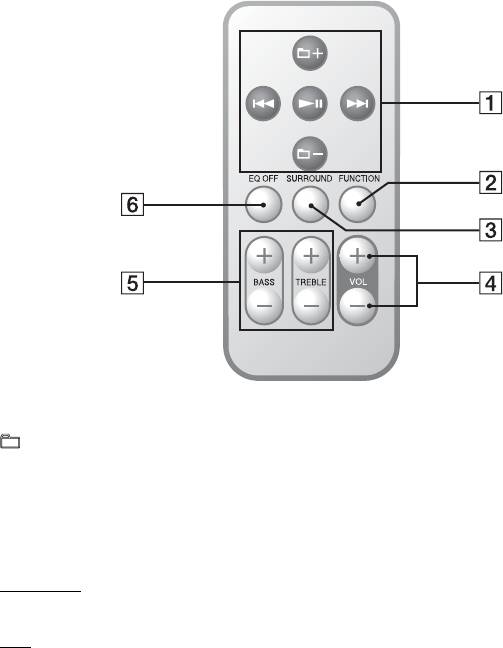
1 +/–*: Moves the playback position to the folder before (or after) the folder set by the
“Walkman”.**
./>*: Hold down to fast-rewind (fast-forward), or press and release to skip to the beginning
of the current (or next) song.
NX*: Playback/Pause (or Playback/Stop)
2 FUNCTION: Switches the input source.
“Walkman”
y LINE (The LINE indicator lights up.)
3 SURROUND: Turns the surround sound effect on and off.
OFF
y ON (The SURROUND indicator lights up.)
4 VOL +/–: Adjusts the volume. (20 levels)
5 BASS +/–: Adjusts the bass. (±3 steps)
TREBLE +/–: Adjusts the treble. (±3 steps)
6 EQ OFF: Resets the bass and treble.
* These controls may not function or may operate differently depending on the “Walkman” specifications.
** See the user's guide of your “Walkman” for the folder setting method.
To listen to music on a portable audio player
Switch the function to LINE in step 2, and then start play on your portable audio player. The LINE
indicator lights up.
Note
The buttons 1 of the remote do not function for portable audio players other than “Walkman” models compatible
with this system.
GB
8
