
Sony CPF-NW001: Checking Supplied Items
Checking Supplied Items: Sony CPF-NW001
Table of contents
Checking Supplied Items
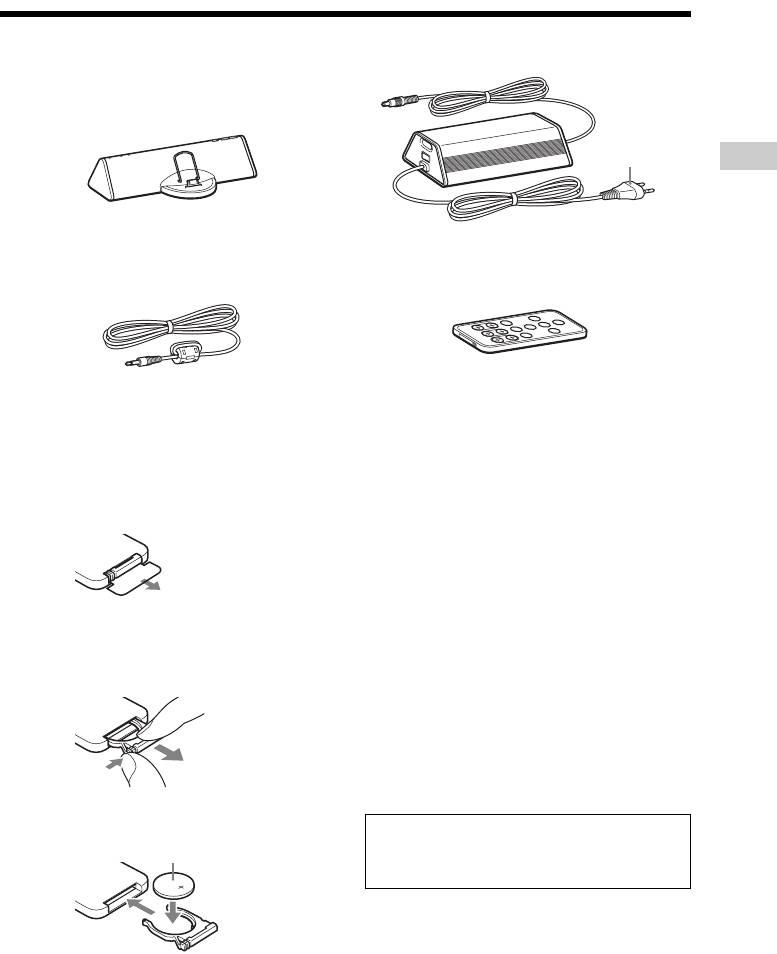
Main unit (See page 2 for compatible “Walkman”
Subwoofer
models.)
*
GB
* The shape of the plug differs depending on the area.
LINE IN cable Remote
Preparing the remote
Pull out the insulating sheet to allow power to
Note
flow from the battery.
If you do not use the remote for a long period of time,
remove the battery to avoid possible damage from
The remote already contains a battery.
battery leakage and corrosion.
Notes on lithium battery
• Keep the lithium battery out of the reach of children.
Should the battery be swallowed, immediately
consult a doctor.
To replace the battery, follow the instructions
• Wipe the battery with a dry cloth to assure a good
below.
contact.
1 Slide out and remove the battery case.
• Be sure to observe the correct polarity when
installing the battery.
• Do not hold the battery with metallic tweezers,
otherwise a short-circuit may occur.
Tip
When the remote can no longer operate the system,
replace the battery with a new one.
2 Insert a new lithium battery with the + side
facing up.
WARNING
CR2025 lithium battery
Battery may explode if you mistreated.
Do not recharge, disassemble or dispose of in fire.
3 Slide the battery case back in.
GB
3
