
Sony CDX-L550X: Setting the clock
Setting the clock: Sony CDX-L550X
Table of contents
- Welcome!
- Table of Contents
- Location of controls
- Precautions
- Notes on discs
- Detaching the front panel Getting Started Resetting the unit
- Setting the clock
- Display items CD Player Playing a disc
- Playing tracks repeatedly Radio Storing stations automatically Playing tracks in random
- Receiving the stored stations Storing only the desired stations
- RDS Overview of RDS
- Automatic retuning for best reception results
- Receiving traffic Presetting RDS stations with announcements AF and TA setting
- Tuning in stations by programme type
- Setting the clock Other Functions automatically Using the rotary commander
- By rotating the control Changing the operative direction By pushing in and rotating the control
- Adjusting the sound Changing the sound and characteristics display settings Quickly attenuating the sound
- Selecting the sound position
- Setting the equalizer
- Additional Information Maintenance Removing the unit
- Specifications
- Troubleshooting
- Error displays/Messages
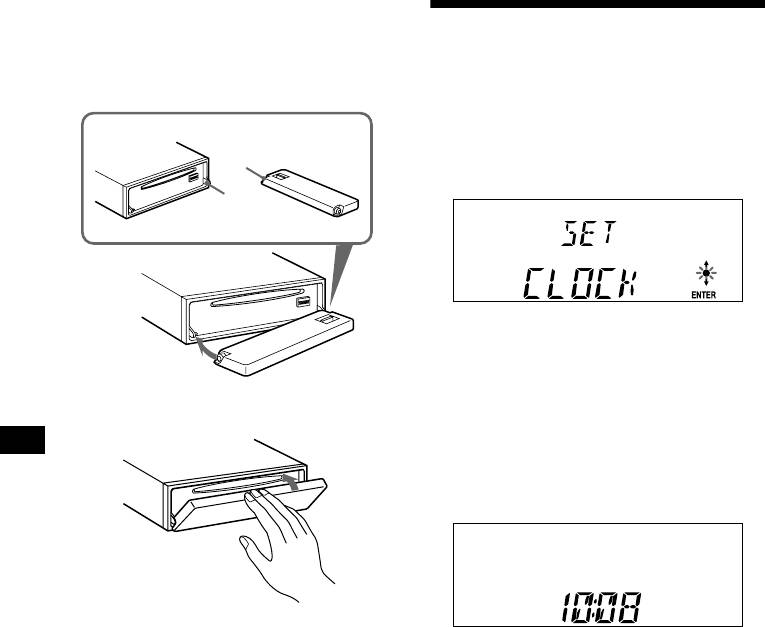
Attaching the front panel
Place hole A of the front panel onto the spindle
Setting the clock
B on the unit, then lightly push the left side in.
Press (SOURCE) (or insert a CD) to operate the
The clock uses a 24-hour digital indication.
unit.
Example: To set the clock to 10:08
1 Press (MENU), then press either side
A
of (PRESET) repeatedly until “CLOCK”
appears.
B
1 Press (ENTER).
The hour indication flashes.
2 Press either side of (PRESET) to set
the hour.
x
3 Press the (+) side of (SEEK).
The minute indication flashes.
4 Press either side of (PRESET) to set
the minute.
2 Press (ENTER).
Note
Do not put anything on the inner surface of the front
The clock starts. After the clock setting is
panel.
completed, the display returns to normal play
mode.
Tips
• You can set the clock automatically with the RDS
feature (page 16).
• When D.INFO mode is set to ON, the time is always
displayed (page 18).
8
