
Sony CDX-L550X: Detaching the front panel Getting Started Resetting the unit
Detaching the front panel Getting Started Resetting the unit: Sony CDX-L550X
Table of contents
- Welcome!
- Table of Contents
- Location of controls
- Precautions
- Notes on discs
- Detaching the front panel Getting Started Resetting the unit
- Setting the clock
- Display items CD Player Playing a disc
- Playing tracks repeatedly Radio Storing stations automatically Playing tracks in random
- Receiving the stored stations Storing only the desired stations
- RDS Overview of RDS
- Automatic retuning for best reception results
- Receiving traffic Presetting RDS stations with announcements AF and TA setting
- Tuning in stations by programme type
- Setting the clock Other Functions automatically Using the rotary commander
- By rotating the control Changing the operative direction By pushing in and rotating the control
- Adjusting the sound Changing the sound and characteristics display settings Quickly attenuating the sound
- Selecting the sound position
- Setting the equalizer
- Additional Information Maintenance Removing the unit
- Specifications
- Troubleshooting
- Error displays/Messages
Detaching the front panel
Getting Started
You can detach the front panel of this unit to
protect the unit from being stolen.
Resetting the unit
Caution alarm
If you turn the ignition switch to the OFF
Before operating the unit for the first time or
position without removing the front panel, the
after replacing the car battery, you must reset the
caution alarm will beep for a few seconds.
unit.
If you connect an optional amplifier and do not
Remove the front panel and press the RESET
use the built-in amplifier, the beep sound will be
button with a pointed object, such as a ballpoint
deactivated.
pen.
1 Press (OFF)*.
CD playback or radio reception stops (the key
illumination and display remain on).
* If your car has no ACC position on the ignition
switch, be sure to turn the unit off by pressing
(OFF) for 2 seconds to avoid car battery drain.
RESET button
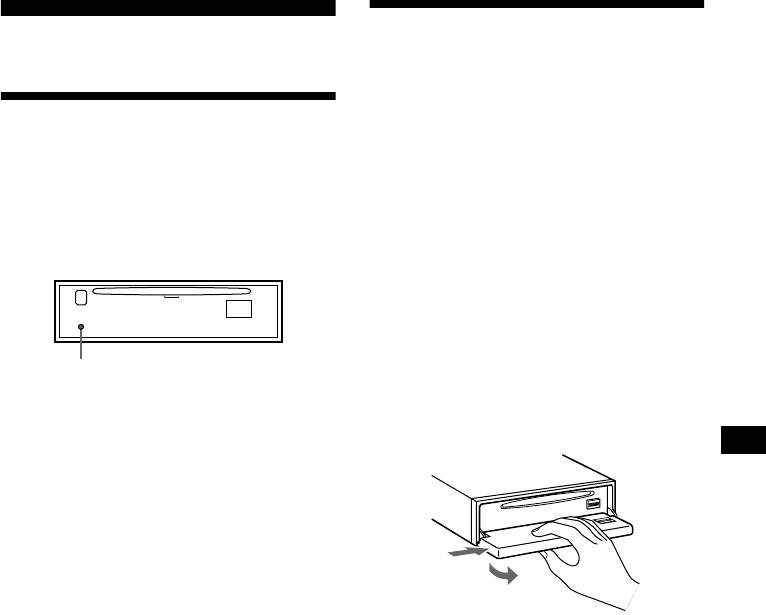
2 Press ( OPEN), then slide the front
Note
panel to the right, and gently pull out
Pressing the RESET button will erase the clock setting
the left end of the front panel.
and some stored contents.
1
2
Notes
• If you detach the panel while the unit is still turned
on, the power will turn off automatically to prevent
the speakers from being damaged.
• Do not drop or put excessive pressure on the front
panel and its display window.
• Do not subject the front panel to heat/high
temperature or moisture. Avoid leaving it in parked
cars or on dashboards/rear trays.
Tip
When carrying the front panel with you, use the
supplied front panel case.
continue to next page t
7
