
Sony CDX-L550V: By rotating the control Changing the operative direction By pushing in and rotating the control
By rotating the control Changing the operative direction By pushing in and rotating the control: Sony CDX-L550V
Table of contents
- Welcome!
- Table of Contents
- Location of controls
- Precautions
- Notes on discs
- Detaching the front panel Getting Started Resetting the unit
- Setting the clock
- Display items CD Player Playing a disc
- Playing tracks repeatedly Radio Storing stations automatically Playing tracks in random order
- Receiving the stored stations Storing only the desired stations
- RDS Overview of RDS
- Automatic retuning for best reception results
- Receiving traffic Presetting RDS stations with announcements AF and TA setting
- Tuning in stations by programme type
- Setting the clock Other Functions automatically Using the rotary commander
- By rotating the control Changing the operative direction By pushing in and rotating the control
- Adjusting the sound Changing the sound and characteristics display settings Quickly attenuating the sound
- Selecting the sound position
- Setting the equalizer
- Additional Information Maintenance Removing the unit
- Specifications
- Troubleshooting
- Error displays/Messages Error displays Messages
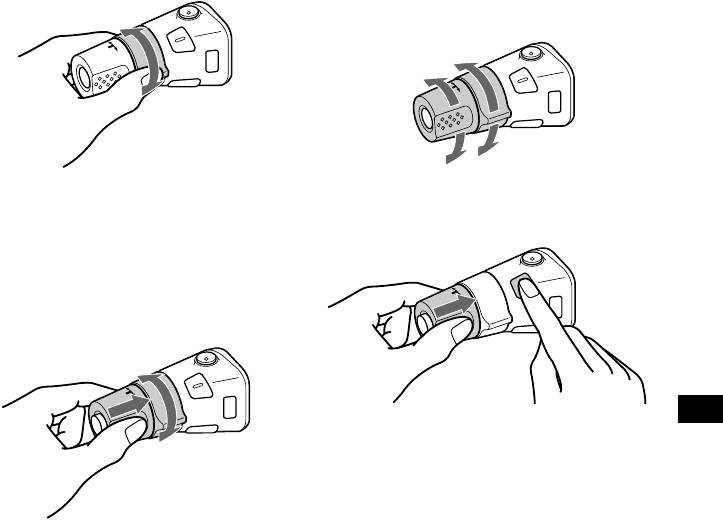
By rotating the control
Changing the operative direction
The operative direction of controls is factory-set
as shown below.
To increase
SEEK/AMS
control
To decrease
Rotate and release to:
If you need to mount the rotary commander on
– Skip tracks.
the right hand side of the steering column, you
– Tune in stations automatically.
can reverse the operative direction.
Rotate, hold, and release to:
– Fast-forward/reverse a track.
– Find a station manually.
By pushing in and rotating the control
Press (SOU N D ) for 2 seconds while
PRESET
pushing the VOL control.
control
Tip
You can also change the operative direction of these
controls with the unit (page 18).
Push in and rotate the control to:
– Receive preset stations.
17
Top 10 manuals
100.00
NZXT HALE90 1000W99.99
Samsung SM-R38099.97
AEG BSB 18C99.97
Dell 2700W99.97
Smeg KSEC70X99.96
Beurer HDE 4099.96
Pyramida KH 50 v.299.96
MSI CSM-H81M-P3299.96
AEG HR 562799.95
Melissa 640-048