
Sony CDX-C5000R: Location of controls
Location of controls: Sony CDX-C5000R
Table of contents
- Welcome ! Precautions
- Notes on CDs
- Table of Contents
- Location of controls
- Location of controls
- Resetting the unit Detaching the front panel
- Turning the unit on/off Setting the clock How to use the menu
- Listening to a CD
- Locating a specific track Locating a specific point in a track Automatically scrolling a disc name
- Playing tracks repeatedly Playing tracks in random order — Shuffle Play
- Labelling a CD — Disc Memo (For a CD unit with the CUSTOM FILE function)
- Locating a disc by name
- Selecting specific tracks for playback
- Memorising only the desired stations Memorising stations automatically
- Receiving the memorised stations
- Overview of the RDS function Retuning the same programme automatically Displaying the station name
- Listening to traffic announcements
- Presetting the RDS stations with the AF and TA data
- Locating a station by programme type
- Setting the clock automatically Labelling the rotary commander (optional)
- Using the rotary commander (optional)
- Adjusting the sound characteristics
- Attenuating the sound Changing the sound and display settings
- Boosting the bass sound Maintenance
- Cleaning the connectors Dismounting the unit
- Specifications
- Troubleshooting guide General CD/MD playback
- Radio reception RDS
- Error displays (when an optional CD/MD unit is connected)
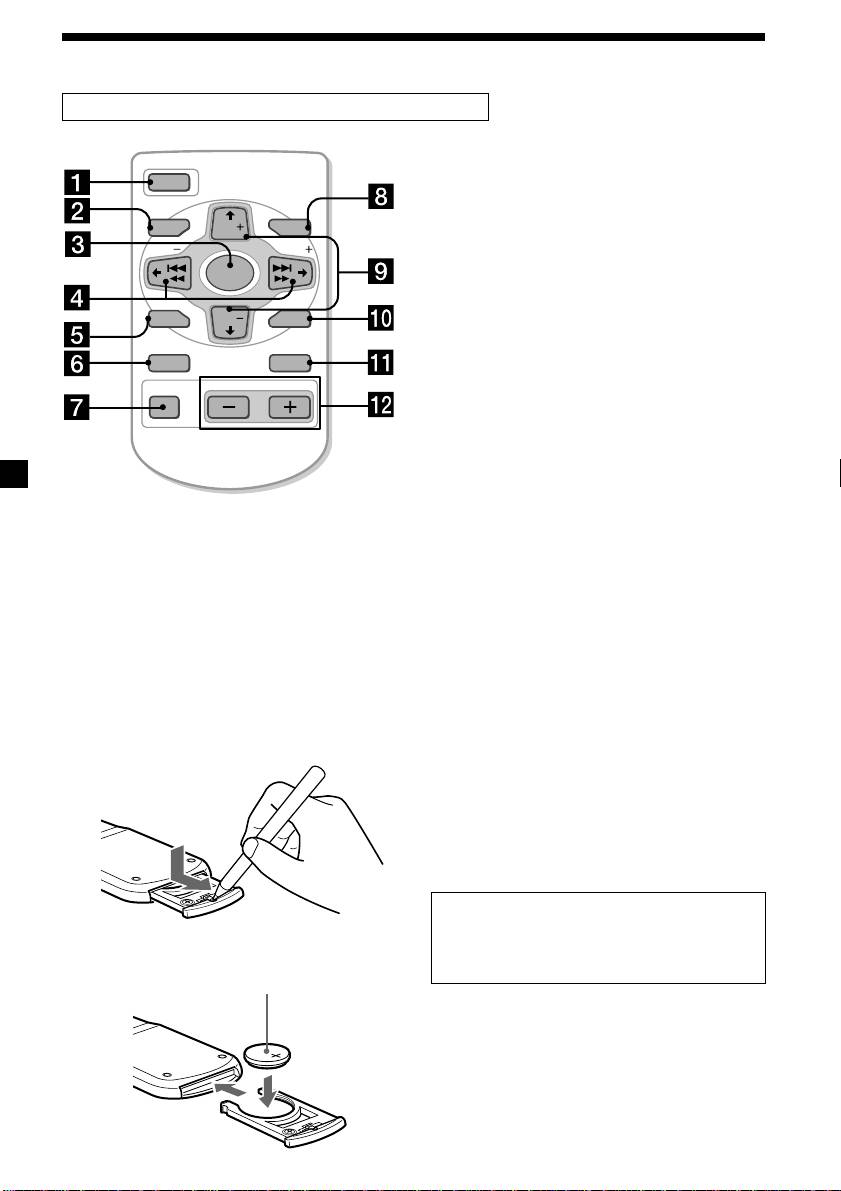
Location of controls
Card remote commander RM-X91 (optional)
The corresponding buttons of the card
OPEN/CLOSE
remote commander control the same
OFF
functions as those on this unit.
1 OFF button
MENU LIST
DISC
2 MENU button
SEEK SEEK
SOURCE
3 SOURCE button
4 SEEK/AMS buttons
SOUND
DISC
ENTER
5 SOUND button
6 DSPL (DSPL/PTY) button
DSPL MODE
7 ATT button
VOLATT
8 LIST button
9 DISC/PRST buttons
q; ENTER button
qa MODE button
qs VOL buttons
Notes
• A unit turned off by pressing (OFF) for two seconds cannot be operated with the card remote
commander unless (SOURCE) on the unit is pressed, or a disc is inserted to activate the unit first.
• Do not leave the card remote commander where it can be exposed to direct sunlight such as on a
dashboard or the steering wheel, etc. The card remote commander may be deformed by the heat.
• The unit may not operate properly with the card remote commander in direct sunlight. In such a case,
hold the card remote commander close to the unit’s receptor.
Replacing the lithium battery
Notes on lithium battery
When the battery becomes weak, the range of
•Keep the lithium battery out of the reach of
the card remote commander becomes shorter.
children. Should the battery be swallowed,
Replace the battery with a new CR2025 lithium
immediately consult a doctor.
battery.
•Wipe the battery with a dry cloth to assure a
good contact.
•Be sure to observe the correct polarity when
installing the battery.
•Do not hold the battery with metallic
tweezers, otherwise a short-circuit may
occur.
WARNING
Battery may explode if mistreated.
Do not recharge, disassemble, or dispose of
x
in fire.
+ side up
6

