
Sony CDX-4000R RU: Location of controls
Location of controls: Sony CDX-4000R RU
Table of contents
- Welcome ! Precautions
- Notes on CDs
- Table of Contents
- Location of controls
- Resetting the unit Detaching the front panel
- Turning the unit on/off Setting the clock How to use the menu
- Listening to a CD
- Automatically scrolling a disc name Locating a specific track — Auto Scroll — Automatic Music Sensor (AMS) Locating a specific point in a track — Manual Search
- Playing a CD in various modes Memorising stations automatically
- Receiving the memorised stations Memorising only the desired stations
- Overview of the RDS function Displaying the station name
- Retuning the same programme automatically
- Listening to traffic announcements
- Presetting the RDS stations with the AF and TA data
- Locating a station by programme type
- Setting the clock automatically Labelling the rotary commander (optional)
- Using the rotary commander (optional)
- Adjusting the sound characteristics
- Attenuating the sound Changing the sound and display settings
- Boosting the bass sound Maintenance
- Cleaning the connectors Dismounting the unit
- Specifications CD player section General Tuner section Power amplifier section
- Troubleshooting guide General CD playback
- Radio reception RDS
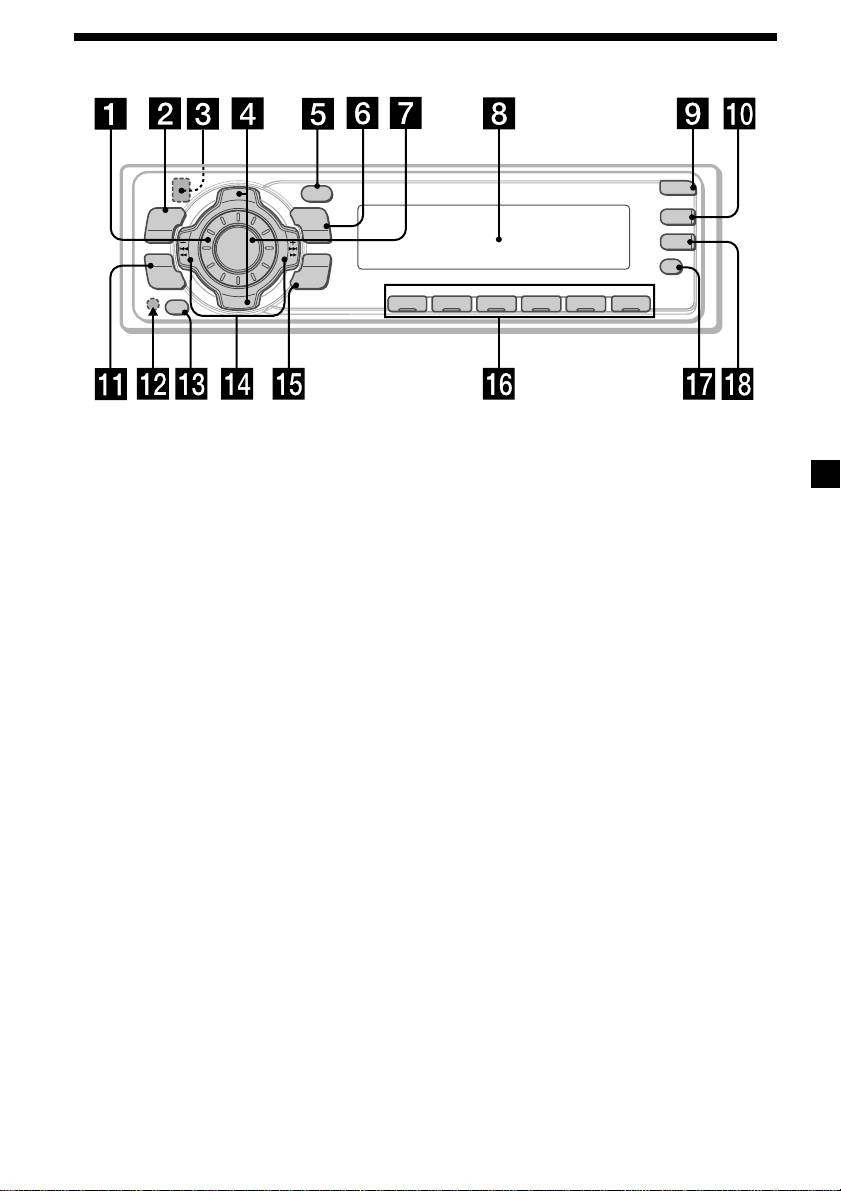
Location of controls
OPEN
P
R
S
T
+
PTY
DSPL
MENU
MODE
D-BASS
TA
SOURCE
-
SEEK/AMS
AF
SOUND
ENTER
REP SHUF
P
R
S
T
–
OFF
1 2 3 4 56
CDX-4000RX/4000RV
/4000R/3900R
Refer to the pages listed for details.
1 Volume control dial 15
qf SEEK/AMS –/+ (cursor left/right) buttons
7, 9, 11, 12, 14, 15, 17, 19, 20
2 MENU button 7, 9, 10, 11, 12, 14, 15, 17,
Automatic Music Sensor 9
20
Manual Search 9
3
Z (eject) button (located on the front
Seek 11, 13
side of the unit behind the front panel)
8
qg ENTER button 7, 9, 10, 11, 12, 14, 15, 16,
17, 20
4 PRST +/– (cursor up/down) buttons
7, 9, 10, 11, 12, 14, 15, 17, 20
qh Number buttons
During radio reception:
During radio reception:
Preset number select 11, 14, 15
Preset stations select 11, 16
During CD playback:
5 DSPL/PTY (display mode change/
(1) REP 10
programme type) button 8, 9, 13, 16
(2) SHUF 10
6 MODE button 15
qj AF button 13, 15
During radio reception:
BAND select 10, 11
qk TA button 14, 15
7 SOURCE (TUNER/CD) button
* Warning when installing in a car
7, 8, 9, 10, 11
without ACC (accessory) position on
8 Display window
the ignition key switch
Be sure to press (OFF) on the unit for two
9 OPEN button 6, 8, 22
seconds to turn off the clock display after
q; D-BASS button 21
turning off the engine.
When you press (OFF) only momentarily,
qa SOUND button 19
the clock display does not turn off and this
qs Reset button (located on the front side
causes battery wear.
of the unit behind the front panel) 6
qd OFF button* 6, 7, 8
5
