
Dell C__Dock II Expansion Station: Replacing the Battery Removing and Installing a PCI Expansion Card
Replacing the Battery Removing and Installing a PCI Expansion Card: Dell C__Dock II Expansion Station
Table of contents
- System Information Guide
- Notes, Notices, and Cautions
- System Information Guide Other Documents Available Getting Help Docking Device Overview
- I/O Panel of the Docking Device
- External I/O Connectors Audio Connectors and Infrared Sensor
- Docking Control Base Controls and Indicators
- Docking Device With the Monitor Stand Before Docking the Computer
- Check Your Computer for Existing Docking Drivers Installing the Docking Drivers Installing the Docking Drivers From the ResourceCD or Drivers and Utilities CD
- Installing the Docking Drivers From the Dell Support Website
- Docking Your Computer
- Docking Panel Door on the Computer
- Docking the Computer
- Docking for the First Time With Windows XP and Windows 2000 Docking for the First Time With Windows Me
- Docking for the First Time With Windows NT 4.0
- Docking for the First Time With Windows 98
- Docking for the First Time With Windows 95
- Updating Drivers in Windows XP and Windows 2000 Updating Drivers in Windows Me
- Undocking the Computer
- Replacing the Battery
- Removing the Top Cover
- Replacing the Battery Removing and Installing a PCI Expansion Card
- PCI Expansion-Slot Door and Expansion-Card Connector
- If you are using a PCI card that was not purchased from Dell, use the drivers and instructions provided by the manufacturer of the card.
- Using the C/Dock II Media Bay
- Installing a Media Device for Windows NT 4.0 With Softex Docking Services Securing the C/Dock Expansion Station Security Features
- Securing the C/Dock II Expansion Station Dell Diagnostics
- Technical Specifications
- Technical Specifications
- Safety and EMC Instructions: Portable Computers
Replacing the Battery
5
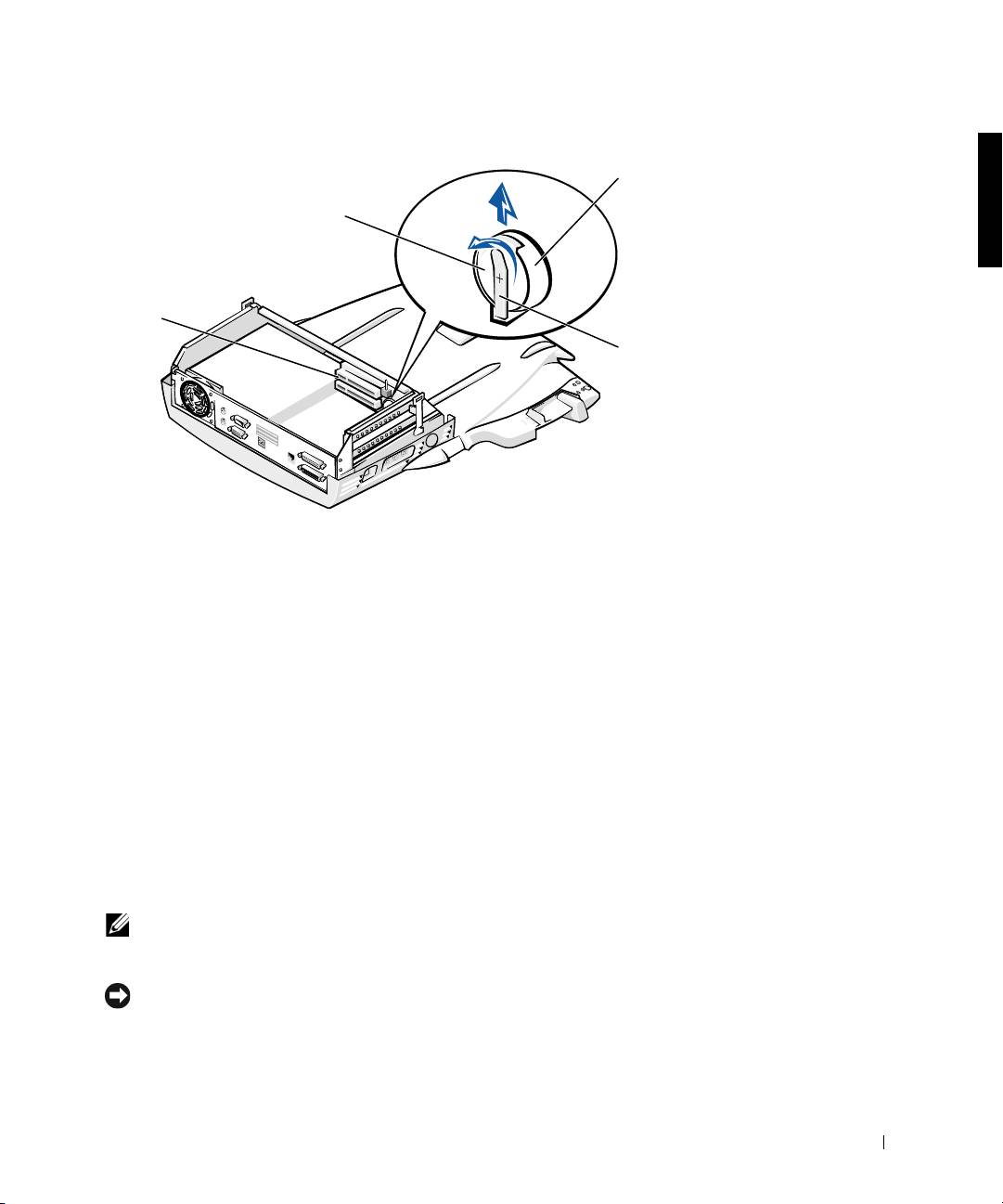
Slightly lift up the battery securing tab and remove the battery from
the battery socket.
6 Orient the new battery with the side labeled “+” facing up. Then
insert the battery into the socket and release the securing tab.
Do not dispose of this battery along with household waste. Contact your
local waste disposal agency for the address of the nearest battery deposit
site.
Removing and Installing a PCI
Expansion Card
To install a Peripheral Component Interconnect (PCI) expansion card in
the docking device, perform the following steps.
NOTE: Install 3.3-volt (V) or 5-V PCI expansion cards no longer than 10
inches (25.4 centimeters [cm]) in the top slot and install 3.3-V or 5-V PCI
expansion cards no longer than 6.9 inches (15.5 cm) in the bottom slot.
NOTICE: Do not touch or handle anything inside the docking device except
those objects mentioned in the following procedure. If you touch other objects,
you may damage the docking device, and may void your warranty.
System Information Guide 21
b
0G913bk1.book Page 21 Thursday, October 18, 2001 12:33 PM
attery
socket
battery
expansion-card
slots (2)
battery
securing
tab
