
Dell DR4000: instruction
Class: Professional equipment
Type:
Manual for Dell DR4000
Table of contents
- Getting Started With Your System
- Notes, Cautions, and Warnings
- Installation and Configuration Unpacking the System
- Optional – Connecting the Keyboard, Mouse, and Monitor Connecting the Power Cable(s)
- Securing the Power Cable(s) Turning On the System
- Installing the Optional Bezel Operating System Information Other Information You May Need
- Obtaining Technical Assistance NOM Information (Mexico Only)
- Technical Specifications Processor Expansion Bus Memory Drives Connectors
- Connectors (continued) Video Power Physical
- Environmental
Dell DR4000 Systems
Getting Started
With Your System
Začínáme se systémem
Guide de mise en route
Handbuch zum Einstieg mit dem System
Τα πρώτα βήματα με το σύστημά σας
Rozpoczęcie pracy z systemem
На чало работы с системой
Procedimientos iniciales con el sistema
Sisteminizi Kullanmaya Başlarken
תכרעמה םע הדובע תליחת


Dell DR4000 Systems
Getting Started
With Your System
Regulatory Model E13S Series
Notes, Cautions, and Warnings
NOTE:
A NOTE indicates important information that helps you make better use of
your computer.
CAUTION:
A CAUTION indicates potential damage to hardware or loss of data if
instructions are not followed.
WARNING:
A WARNING indicates a potential for property damage, personal
injury, or death.
____________________
Information in this publication is subject to change without notice.
© 2011 Dell Inc. All rights reserved.
Reproduction of these materials in any manner whatsoever without the written permission of Dell Inc.
is strictly forbidden.
®
®
Trademarks used in this text: Dell™ and the DELL logo are trademarks of Dell Inc. Intel
and Xeon
are registered trademarks or trademarks of Intel Corporation in the United States or other countries.
Other trademarks and trade names may be used in this publication to refer to either the entities claiming
the marks and names or their products. Dell Inc. disclaims any proprietary interest in trademarks and
trade names other than its own.
Regulatory Model E13S Series
2011 - 11 P/N WXP9N Rev. A00
Installation and Configuration
WARNING:
Before performing the following procedure, review the safety
instructions that came with the system.
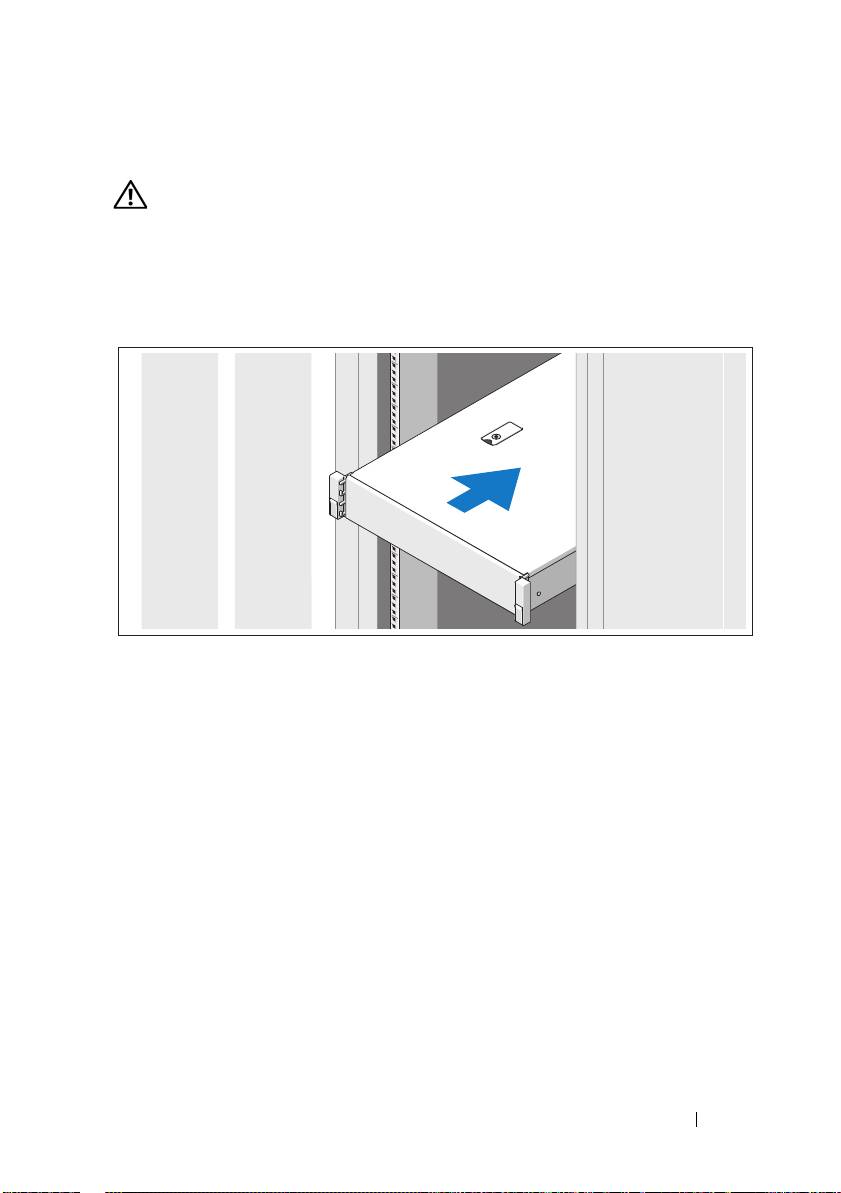
Unpacking the System
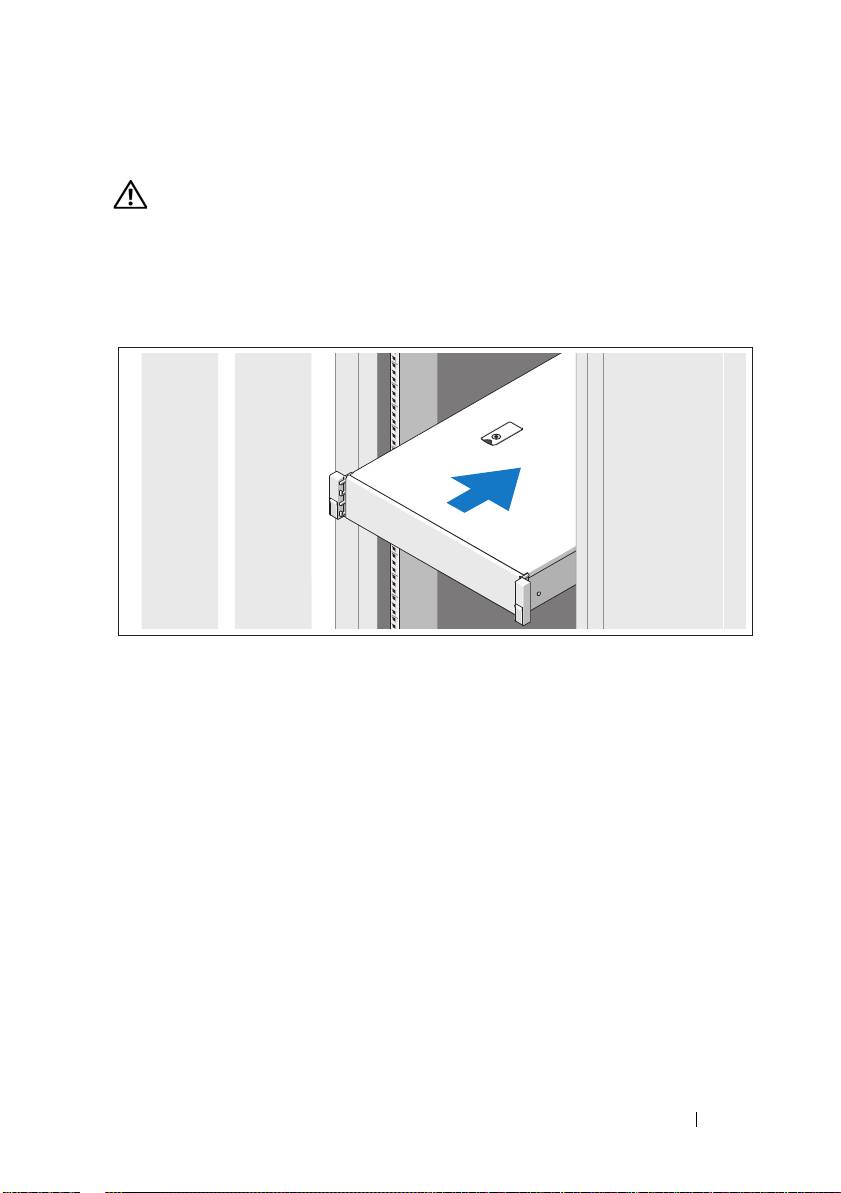
Unpack your system and identify each item.
Assemble the rails and install the system in the rack following the safety
instructions and the rack installation instructions provided with your system.
Getting Started With Your System
3
Optional – Connecting the Keyboard, Mouse, and Monitor
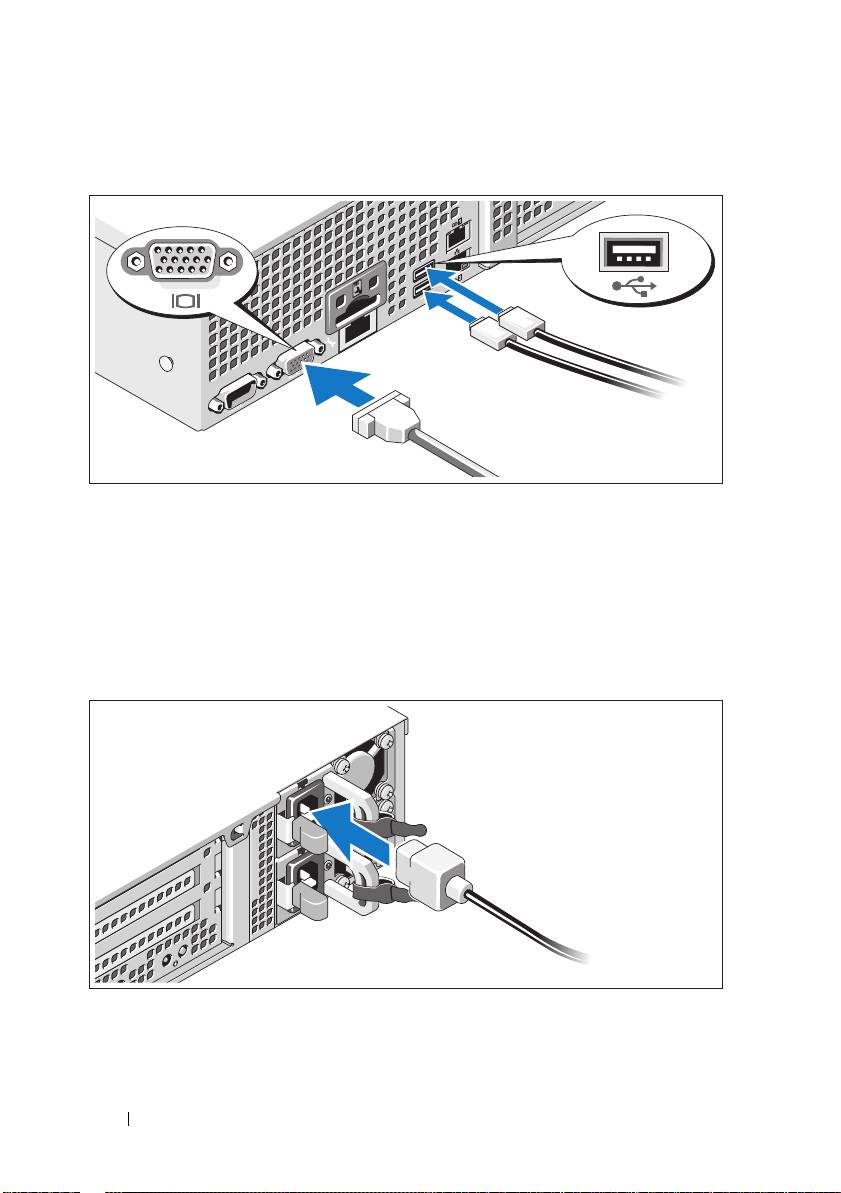
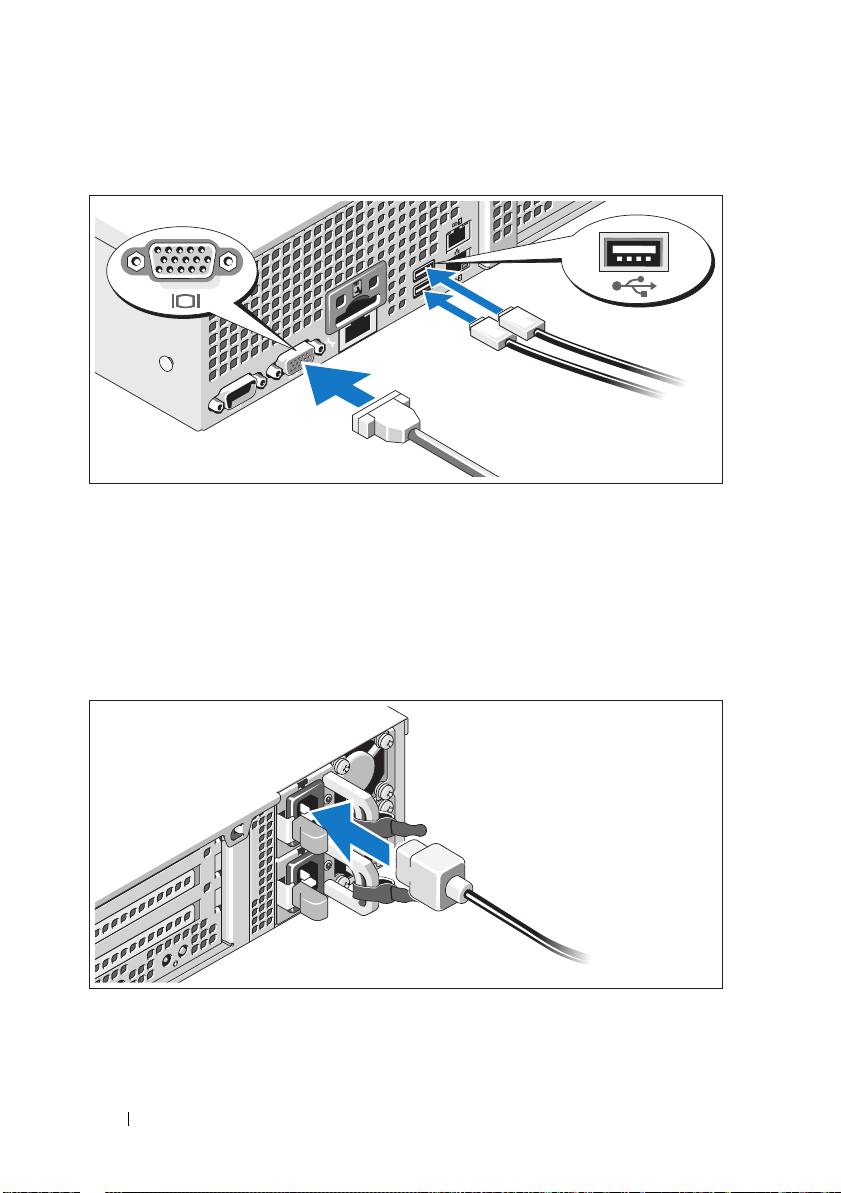
Connect the keyboard, mouse, and monitor (optional).
The connectors on the back of your system have icons indicating which cable
to plug into each connector. Be sure to tighten the screws (if any) on the
monitor's cable connector.
Connecting the Power Cable(s)
Connect the system’s power cable(s) to the system and, if a monitor is used,
connect the monitor’s power cable to the monitor.
4
Getting Started With Your System
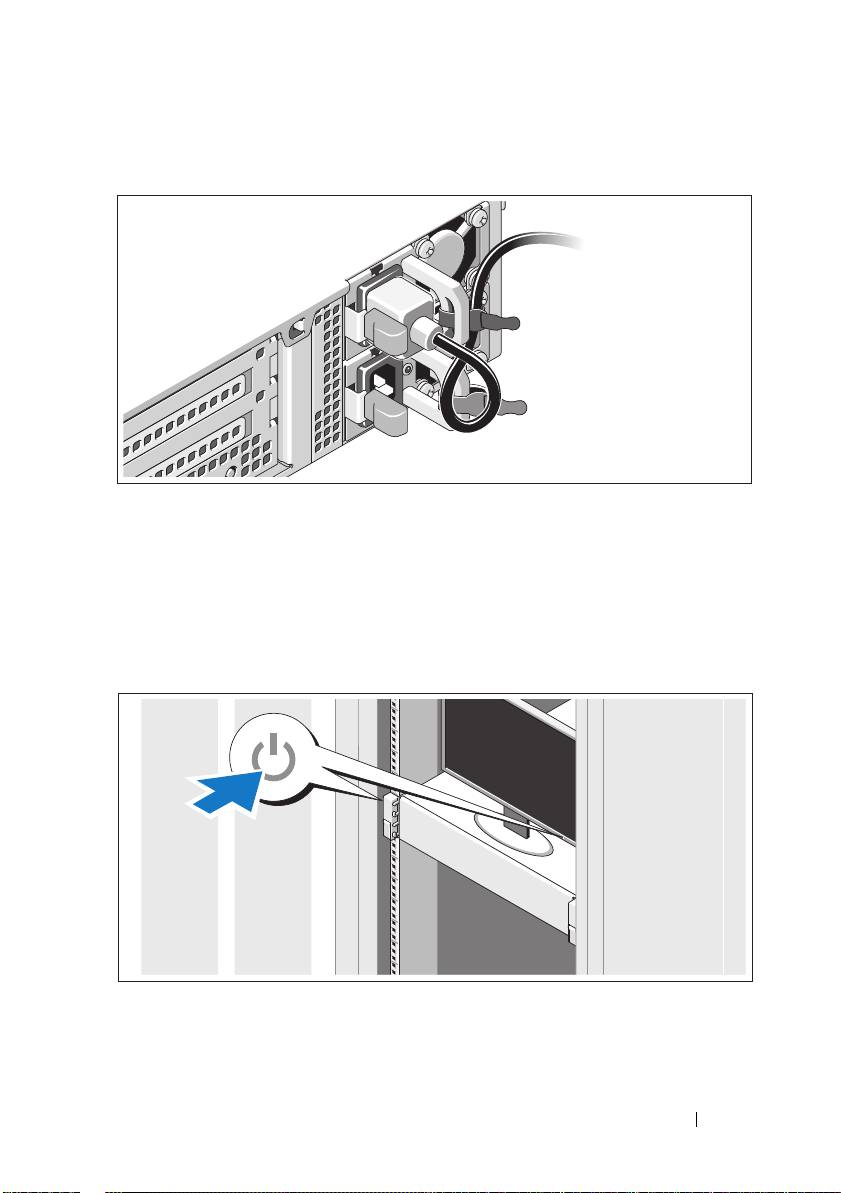
Securing the Power Cable(s)
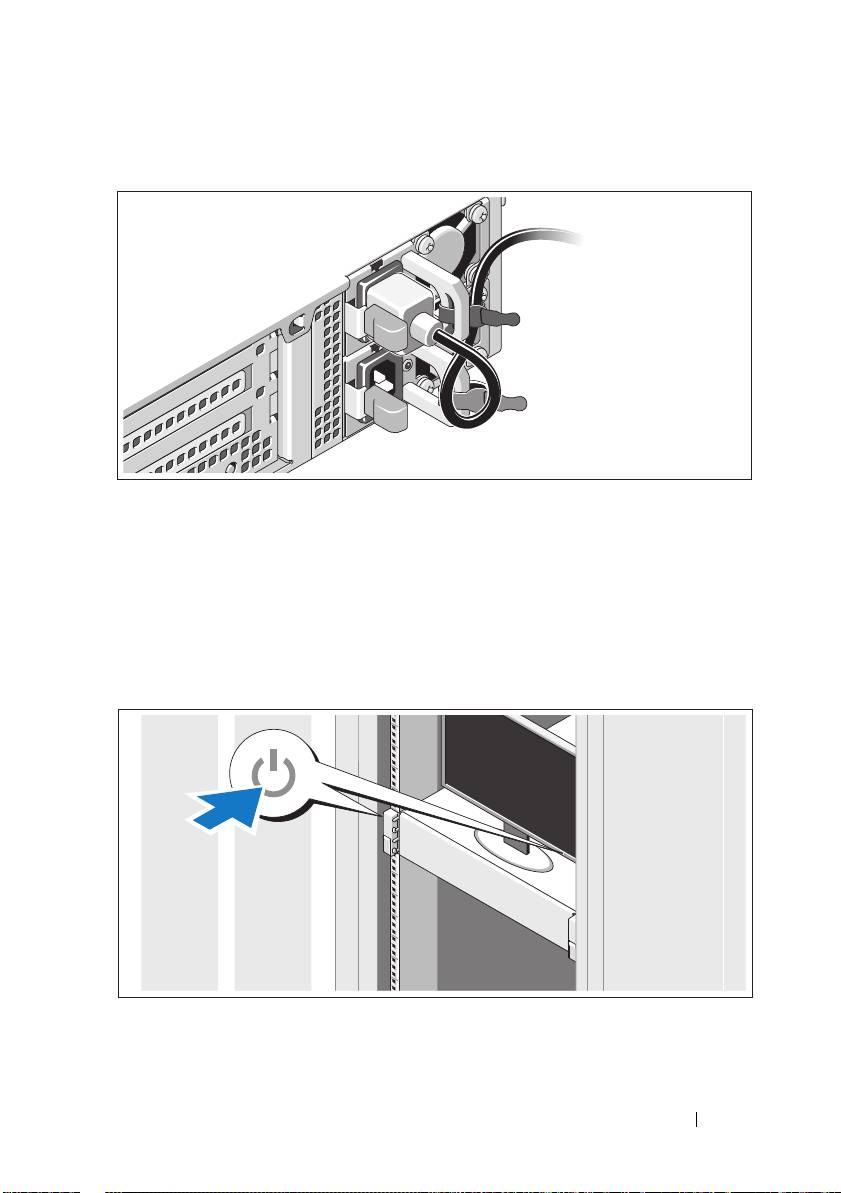
Bend the system power cable into a loop as shown in the illustration and secure
the cable to the bracket using the provided strap. Plug the other end of the
power cable into a grounded electrical outlet or a separate power source such as
an uninterrupted power supply (UPS) or a power distribution unit (PDU).
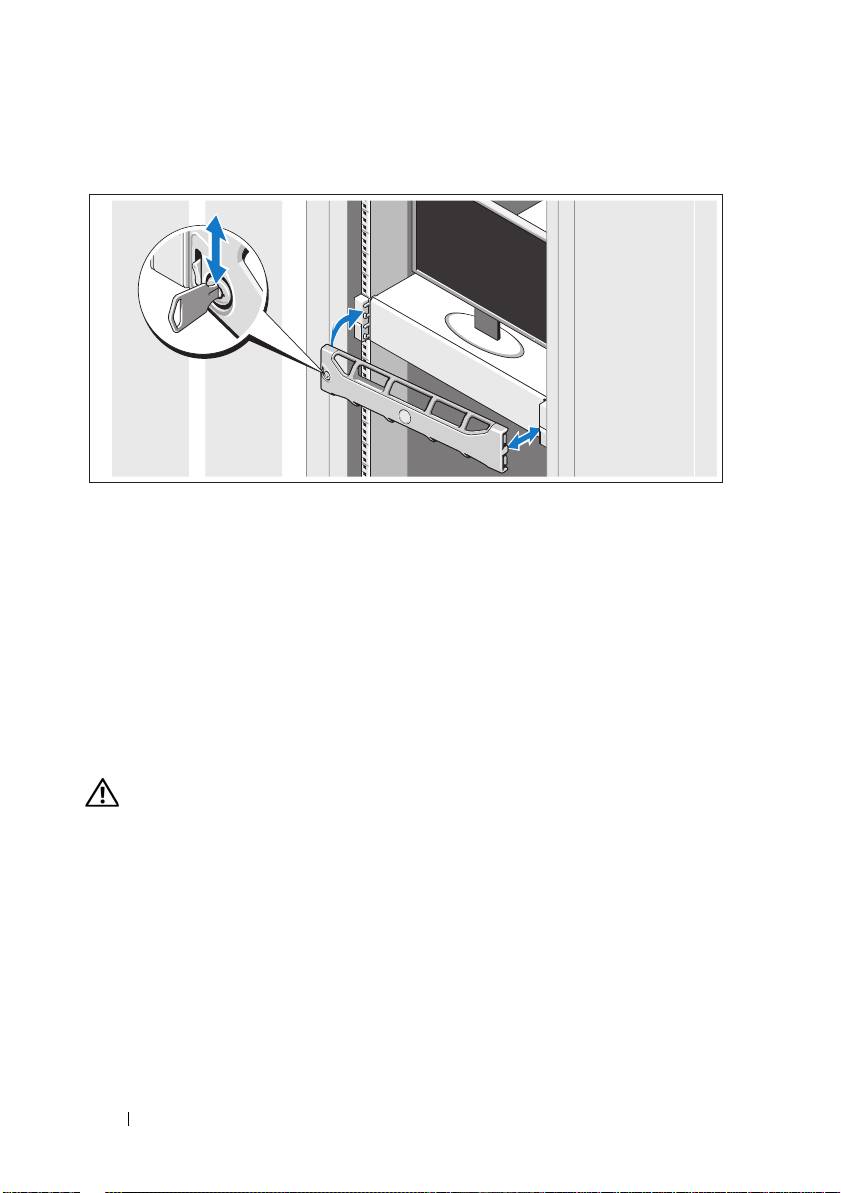
Turning On the System
Press the power button on the system and the monitor. The power indicators
should light.
Getting Started With Your System
5
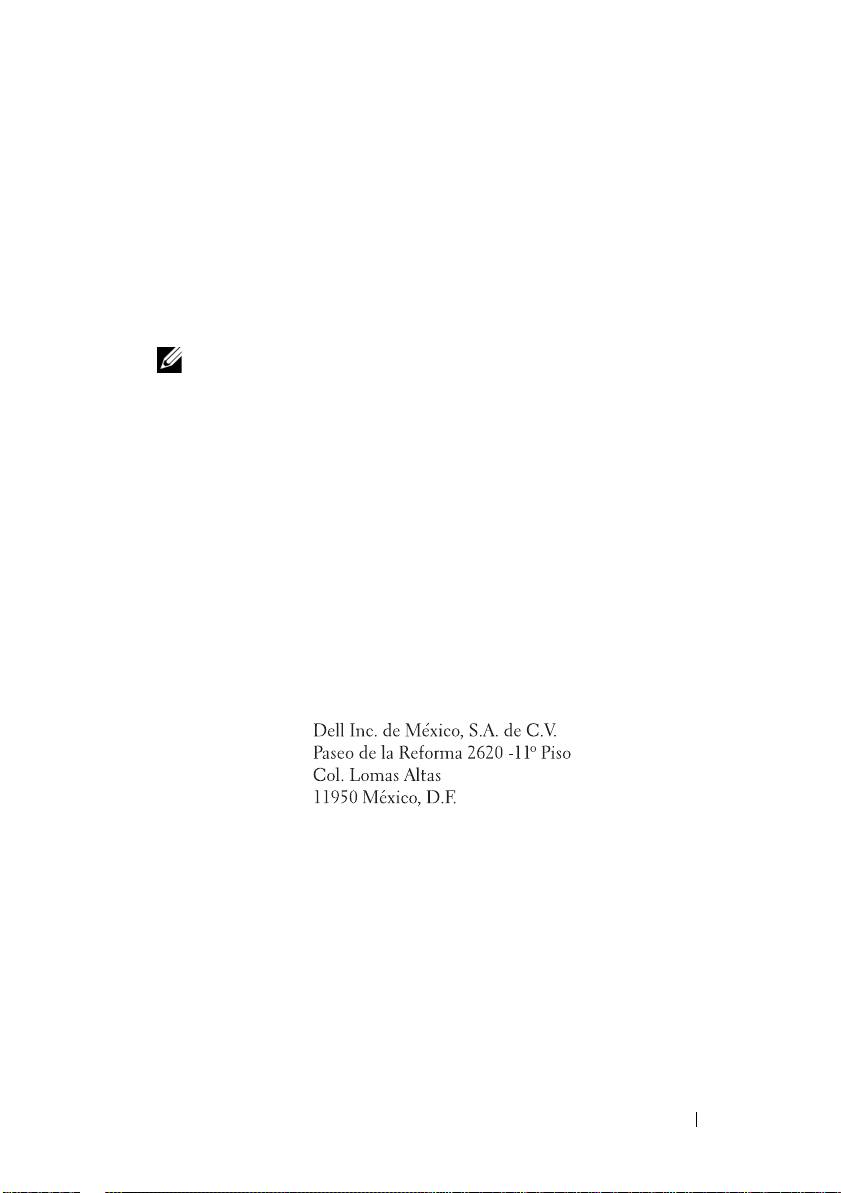
Installing the Optional Bezel
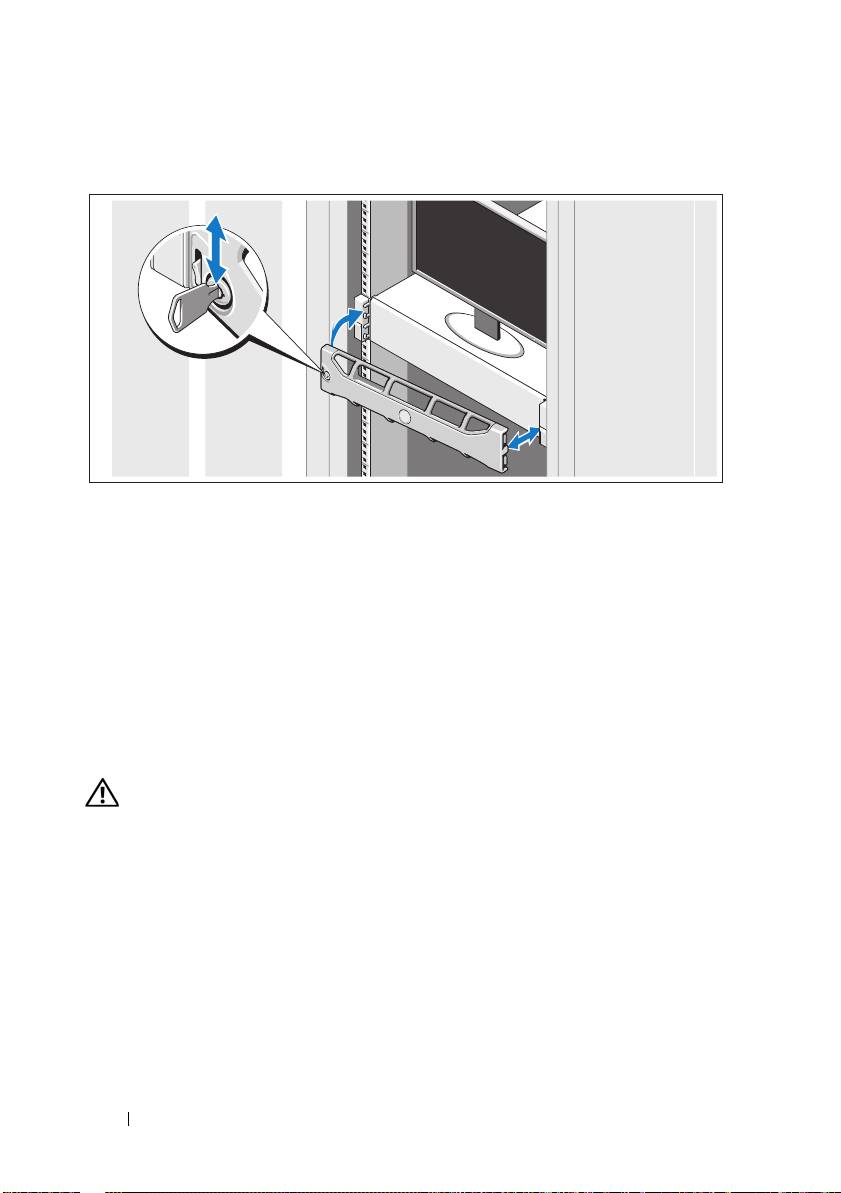
Install the bezel (optional).
Operating System Information
The operating system is preinstalled and configured to support the
preinstalled applications. See the operating system documentation that
shipped with your system for additional information about customizing
the operating system, only if required for your environment.
Other Information You May Need
WARNING:
See the safety and regulatory information that shipped with
your
system. Warranty information may be included within this document or
as
a separate document.
• The rack documentation included with your rack solution describes
how to install your system into a rack.
•The
Administrator’s Guide
provides information about what to do on first
boot during initial system setup.
6
Getting Started With Your System
• The
Owner’s Manual
provides information about system features and
describes how to troubleshoot the system and install or replace system
components. This document is available at
support.dell.com/manuals
.
• Any media that ships with your system that provides documentation
and tools for configuring and managing your system, including those
pertaining to the operating system, system management software,
system updates, and system components that you purchased
with your system.
NOTE:
Always check for updates on support.dell.com/manuals and read the
updates first because they often supersede information in other documents.
Obtaining Technical Assistance
If you do not understand a procedure in this guide or if the system does
not perform as expected, see your Owner’s Manual. Dell offers comprehensive
hardware training and certification. See dell.com/training for more
information. This service may not be offered in all locations.
NOM Information (Mexico Only)
The following information is provided on the device described in this
document in compliance with the requirements of the official Mexican
standards (NOM):
Importer:
Model number: E13S Series
Supply voltage: 100 V CA to 240 V CA
Frequency: 50/60 Hz
Current consumption: 7.5 A to 4.0 A
Getting Started With Your System
7

Technical Specifications
Processor
Processor type Two Intel Xeon processors E5645 series
Expansion Bus
Bus type PCI Express Generation 2
Riser card expansion slots Slot 1: PCIe x4, half-length, full-height
Slot 2: PCIe x4, full-length, full-height
Slot 3: PCIe x8, half-length, full-height
Slot 4 : PCIe x4, internal slot for integrated
storage card
Memory
Architecture 1333 MHz DDR3 RDIMMs
Memory module sockets Eight 240-pin
Memory module capacities 4 GB
Maximum RAM 32 GB
Drives
Hard drives Twelve 3.5" hot-swappable SAS or nearline-
SAS drives and two cabled 2.5" SAS drives
NOTE:
The operating system is installed on the
internal hard drives in a RAID 1 configuration.
Connectors
Back
NIC
Two RJ-45 (for integrated 1 GB NICs)
Serial
9-pin, DTE, 16550-compatible
USB
Two 4-pin, USB 2.0-compliant
Video
15-pin VGA
iDRAC Enterprise
One RJ-45
8
Getting Started With Your System

Connectors (continued)
Front
Video
15-pin VGA
USB
One 4-pin, USB 2.0-compliant
Internal
USB
Two 4-pin, USB 2.0-compliant
Video
Video type Matrox G200, integrated in BMC
Video memory 8 MB
Power
AC power supply (per power supply)
Wattage
750 W (redundant power supply)
Voltage
100 VAC to 240 VAC, autoranging, 50 Hz to
60 Hz
Heat dissipation
2450 BTU/hr (maximum)
Maximum inrush current
Under typical line conditions and over the
entire system ambient operating range,
the inrush current may reach 55 A per
power supply for 10 ms or less
Batteries
System battery
CR 2032 3.0-V Lithium coin cell
Physical
Height 8.67 cm (3.42 inch)
Width 44.52 cm (17.53 inch)
Depth 66.46 cm (26.17 inch)
Weight (maximum configuration) 29.0 kg (63.80 lb)
Weight (empty) 15.85 kg (34.87 lb)
Getting Started With Your System
9

Environmental
NOTE:
For additional information about environmental measurements for specific
system configurations, see dell.com/environmental_datasheets.
Temperature
Operating
10 °C to 35 °C (50 °F to 95 °F) with a maximum
temperature gradation of 10 °C per hour
NOTE:
For altitudes above 2950 feet, the maximum
operating temperature is derated 1 ºF/550 ft.
Storage
–40 °C to 65 °C (–40 °F to 149 °F) with a maximum
temperature gradation of 20 °C per hour
Relative humidity
Operating
20% to 80% (noncondensing) with a maximum
humidity gradation of 10% per hour
Storage
5% to 95% (noncondensing)
Maximum vibration
Operating
0.26 G at 5 Hz to 350 Hz for 15 min
Storage
1.54 G at 10 Hz to 250 Hz for 15 min
Maximum shock
Operating
One shock pulse in the positive z axis (one pulse on
each side of the system) of 31 G for 2.6 ms in the
operational orientation
Storage
Six consecutively executed shock pulses in the
positive and negative x, y, and z axes (one pulse on
each side of the system) of 71 G for up to 2 ms
Altitude
Operating
–16 m to 3048 m (–50 ft to 10,000 ft)
NOTE:
For altitudes above 2950 feet, the maximum
operating temperature is derated 1 ºF/550 ft.
Storage
–16m to 10,600 m (–50 ft to 35,000 ft)
Airborne Contaminant Level
Class
G1 as defined by ISA-S71.04-1985
10
Getting Started With Your System

Systémy
Dell DR4000
Začínáme se systémem
Regulační model série E13S
Poznámky a upozornìní
POZNÁMKA:
POZNÁMKA označuje dt’ležité informace, které pomáhají lepšímu využití
počítače.
UPOZORNĚNÍ:
VÝSTRAHA poukazuje na možnost poškození hardwaru nebo
ztráty dat v případě nedodržení pokynt’.
VAROVÁNÍ:
VAROVÁNÍ upozorňuje na potenciální nebezpečí poškození majetku,
úrazu nebo smrti.
____________________
Informace v této publikaci se mohou bez předchozího upozornění změnit.
© 2011 Dell Inc. Všechna práva vyhrazena.
Jakákoli reprodukce těchto materiált’ bez písemného povolení společnosti Dell Inc. je přísně zakázána.
Ochranné známky použité v tomto textu: Dell™ a logo DELL jsou ochranné známky společnosti
®
®
Dell Inc. Intel
a Xeon
jsou registrované ochranné známky nebo ochranné známky společnosti
Intel Corporation ve Spojených státech nebo v jiných zemích.
Ostatní ochranné známky a obchodní názvy mohou být v této publikaci použity v souvislosti s právními
subjekty, které si na tyto ochranné známky a názvy svých produktt’ činí nárok. Společnost Dell Inc. se
zříká všech vlastnických nárokt’ na ochranné známky a obchodní názvy jiné než vlastní.
Regulační model série E13S
2011 - 11 Č. dílu WXP9N Rev. A00
Instalace a konfigurace
VAROVÁNÍ:
Před provedením následujícího postupu si prostudujte bezpečnostní
pokyny dodané se systémem.
Rozbalení systému
Rozbalte systém a identifikujte jeho jednotlivé součásti.
Sestavte kolejničky a nainstalujte systém do stojanu podle bezpečnostních
pokynů a pokynů k instalaci do stojanu dodaných se systémem.
Začínáme se systémem
13
Volitelné – Připojení klávesnice, myši a monitoru
Připojte klávesnici, myš a monitor (volitelné).
Konektory na zadní straně systému mají ikony znázorňující, který kabel se má
připojit ke kterému konektoru. Zajistěte, aby šrouby na konektoru kabelu
monitoru byly dobře dotaženy (je-li jimi konektor vybaven).
Připojení napájecích kabelů
Připojte napájecí kabely k systému, a pokud používáte monitor, připojte
napájecí kabel také k monitoru.
14
Začínáme se systémem
Zajištění napájecích kabelů
Ohněte napájecí kabel systému do smyčky, jak je znázorněno na obrázku, a
připevněte jej dodanou páskou k držáku. Poté zasuňte druhý konec napájecího
kabelu do uzemněné elektrické zásuvky nebo jej připojte k samostatnému
zdroji napájení, například ke zdroji nepřerušitelného napájení (UPS) nebo
jednotce rozvaděče (PDU).
Zapnutí systému
Stiskněte vypínač na systému a na monitoru. Indikátory napájení by se měly
rozsvítit.
Začínáme se systémem
15
Montáž volitelného rámu
Nainstalujte čelní kryt (volitelný).
Informace o operačním systému
Operační systém je na systému předinstalován a nakonfigurován tak, aby
podporoval předinstalované aplikace. Více informací o změnách v operačním
systému získáte v dokumentaci operačního systému, který vám byl dodán
společně se systémem.
Další užitečné informace
VAROVÁNÍ:
Prostudujte si informace o bezpečnosti a předpisech, které byly
dodány se systémem. Informace o záruce jsou součástí tohoto dokumentu nebo
jsou přiloženy samostatně.
•
Pokyny k instalaci do stojanu dodané se stojanovým řešením popisují
instalaci systému do stojanu.
•
Příručka správce
obsahuje informace o tom co dělat při prvním spuštění
během nastavení systému.
•
Příručka majitele
obsahuje informace o funkcích systému a popisuje řešení
problémů se systémem a instalací nebo výměnu komponent. Tento
dokument je k dispozici online na adrese
support.dell.com/manuals
.
16
Začínáme se systémem

•
Média dodaná se systémem obsahují dokumentaci a nástroje pro
konfiguraci a správu systému. Mohou být dodána například média týkající
se operačního systému, softwaru pro správu systému, aktualizací systému a
komponent zakoupených se systémem.
POZNÁMKA:
Vždy nejprve zkontrolujte a pročtěte aktualizace uvedené na adrese
support.dell.com/manuals
, protože tyto aktualizace často nahrazují informace v
ostatních dokumentech.
Odborná pomoc
Nerozumíte-li některému z postupů popsaných v této příručce nebo
nepracuje-li systém podle očekávání, nahlédněte do Příručky majitele.
Společnost Dell nabízí v souvislosti s hardwarem kompletní školení a certifikaci.
Další informace naleznete na webových stránkách dell.com/training. Tato
služba nemusí být nabízena ve všech regionech.
Informace NOM (jen pro Mexiko)
K zařízení popsanému v tomto dokumentu se vztahují v souladu s požadavky
oficiálních mexických norem NOM následující informace:
Dovozce:
Číslo modelu: Série E13S
Napájecí napětí: 100 až 240 Vstř.
Frekvence: 50/60 Hz
Spotřeba proudu: 7,5 až 4,0 A
Začínáme se systémem
17

Technické specifikace
Procesor
Typ procesoru Dva procesory Intel Xeon série E5645
Rozšiřovací sběrnice
Typ sběrnice PCI Express 2. generace
Slot pro rozšiřující karty Slot 1:
PCIe x4, poloviční délka, plná výška
Slot 2:
PCIe x4, plná délka, plná výška
Slot 3:
PCIe x8, poloviční délka, plná výška
Slot 4:
PCIe x4, interní slot pro integrovanou kartu
Pamět’
Architektura 1333 MHz DDR3 RDIMM
Sloty pro pamět’ové moduly Osm 240kolíkových
Kapacity pamět’ových modulů 4 GB
Maximum paměti RAM 32 GB
Jednotky
Pevné disky Dvanáct 3,5palcových disků SAS nebo SAS typu
„nearline“ vyměnitelných za provozu a dva
2,5palcové disky SAS připojené kabelem
POZNÁMKA:
Operační systém je nainstalován na
vnitřních pevných discích v konfiguraci RAID 1.
Konektory
Vzadu
Sít’ové
Dva konektory RJ-45 (pro integrované sít’ové
karty 1 Gb/s)
Sériový
9kolíkový, DTE, kompatibilní s normou 16550
USB
Dva 4kolíkové, USB 2.0
Video
15kolíkový VGA
iDRAC Enterprise
Jeden RJ-45
18
Začínáme se systémem
