
Dell POWEREDGE M905: instruction
Class: Household, kitchen appliances, electronics and equipment
Type: Computer
Manual for Dell POWEREDGE M905
Table of contents
- Quick Start Guide Installation Instructions Step 1. Verify the Package Contents
- Step 2. Install the HBA Hardware
- Step 3. Install the HBA Driver Step 4. Install the SANsurfer Pro Management Application
- HBA LEDs (Excludes the QME2462 HBA) Troubleshooting and Technical Support Warranty Laser Safety (Excludes QME2462 and QME2472) FDA Notice
- Agency Certification QLogic SANblade HBAs EMI and EMC Requirements
- Product Safety Compliance
[]
Quick Start Guide
QUICK START GUIDE
FIBRE CHANNEL HBA INSTALLATION d
光纤通道 HBA 安装
光纖通道 HBA 安裝
INSTALLATION DE L'ADAPTATEUR HBA FIBRE CHANNEL
FIBRE-CHANNEL-HBA-INSTALLATION
INSTALLAZIONE DI HBA IN FIBRA OTTICA
ファイバチャネル HBA の取り付け
파이버 채널 HBA 설치
INSTALACJA ŚWIATŁOWODOWEJ KARTY HBA
Установка
FIBRE CHANNEL HBA
INSTALACIÓN DEL HBA FIBRE CHANNEL

Quick Start Guide
Installation Instructions
®
This Quick Start Guide describes how to install and configure your new QLogic SANblade
host bus adapter (HBA) and
SANsurfer Pro management application in four simple steps:
❑ Step 1. Verify the package contents.
❑ Step 2. Install the HBA hardware.
❑ Step 3. Install the HBA driver.
❑ Step 4. Install the SANsurfer Pro management application.
Keep the HBA in the antistatic bag until installation. The HBA contains parts that can be damaged by
electrostatic discharge (ESD). Before handling the HBA, use standard methods to discharge static
CAUTION!
electricity. Place the HBA on the bag when examining it. Retain the bag for future use.
Step 1. Verify the Package Contents
The QLogic HBA is shipped with the following items:
❑ QLogic SANblade HBA
❑ Low-profile bracket (not available in all models)
❑ Dell Documentation Kit
1
Step 2. Install the HBA Hardware
To install the HBA hardware, you need to open the computer and locate the appropriate bus slot. If necessary, consult
your computer system manual for instructions to remove the computer cover.
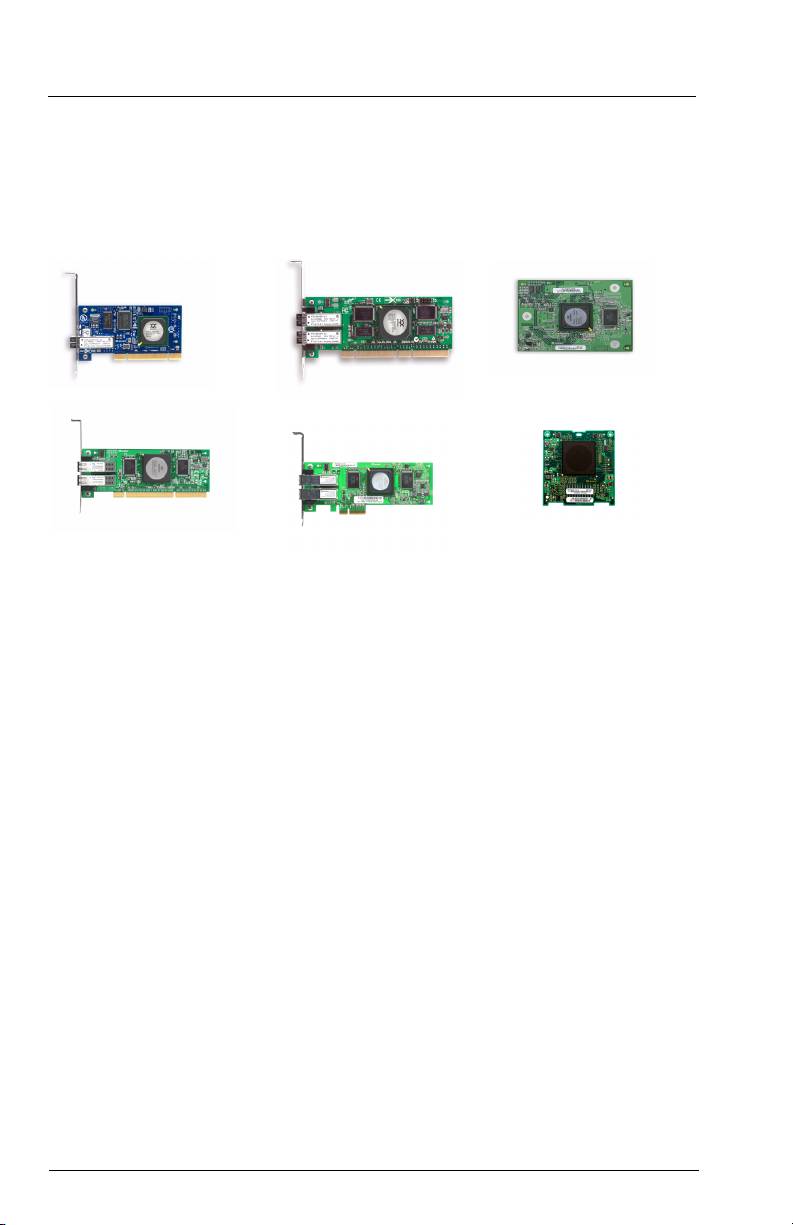
Depending on the HBA you are installing, the connector will look like one of the following samples:
32-bit PCI-X connector
64-bit PCI-X connector
QME2462
64-bit PCI-X 2.0 connector
x4 PCI Express connector
QME2472
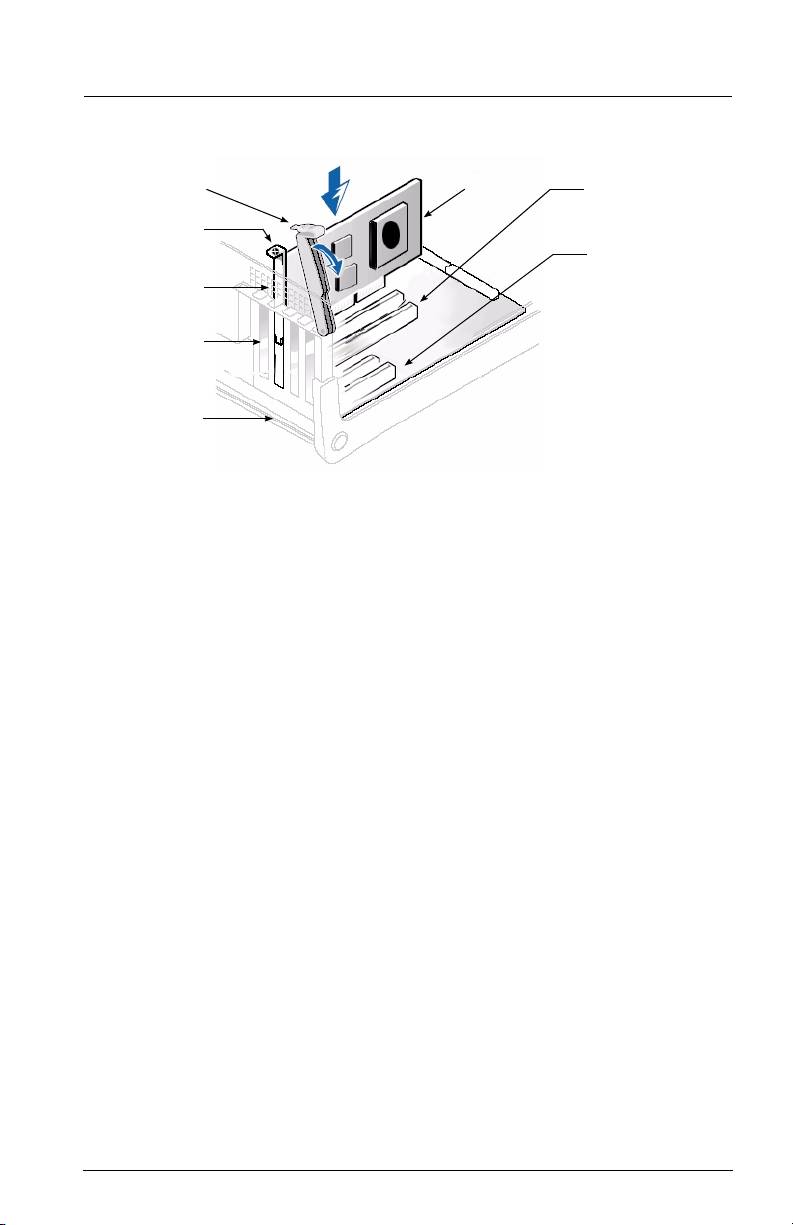
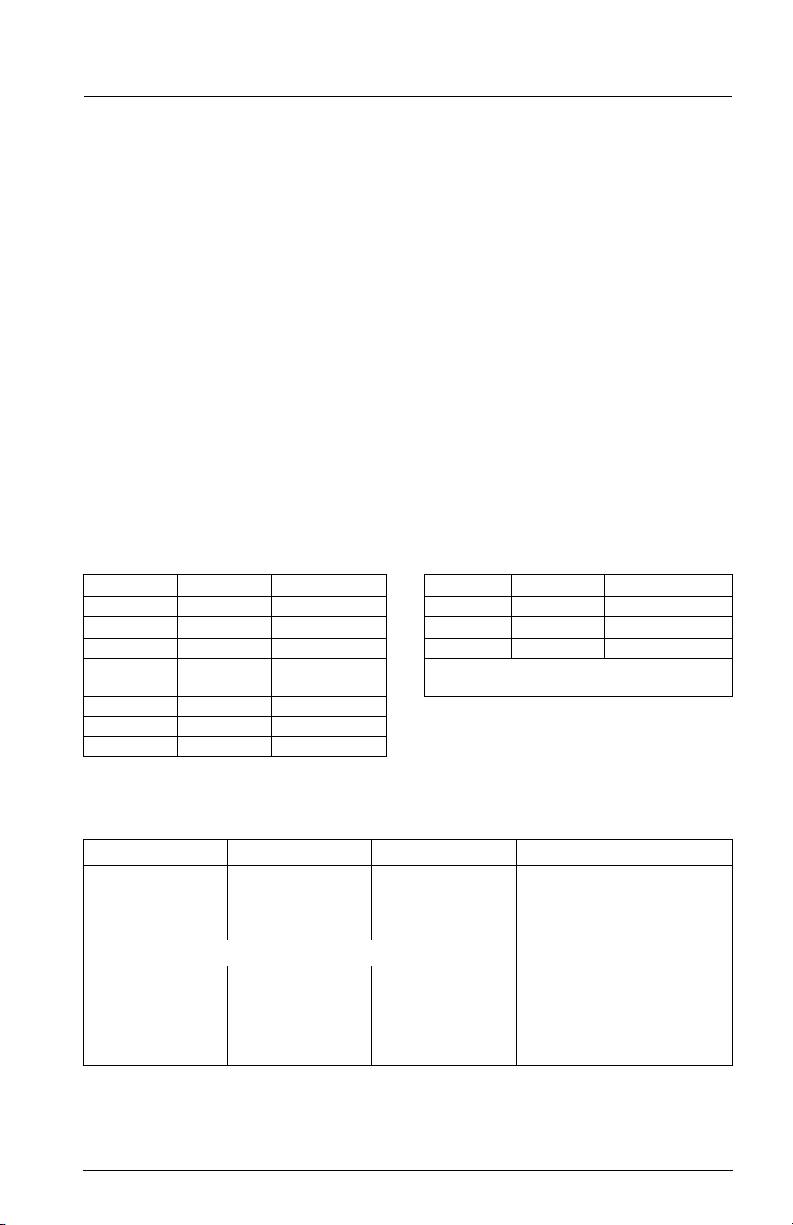
Follow these steps to install the HBA hardware (for QME2462 and QME2472 installation instructions, please refer to
your Server Hardware Owner’s Manual):
1. Power off the computer, and then disconnect the power cable.
2. Remove the computer cover and find an empty bus slot.
3. Pull out the slot cover (if any) by removing the screw or releasing the lever.
4. Grasp the HBA by the top edge and seat it firmly into the slot.
5. Refasten the HBA’s retaining bracket using the existing screw or lever.
6. Close the computer cover.
7. Plug in the power cable and turn on the computer.
2
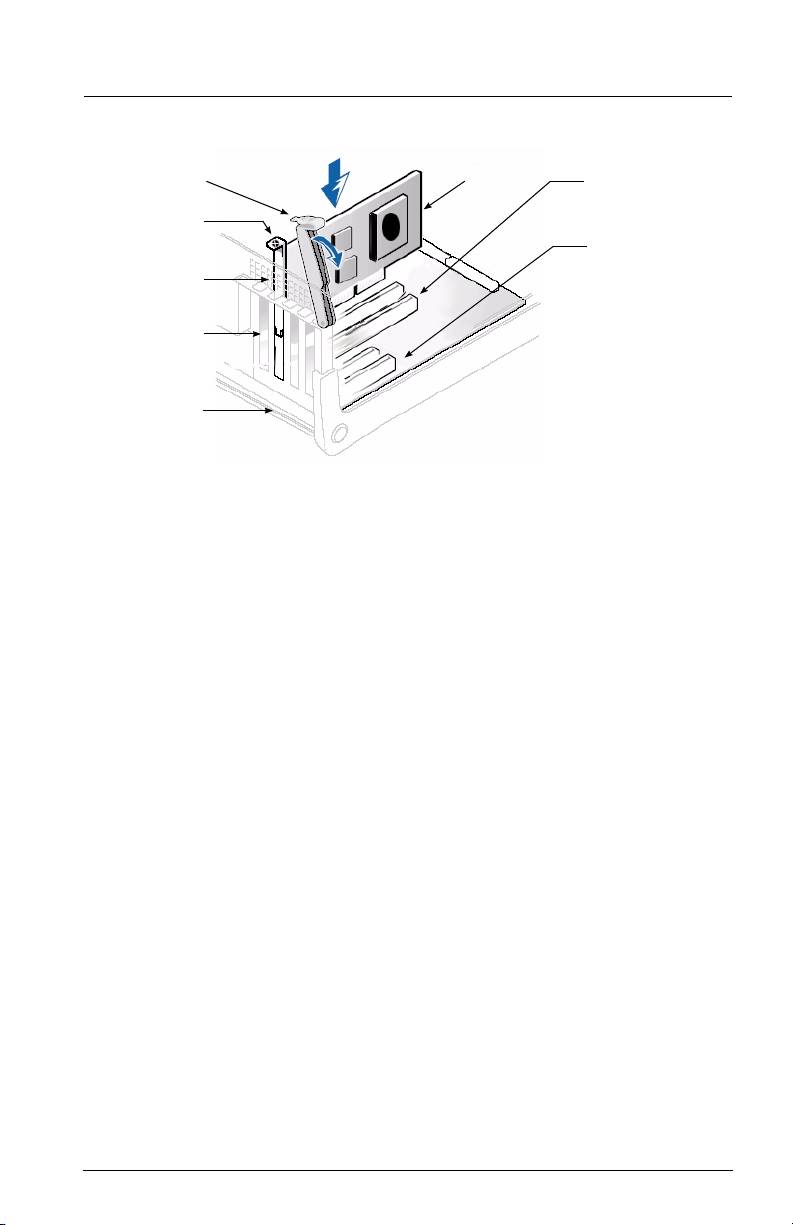
HBA
64-BIT PCI-X SLOT
LEVER
SCREW
OR
x4 PCI EXPRESS
HBA
SLOT
RETAINING
BRACKET
SLOT COVERS
SYSTEM
CHASSIS
Sample motherboard and slots
Step 3. Install the HBA Driver
To retrieve and install the latest HBA driver, access the QLogic support page at:
http://support.qlogic.com/support/newoem_product_list_emc.asp?oemid=65&CATID=58604&type=Dell
Step 4. Install the SANsurfer Pro Management Application
To retrieve and install the latest SANsurfer FC HBA Manager utility, access the QLogic support
page at:
http://support.qlogic.com/support/newoem_product_list_emc.asp?oemid=65&CATID=58604&type=Dell
Congratulations! You have successfully installed your QLogic HBA and
management application!
The following section contains additional information about the SANblade QLogic HBA, including
the LED scheme, troubleshooting, warranty, technical support, and certification information.
3
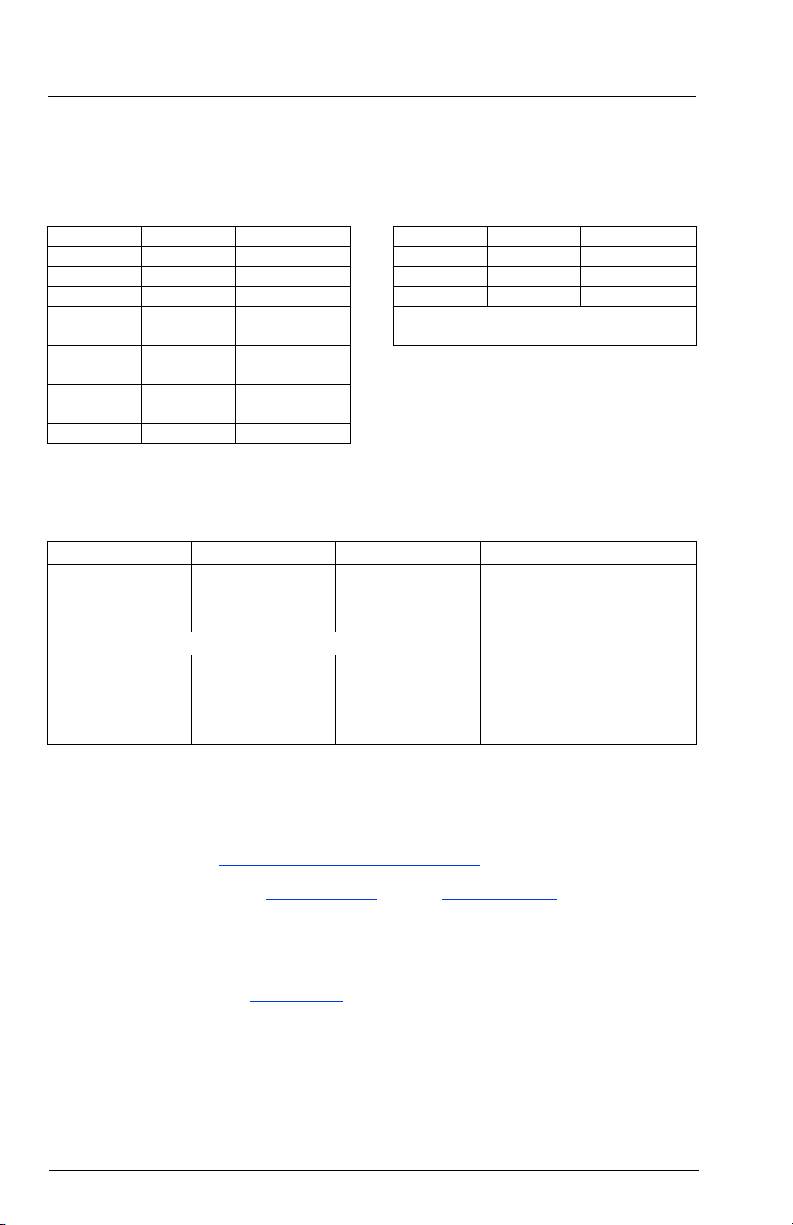
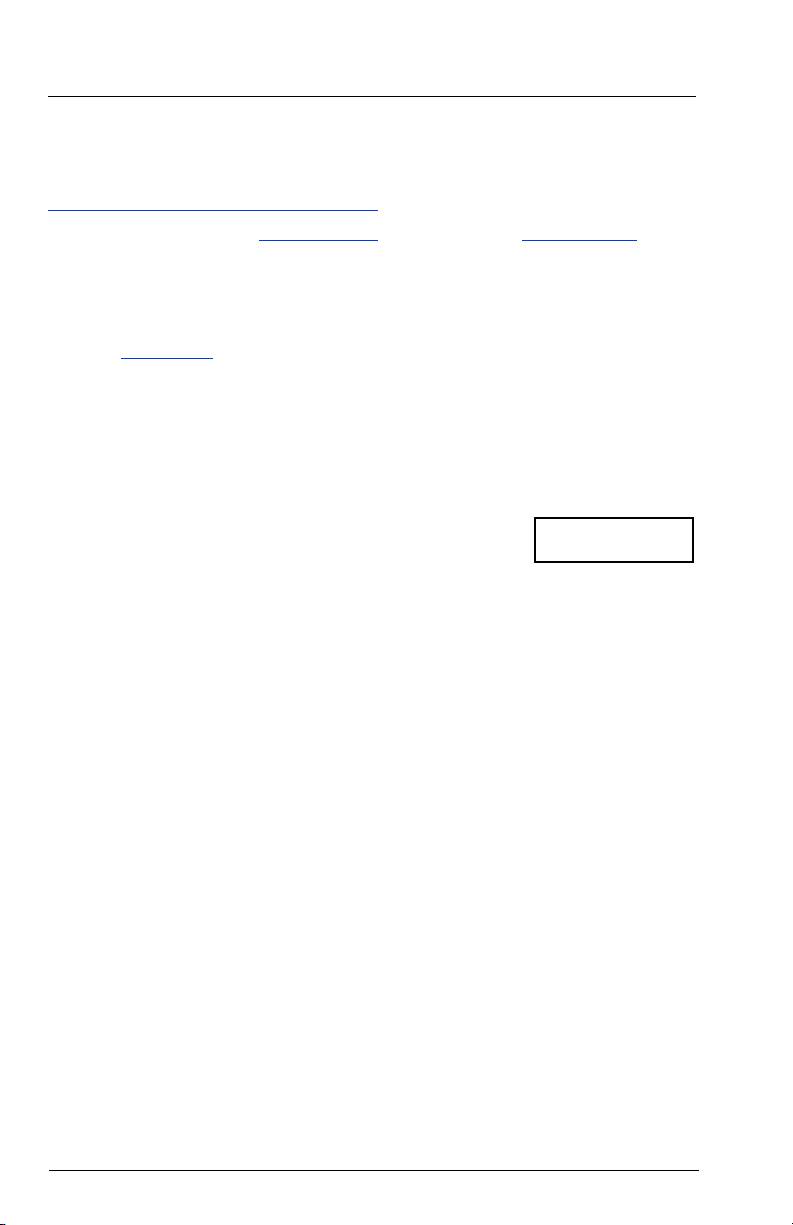
HBA LEDs (Excludes the QME2462 HBA)
QLA234x/QLE220 HBA LED Scheme QME2472 HBA LED Scheme*
Green LED Amber LED Activity Green LED Amber LED Activity
❍❍Power off Flashing ❍ 4 Gbps
●●Power ❍ Flashing
1 Gbps or 2Gbps
●❍Online
❍● Link
For more information, please refer to your
established
Server Hardware Owner’s Manual
❍ Flashing Loss of
*
LEDs located on Fibre Channel Passthru Module
synchronization
Alternate
Alternate
Firmware error
flashing
flashing
Flashing ❍ Beacon
QLE246x HBA LED Scheme
Yellow LED Green LED Amber LED Activity
❍ ❍ ❍ Power off
● ● ● Power on (before firmware init)
Flashing Flashing Flashing Power on (after firmware init)
Yellow, Green and Amber LEDs flashing alternately Firmware error
❍ ❍ ●/Flashing Online, 1-Gbps link established
❍ ●/Flashing ❍ Online, 2-Gbps link established
●/Flashing ❍ ❍ Online, 4-Gbps link established
Flashing ❍ Flashing Beacon
Troubleshooting and Technical Support
The QLogic knowledge database contains troubleshooting information for the QLogic SANblade HBAs. Access the data
base from the QLogic web site www.qlogic.com/support/knowledge_base.asp.
For technical support, visit our web site support.qlogic.com,
email us at support@qlogic.com, or call at 952-932-4040.
Warranty
The QLogic SANblade HBA comes with a standard three year QLogic warranty, or as specified by other agreements.
Please check the QLogic Web site at www.qlogic.com
for warranty details.
Laser Safety (Excludes QME2462 and QME2472)
FDA Notice
This product complies with DHHS Rules 21CFR Chapter I, Subchapter J. This product has been designed and manufactured according to
IEC60825-1 on the safety label of laser product.
4
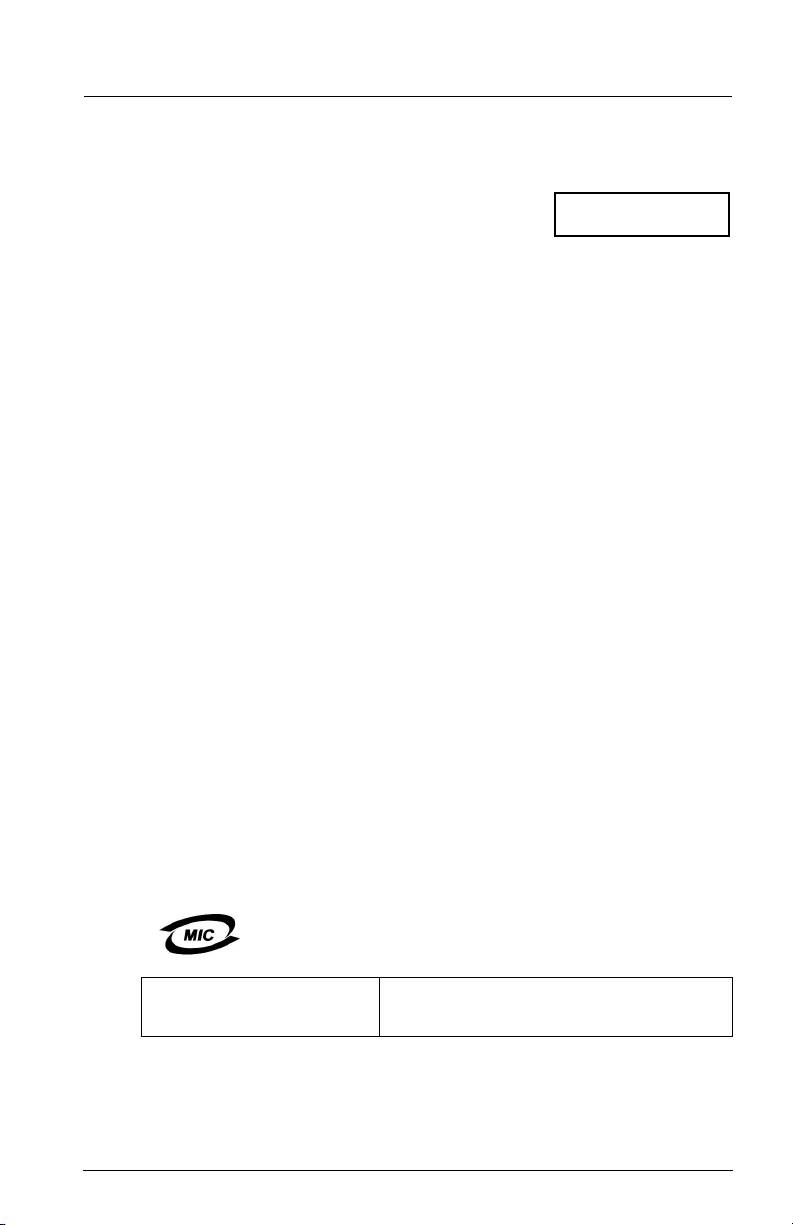
Class 1 Laser Product
Caution–Class 1 laser radiation when open
Appareil laser de classe 1
Do not view directly with optical instruments
Produkt der Laser Klasse 1
Attention–Radiation laser de classe 1
Luokan 1 Laserlaite
Ne pas regarder directement avec des instruments optiques
CLASS I LASER
Vorsicht–Laserstrahlung der Klasse 1 bei geöffneter Abdeckung
Direktes Ansehen mit optischen Instrumenten vermeiden
Varoitus–Luokan 1 lasersäteilyä, kun laite on auki
Älä katso suoraan laitteeseen käyttämällä optisia instrumentteja
Agency Certification
QLogic SANblade HBAs
The following sections contain a summary of EMC/EMI test specifications performed on the QLogic SANblade HBAs to comply with radiated
emission, radiated immunity, and product safety standards.
EMI and EMC Requirements
FCC Part 15 compliance: Class A (QLE200, QME2462, QME2472), Class B (QLA234x)
FCC compliance information statement: This device complies with Part 15 of the FCC Rules. Operation is subject to the following two
conditions: (1) this device may not cause harmful interference, and (2) this device must accept any interference received, including
interference that may cause undesired operation.
ICES-003 compliance: Class A (QLE200, QME2462, QME2472), Class B (QLA234x)
❑ For QLE200, QME2462, and QME2472 HBAs: This Class A digital apparatus complies with Canadian ICES-003.
Cet appareil numériqué de la classe A est conformé à la norme NMB-003 du Canada.
❑ For QLA234x HBAs: This Class B digital apparatus complies with Canadian ICES-003.
Cet appareil numériqué de la classe B est conformé à la norme NMB-003 du Canada.
CE Mark 2004/108/EC EMC Directive compliance:
EN55022:1998/CISPR22:1997 - Class A (QLE200, QME2462, QME2472), Class B (QLA234x)
EN55024:1998
Immunity Standards
EN61000-4-2: ESD
EN61000-4-3: RF Electro Magnetic Field
EN61000-4-4: Fast Transient/Burst
EN61000-4-5: Fast Surge Common/ Differential
EN61000-4-6: RF Conducted Susceptibility
EN61000-4-8: Power Frequency Magnetic Filed
EN61000-4-11: Voltage Dips and Interrupt
EN61000-3-2: Harmonic Current Emission
EN61000-3-3: Voltage Fluctuation and Flicker
VCCI compliance: Class A (QLE200, QME2462, QME2472), Class B (QLA234x, QLE246x)
AS/NZS CISPR22 compliance:
Class A (QLE220, QME2462, QME2472), Class B (QLA234x, QLE246x)
CNS 13438 compliance: Class B (QLA234x)
MIC compliance:
Class A (QLE220, QME2462, QME2472), Class B (QLA234x)
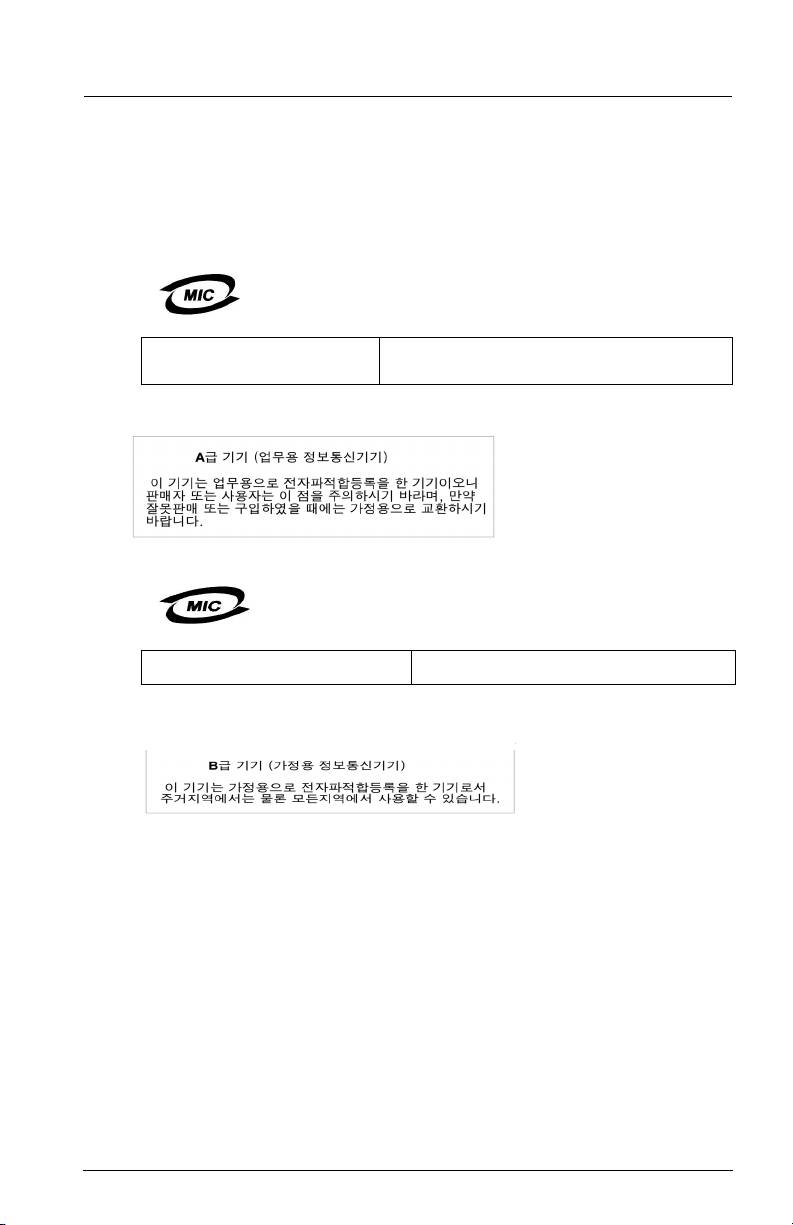
❑ For QLE220, QLA234x, and QME2472 HBAs: Korea MIC Class A Certified
Product Name/Model Fibre Channel HBA
Certification holder QLogic Corporation
Manufactured date Refer to date code listed on product
Manufacturer/Country of origin QLogic Corporation/USA
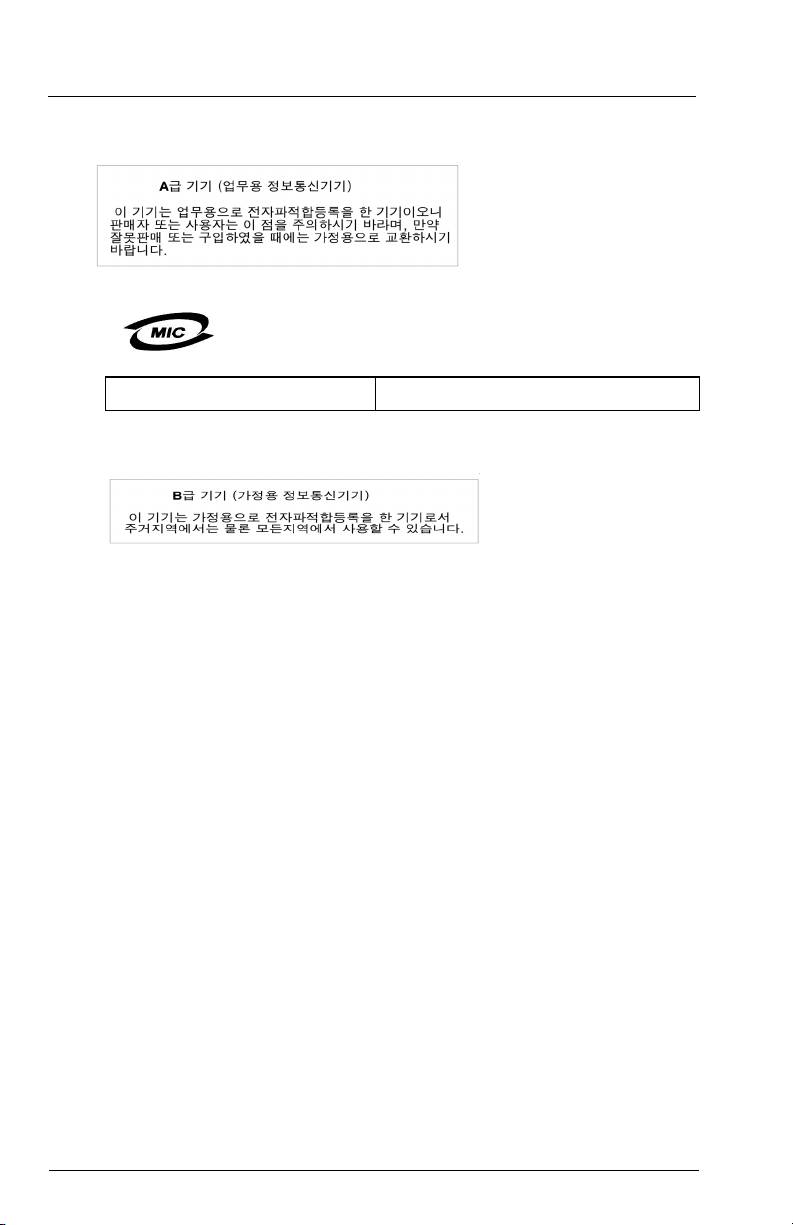
A class equipment
As this equipment has undergone EMC registration for business
(Business purpose info/telecommunications
purpose, the seller and/or the buyer is asked to beware of this point
equipment)
and in case a wrongful sale or purchase has been made, it is asked
that a change to household use be made.
5
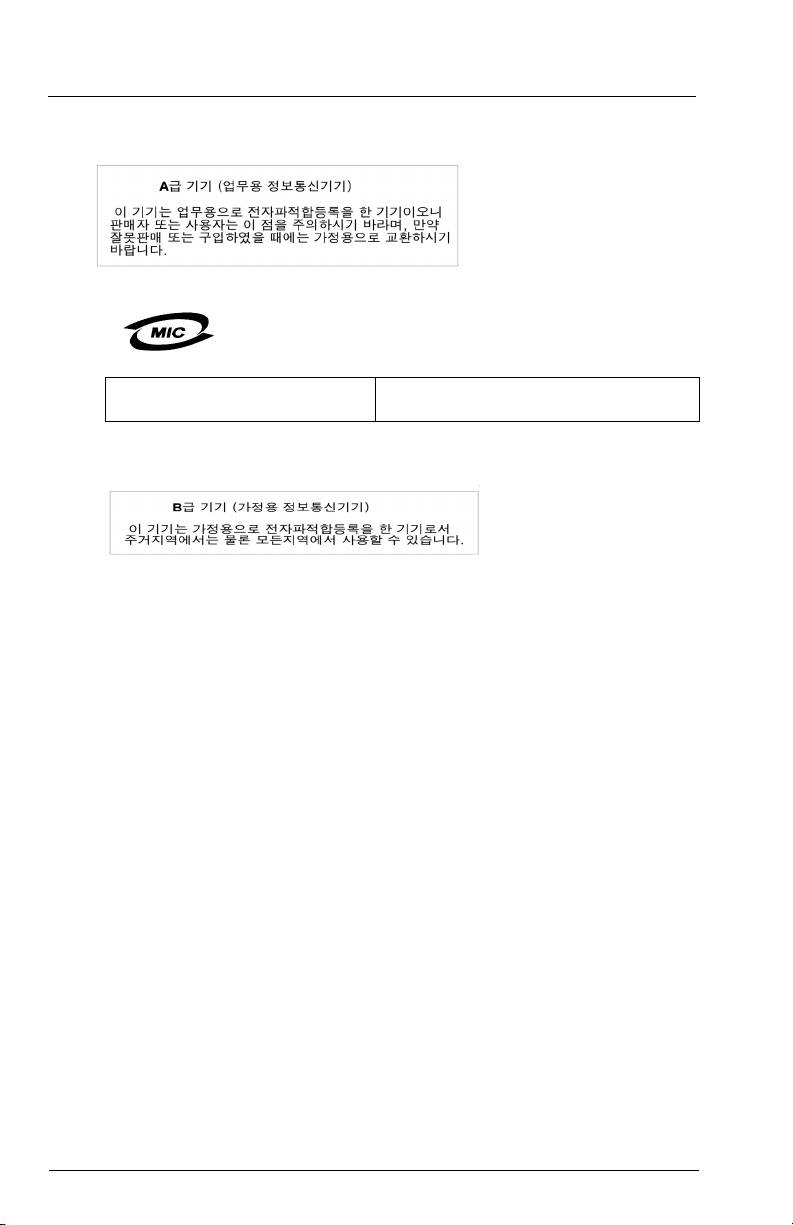
❑ Korean Language Format– Class A
❑ For QLE246x HBA: Korea MIC Class B Certified
Product Name/Model Fibre Channel HBA
Certification holder QLogic Corporation
Manufactured date Refer to date code listed on product
Manufacturer/Country of origin QLogic Corporation/USA
B class equipment
As this equipment has undergone EMC registration for
(Household purpose info/telecommunications
household purpose, this product can be used in any area
equipment)
including residential area.
❑ Korean Language Format– Class B
Product Safety Compliance
UL, cUL product safety compliance: QLE220, QLA234x, QLE246x
UL60950-1
CSA C22.2 No.60950-1
Class 1 Laser Product per DHHS 21CFR(J)
2006/95/EC low voltage directive: QLE220, QLA234x, QLE246x
TUV:
-EN60950-1:2001
-EN60825-1:1994+A1+A2
-EN60825-2:1994+A1
6
快速入门指南
安装说明
®
本《快速入门指南》介绍了如何通过四个简单的步骤来安装及配置新的 QLogic SANblade
主机总线适配器
(HBA) 和 SANsurfer Pro 管理应用程序:
❑ 步骤 1. 确认包装箱中的物品。
❑ 步骤 2. 安装 HBA 硬件。
❑ 步骤 3. 安装 HBA 驱动程序。
❑ 步骤 4. 安装 SANsurfer Pro 管理应用程序。
安装之前,请勿将 HBA 从防静电包装袋中取出。 静电释放 (ESD)会损坏 HBA 上的某些部
件。 拿放 HBA 前,请用标准方法释放静电。 检查 HBA 时,请将其置于包袋上。 保留此袋以
小心!
备将来使用。
步骤 1. 确认包装箱中的物品
QLogic HBA 附带以下物品:
❑ QLogic SANblade HBA
❑ 薄型支架 (不对全部型号适用)
❑ Dell 说明文件套件
7

步骤 2. 安装 HBA 硬件
要安装 HBA 硬件,需要打开计算机机盖并找到合适的总线插槽。 如果必要,请参阅您的计算机 “系统
手册”中关于拆卸主机盖的说明。
根据要安装的 HBA 的不同,连接器将与以下某个样本相似:
32 位 PCI-X 连接器
64 位 PCI-X 连接器
QME2462
64 位 PCI-X 2.0 连接器
x4 PCI Express 连接器
QME2472
请遵循以下步骤以安装 HBA 硬件 (有关 QME2462 和 QME2472 的安装说明,请参阅您的服务器硬件所有者
的手册):
1. 关闭计算机的电源,然后断开电源电缆连接。
2. 卸下主机盖,找到一个未占用的总线插槽。
3. 拧下螺钉或放开拉杆,将插槽盖板拉出 (如果有)。
4. 握住 HBA 的顶部边缘,将其牢固地座入插槽。
5. 用现有的螺钉或拉杆重新紧固 HBA 的固定托架。
6. 盖好主机盖。
7. 插上电源电缆并打开计算机电源。
8
HBA
拉杆
64 位 PCI-X 插槽
螺钉
或
x4 PCI EXPRESS
插槽
HBA 固定托架
插槽盖板
系统
机箱
样本母板和插槽
步骤 3. 安装 HBA 驱动程序
要检索和安装最新版本的 HBA 驱动程序,请访问 QLogic 支持页:
http://support.qlogic.com/support/newoem_product_list_emc.asp?oemid=65&CATID=58604&type=Dell
步骤 4. 安装 SANsurfer Pro 管理应用程序
要检索和安装最新版本的 SANsurfer FC HBA 管理器公用程序,请访问 QLogic 支持页:
http://support.qlogic.com/support/newoem_product_list_emc.asp?oemid=65&CATID=58604&type=Dell
祝贺您!您已经成功安装了 QLogic HBA 和管理应用程序!
以下小节包含有关 SANblade QLogic HBA 的其它信息,包括 LED 指示灯方案、故障排除、
担保、技术支持和认证信息。
9

HBA LED (不包括 QME2462 HBA)
QLA234x/QLE220 HBA LED 指示灯方案 QME2472 HBA LED 指示灯方案
绿色 LED
琥珀色 LED
绿色 LED
琥珀色 LED
活动
活动
指示灯
指示灯
指示灯
指示灯
❍❍
关闭电源 闪烁
❍ 4 Gbps
●●
通电
❍
闪烁
2 Gbps
或
1 Gbps
●❍
联机
❍●
建立
有关详情,请参阅您的服务器硬件所有者
链接
的手册。
❍
闪烁 同步损失
*
LED
指示灯在光纤通道通过模块上。
交替闪烁 交替闪烁 固件错误
闪烁
❍
信标
QLE246x HBA LED 指示灯方案
黄色 LED 指示灯 绿色 LED 指示灯 琥珀色 LED 指示灯
活动
❍ ❍ ❍
关闭电源
● ● ●
开启电源 (在固件启动之前)
闪烁 闪烁 闪烁
开启电源 (在固件启动之后)
黄色、绿色和琥珀色 LED 指示灯交替闪烁
固件错误
❍ ❍
●/ 闪烁
联机,已建立 1 Gbps 链接
❍
●/ 闪烁
❍
联机,已建立 2 Gbps 链接
●/ 闪烁
❍ ❍
联机,已建立 4 Gbps 链接
闪烁
❍
闪烁
信标
故障排除及技术支持
QLogic 知识数据库包含 QLogic SANblade HBA 的故障排除信息。 可从 QLogic 网站
www.qlogic.com/support/knowledge_base.asp
访问该数据库。
要获得技术支持,请访问我们的网站 support.qlogic.com
,发送电子邮件至 support@qlogic.com,或拨打电话
号码 952-932-4040 与我们联系。
担保
QLogic SANbladeHBA 带有标准的三年 QLogic 担保,或由其它协议指定。 有关担保的详细信息,请查看
QLogic 网站 www.qlogic.com
。
激光安全性 (不包括 QME2462 和 QME2472)
FDA 注意
本产品符合 DHHS 规则 21CFR 第 I 章,第 J 子章中的内容。本产品的设计和生产符合 IEC60825-1 中有关激光产品安全标签的
规定。
10
Class 1 Laser Product
Caution-Class 1 laser radiation when open
Appareil laser de classe 1
Do not view directly with optical instruments
Produkt der Laser Klasse 1
Attention–Radiation laser de classe 1
Luokan 1 Laserlaite
Ne pas regarder directement avec des instruments optiques
1 级激光产品
I 级激光产品
Vorsicht–Laserstrahlung der Klasse 1 bei geöffneter Abdeckung
Direktes Ansehen mit optischen Instrumenten vermeiden
Varoitus–Luokan 1 lasersäteilyä, kun laite on auki
Älä katso suoraan laitteeseen käyttämällä optisia instrumentteja
小心
–
打开时为 1 级激光辐射
请勿直接用光学仪器查看
机构认证
QLogic SANblade HBA
以下各节包含了为符合辐射性放射、辐射性抗扰以及产品安全标准在 QLogic SANblade HBA 上执行的 EMC/EMI 测试规格摘要。
EMI 和 EMC 要求
FCC 第 15 章符合性: Class A (QLE200, QME2462, QME2472), Class B (QLA234x)
FCC 符合性信息声明: 该设备符合 FCC 规则的第 15 部分。 操作应符合下列两个条件:(1)该设备不会造成有害干扰,
且(2)该设备必须能够承受接收到的任何干扰,包括可能导致不良操作的干扰。
ICES-003 符合性: Class A (QLE200, QME2462, QME2472), Class B (QLA234x)
❑ 对于 QLE200, QME2462,和 QME2472 HBA:该 A 级数字设备符合加拿大 ICES-003 规则 。
Cet appareil numériqué de la classe A est conformé à la norme NMB-003 du Canada.
❑ 对于 QLA234x HBA:该 B 级数字设备符合加拿大 ICES-003 规则。
Cet appareil numériqué de la classe B est conformé à la norme NMB-003 du Canada.
CE 标记 2004/108/EC EMC 规程符合性:
EN55022:1998/CISPR22:1997 - Class A (QLE200, QME2462, QME2472), Class B (QLA234x)
EN55024:1998
抗扰性标准
EN61000-4-2: ESD
EN61000-4-3: RF 电磁场
EN61000-4-4: 快速瞬变 / 猝变
EN61000-4-5: 快速电涌常见 / 差动
EN61000-4-6: RF 传导敏感度
EN61000-4-8: 电力频率电磁场
EN61000-4-11: 电压骤降和干扰
EN61000-3-2:谐波电流放射
EN61000-3-3:电压波动和闪动
VCCI 符合性: Class A (QLE200, QME2462, QME2472), Class B (QLA234x, QLE246x)
AS/NZS CISPR22 符合性:
Class A (QLE220, QME2462, QME2472), Class B (QLA234x, QLE246x)
CNS 13438 符合性: Class B (QLA234x)
MIC 符合性:
Class A (QLE220, QME2462, QME2472), Class B (QLA234x)
❑ 对于 QLE220, QLA234x,和 QME2472 HBA: 韩国 MIC A 级认证
产品名称 / 型号 光纤通道 HBA
证书持有方 QLogic Corporation
制造日期 参见产品上列出的日期代码
制造商 / 原产国 QLogic Corporation/USA
A 级设备
由于本设备已就其商用性执行了 EMC 注册,因此要
(商用目的信息 / 电讯设备)
求销售方和 / 或购买方对此引起充分注意,倘若发生错误的销
售或购买行为,要求立即将其更换成家用型设备。
11
❑ 韩国语言格式– A 级
❑ 对于 QLE246x HBA:韩国 MIC B 级认证
产品名称 / 型号 光纤通道 HBA
证书持有方 QLogic Corporation
制造日期 参见产品上列出的日期代码
制造商 / 原产国 QLogic Corporation/USA
B 级设备
由于该设备已经在 EMC 注册为用于家用目的,
( 家用目的信息 / 电讯设备)
因此该产品可在包括住宅区的任何区域内使用。
❑ 韩国语言格式– B 级
产品安全符合性
UL、 cUL 产品安全符合性: QLE220, QLA234x, QLE246x
UL60950-1
CSA C22.2 No.60950-1
符合 DHHS 21 CFR (J)的 1 级激光产品
2006/95/EC 低压规程:QLE220, QLA234x, QLE246x
TUV:
-EN60950-1:2001
-EN60825-1:1994+A1+A2
-EN60825-2:1994+A1
12
快速入門指南
安裝說明
本 「快速入門指南」說明如何透過四個簡單的步驟安裝和設定新的 QLogic SANblade® 主機匯流排配接卡
(HBA) 以及 SANsurfer Pro 管理應用程式:
❑ 步驟 1 核對包裝內容。
❑ 步驟 2 安裝 HBA 硬體。
❑ 步驟 3 安裝 HBA 驅動程式。
❑ 步驟 4 安裝 SANsurfer Pro 管理應用程式。
在您安裝之前,應將 HBA 存放於防靜電袋中。 HBA 中包含可能會被靜電放電 (ESD) 損壞的零
件。 在處理 HBA 之前,請使用標準方法釋放靜電。 在檢視 HBA 時,請將其放在袋上。請保留
注意!
此袋以供日後使用。
步驟 1. 確認套件內容
QLogic HBA 中附有下列物品:
❑ QLogic SANblade HBA
❑ 矮式座架 ( 並非在所有機型中均提供 )
❑ Dell 說明文件套件
13
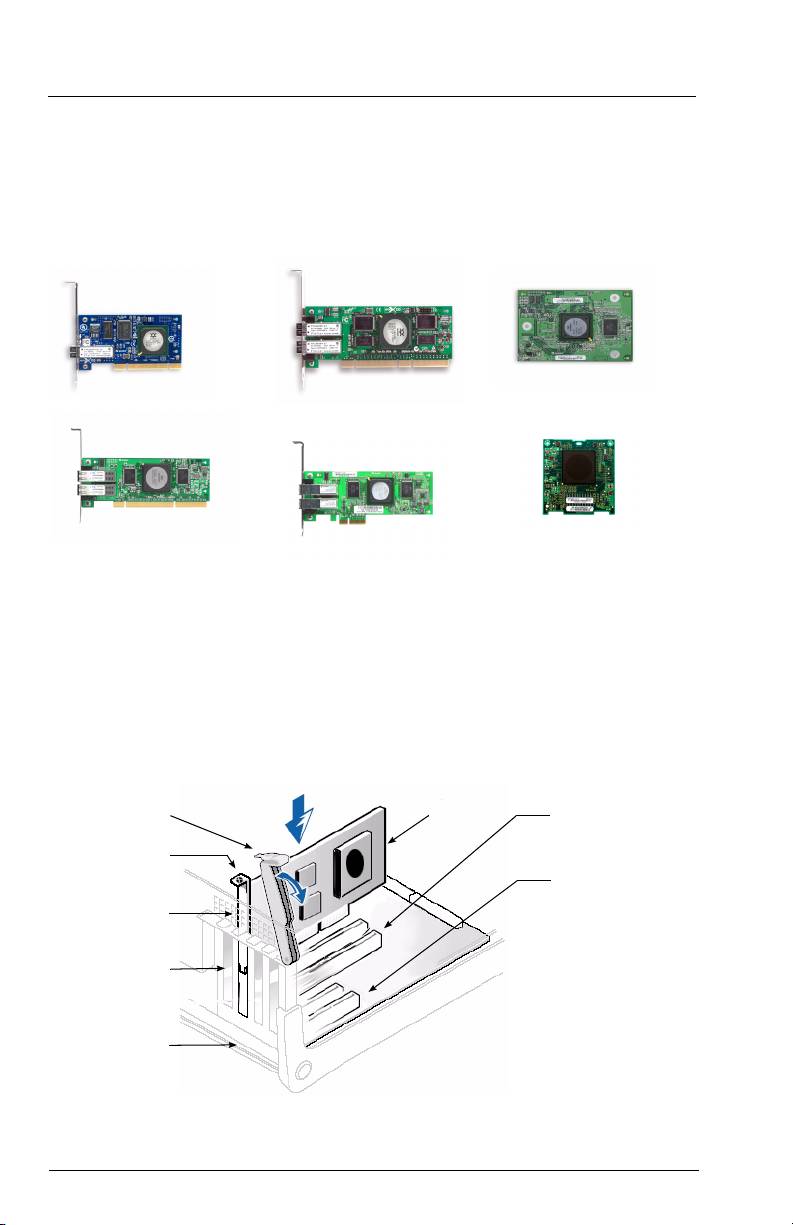
步驟 2. 安裝 HBA 硬體
若要安裝 HBA 硬體,您需要開啟電源並找到適當的匯流排插槽。 如有需要,請參閱電腦的系統手冊以瞭解
有關卸下電腦蓋的說明。
視您要安裝的 HBA 而定,連接器外觀可能與下列其中一個範例類似:
32 位元 PCI-X 連接器
64 位元 PCI-X 連接器
QME2462
64 位元 PCI-X 2.0 連接器
x4 PCI Express 連接器
QME2472
請遵循這些步驟來安裝 HBA 硬體 (QME2462 與 QME2472 安裝指示,請參考您的伺服器硬體使用者手冊 ):
1. 關閉電腦電源,然後中斷電源連接線。
2. 將電腦蓋卸下,然後找到一個空的匯流排插槽。
3. 卸下螺絲或鬆開導桿,以將插槽蓋拉出 ( 如果有的話 )。
4. 抓住 HBA 的頂端邊緣,將其牢固地卡入插槽中。
5. 使用現有的螺絲或導桿重新鎖緊 HBA 的固定座架。
6. 關閉電源蓋。
7. 插上電源線,然後開啟電腦電源。
HBA
導桿
64 位元 PCI-X 插槽
或
螺絲
x4 PCI EXPRESS 插槽
HBA 固定座架
插槽蓋
系統 底座
範例主機板與插槽
14
步驟 3. 安裝 HBA 驅動程式
要恢復與安裝最新的 HBA 驅動程式,請到 QLogic 支援網頁,其網頁網址為 :
http://support.qlogic.com/support/newoem_product_list_emc.asp?oemid=65&CATID=58604&type=Dell
步驟 4. 安裝 SANsurfer Pro 管理應用程式
要恢復與安裝最新的 SANsurfer FC HBA 管理員公用程式,請到 QLogic 支援網頁,其網頁
網址為 :
http://support.qlogic.com/support/newoem_product_list_emc.asp?oemid=65&CATID=58604&type=Dell
恭喜您 ! 您已經成功地安裝 QLogic HBA 與管理應用程式!
下面一部分包含 SANblade QLogic HBA 相關的更多資訊,其中包括 LED 方案、疑難排解、保固、技術支援與
證書資訊。
HBA LED 指示燈 ( 不包括 QME2462 HBA)
QLA234x/QLE220 HBA LED 指示燈方案 QME2472 HBA LED 指示燈方案*
綠色 LED 琥珀色 LED
活動
綠色 LED 琥珀色 LED
活動
❍❍
關閉電源 閃光
❍ 4 Gbps
●●
電源
❍
閃光 1 Gbps 或 2 Gbps
●❍
連線
❍●
已建立連結 更多資訊,請參閱您的伺服器硬體使用者
手冊
❍
閃光 同步化遺失
*
位於光纖通道函式模組上的 LEDs
交替閃光 交替閃光 韌體錯誤
閃光
❍
信標
QLE246x HBA LED 指示燈方案
黃色 LED 綠色 LED 琥珀色 LED
活動
❍ ❍ ❍
關閉電源
● ● ●
開啟電源 ( 韌體初始化前 )
閃光 閃光 閃光 開啟電源 ( 韌體初始化後 )
黃色,綠色和琥珀色 LED 指示燈交替地閃爍 韌體錯誤
❍ ❍
●/ 閃光 連線,已建立 1 Gbps 的連結
❍
●/ 閃光
❍
連線,已建立 2 Gbps 的連結
●/ 閃光
❍ ❍
連線,已建立 4 Gbps 的連結
閃光
❍
閃光 信標
15
疑難排解與技術支援
QLogic 資料數據庫包含 QLogic SANblade HBA 的疑難排解資訊。 請從 QLogic 網站
www.qlogic.com/support/knowledge_base.asp
存取資料庫。
如需技術支援,請造訪我們的網站 support.qlogic.com
、以電子郵件與我們連絡 support@qlogic.com 或是撥打
電話 952-932-4040。
保固
QLogic SANblade HBA 附帶標準的三年期 QLogic 保固,或是依其他合約之規定。 如需有關保固的詳細資訊,
請參考位於 www.qlogic.com
的 QLogic 網站。
雷射安全 ( 不包括 QME2462 與 QME2472)
FDA 通知
本產品符合 DHHS 規則 21CFR Chapter I,Subchapter J。本產品的設計與製造符合鐳射產品的安全標籤上的 IEC60825-1。
I 類鐳射產品 1
Caution-Class 1 laser radiation when open
Appareil laser de classe 1
Do not view directly with optical instruments
Produkt der Laser Klasse 1
Attention — Radiation laser de classe 1
Luokan 1 Laserlaite
Ne pas regarder directement avec des instruments optiques
I 類鐳射產品 1
I 類鐳射產品
Vorsicht — Laserstrahlung der Klasse 1 bei geöffneter Abdeckung
Direktes Ansehen mit optischen Instrumenten vermeiden
Varoitus — Luokan 1 lasersäteilyä, kun laite on auki
Älä katso suoraan laitteeseen käyttämällä optisia instrumentteja
注意 — 1 類鐳射輻射開啟時
請勿直接使用光學設備查看
機構認証
QLogic SANblade HBA
下面一部分包含針對 QLogic SANblade HBA 執行的 EMC/EMI 測試規格的摘要,執行測試的目的是為了符合電場輻射干擾發射、
輻射抗擾和產品安全標準。
EMI 和 EMC 需求
符合 FCC 第 15 部分: Class A (QLE200, QME2462, QME2472), Class B (QLA234x)
FCC 符合性資訊聲明: 本裝置符合美國聯邦通訊委員會規則第 15 條。 操作須符合以下兩種條件 : (1) 本裝置不會造成有害干
擾,並且 (2) 本裝置必須接受任何收到的干擾,包括可能會造成意外操作的干擾。
ICES-003 符合性: Class A (QLE200, QME2462, QME2472), Class B (QLA234x)
❑ QLE200, QME2462, 與 QME2472 HBAs: 此 A 類數位裝置符合 Canadian ICES-003。
Cet appareil numériqué de la classe A est conformé à la norme NMB-003 du Canada.
❑ QLA234x HBAs: 此 B 類數位裝置符合 Canadian ICES-003。
Cet appareil numériqué de la classe B est conformé à la norme NMB-003 du Canada.
CE Mark 2004/108/EC EMC 指示符合性 :
EN55022:1998/CISPR22:1997 - Class A (QLE200, QME2462, QME2472), Class B (QLA234x)
EN55024:1998
抗擾標準
EN61000-4-2: ESD
EN61000-4-3: RF 電磁場
EN61000-4-4: 快速變動 / 閃爍
EN61000-4-5: 快速浪湧一般 / 差異
EN61000-4-6: RF 傳導耐受性
EN61000-4-8: 電源頻率磁場
EN61000-4-11: 電壓突降與中斷
EN61000-3-2: 諧波電流干擾
EN61000-3-3: 電壓波動與閃爍
16
VCCI 符合性: Class A (QLE200, QME2462, QME2472), Class B (QLA234x, QLE246x)
AS/NZS CISPR22 符合性:
Class A (QLE220, QME2462, QME2472), Class B (QLA234x, QLE246x)
CNS 13438 符合性: Class B (QLA234x)
MIC 符合性:
Class A (QLE220, QME2462, QME2472), Class B (QLA234x)
❑ QLE220, QLA234x, 與 QME2472 HBAs: Korea MIC A 類認證
產品名稱 / 型號 光纖通道 HBA
證書持有者 QLogic Corporation
製造日期 請參閱產品上列出的日期代碼
製造商 / 原產地 QLogic Corporation/USA
A 類設備
由於此設備已經過 EMC 註冊而用於商業用途,銷售方和 / 或買
( 商業用途資訊 / 電訊設備 )
方需要確知這一點。如果發生誤銷或誤購的情況,則必須變更
為家庭使用。
❑ 韓文格式— A 類
❑ QLE246x HBA: Korea MIC B 類認證
產品名稱 / 型號 光纖通道 HBA
證書持有者 QLogic Corporation
製造日期 請參閱產品上列出的日期代碼
製造商 / 原產地 QLogic Corporation/USA
B 類設備
由於此設備已經過 EMC 註冊而用於家庭用途,因此可以
( 家庭用途資訊 / 電訊設備 )
在任何區域使用此產品 ( 包括居住區 )。
❑ 韓文格式— B 類
產品安全符合性
UL,cUL 產品安全符合性 : QLE220, QLA234x, QLE246x
UL60950-1
CSA C22.2 No.60950-1
1 類鐳射產品 DHHS 21CFR (J)
2006/95/EC 低電壓符合性 : QLE220, QLA234x, QLE246x
TUV:
-EN60950-1:2001
-EN60825-1:1994+A1+A2
-EN60825-2:1994+A1
17

18
