
Dell PowerVault ML6000: instruction
Class: Household, kitchen appliances, electronics and equipment
Type: Computer
Manual for Dell PowerVault ML6000
Table of contents
- Notes, Cautions, and Warnings
- Contents
- Dell PowerVault ML6000 Getting Started Guide (English)
- Installing Your Library in a Rack Special Instructions for LTO-5 Tape Drives
- LTO-5 Fibre Channel Tape Drive LTO-5 SAS Tape Drive
- Connecting Parallel SCSI Cables
- Dell PowerVault ML6000 Getting Started Guide
- Connecting Fibre Channel Cables to a Host or Switch
- Connecting Fibre Channel Cables Through a Fibre Channel I/O Blade
- Connecting Serial Attached SCSI (SAS) Cables
- Dell PowerVault ML6000 Getting Started Guide
- Finishing Cabling the Library
- Powering On the Library
- Getting Started
w w w . d e l l . c o m | s u p p o r t . d e l l . c o m
Dell™ PowerVault™ ML6000
Getting Started Guide (English)
Příručka – začínáme (Czech)
Guide de démarrage rapide (French)
Erste Schritte (German)
Οδηγός «Πρώτα Βήματα» (Greek)
Podstawowe informacje (Polish)
Руководство по началу работы (Russian)
Guía de inicio (Spanish)
*JK926 A03*
J K 9 2 6 A 0 3
EMEA1.book Page 1 Tuesday, March 9, 2010 4:38 PM
Notes, Cautions, and Warnings
NOTE:
A NOTE indicates important information that helps you make better use of
your computer.
CAUTION:
A CAUTION indicates potential damage to hardware or loss of data if
instructions are not followed.
WARNING:
A WARNING indicates a potential for property damage, personal
injury, or death.
Poznámky, upozornění a varování
POZNÁMKA:
POZNÁMKA označuje důležitou informaci, která vám
pomůže lépe využít váš počítač.
UPOZORNĚNÍ: UPOZORNĚNÍ označuje možné nebezpečí pro
hardware nebo ztrátu dat v případě, že nebudete postupovat podle
pokynů.
VAROVÁNÍ: VAROVÁNÍ označuje možné riziko poškození majetku,
zranění osob nebo smrti.
Remarques, mises en garde et avertissements
REMARQUE :
UNE REMARQUE désigne des informations importantes destinées à
vous aider à optimiser l'utilisation de votre ordinateur.
MISE EN GARDE : UNE MISE EN GARDE désigne un risque potentiel de dommage
matériel ou de perte de données en cas de non-respect des instructions.
AVERTISSEMENT : UN AVERTISSEMENT désigne un risque potentiel de dommage
de propriété, de blessures, voire de mort.
EMEA1.book Page 2 Tuesday, March 9, 2010 4:38 PM

Anmerkungen, Vorsichts- und Warnhinweise
ANMERKUNG:
Eine ANMERKUNG gibt Ihnen wichtige Informationen, die Ihnen
helfen, Ihren Computer besser nutzen zu können.
VORSICHTSHINWEIS: Ein VORSICHTSHINWEIS weist auf mögliche
Hardwareschäden oder Datenverluste hin, die eintreten können, wenn
Anweisungen nicht befolgt werden.
WARNHINWEIS: Ein WARNHINWEIS weist auf mögliche Gefahren von
Vermögensschäden, Verletzungsgefahren oder Lebensgefahr hin.
Σημειώσεις, Επισημάνσεις και Προειδοποιήσεις
ΣΗΜΕΙΩΣΗ:
Η ένδειξη ΣΗΜΕΙΩΣΗ υποδεικνύει σημαντικές πληροφορίες
που σας βοηθούν να κάνετε καλύτερη χρήση του υπολογιστή σας.
ΠΡΟΣΟΧΗ: Η ένδειξη ΠΡΟΣΟΧΗ υποδεικνύει πιθανή πρόκληση
ζημιάς στο υλικό ή απώλεια δεδομένων σε περίπτωση μη τήρησης
των οδηγιών.
ΠΡΟΕΙΔΟΠΟΙΗΣΗ: Η ένδειξη ΠΡΟΕΙΔΟΠΟΙΗΣΗ υποδεικνύει την
πιθανότητα πρόκλησης ζημιάς στην περιουσία, τραυματισμού ή
θανάτου.
UWAGI, OSTRZEŻENIA i PRZESTROGA
UWAGA:
UWAGA wskazuje istotną informację, pomagającą korzystać ze
swojego komputera z większą wydajnością.
OSTRZEŻENIE: OSTRZEŻENIE wskazuje na mozlwiość uszkodzenia
sprzętu komputerowego lub utratę danych w przypadku nie
przestrzegania wskazówek zawartych w instrukcji obsługi.
OSTRZEŻENIE: OSTRZEŻENIE wskazuje na możliwość uszkodzenia
własności, uszczerbek na zdrowiu lub utratę życia.
EMEA1.book Page 3 Tuesday, March 9, 2010 4:38 PM
Примечания, предостережения и предупреждения
ПРИМЕЧАНИЕ.
Пометка ПРИМЕЧАНИЕ рядом с разделом указывает
на информацию, которая поможет вам более правильно пользоваться
своим компьютером.
ВНИМАНИЕ! Пометка ВНИМАНИЕ! указывает на потенциальную
угрозу повреждения оборудования или утраты данных в случае,
если не будут соблюдаться инструкции.
ПРЕДУПРЕЖДЕНИЕ! Пометка ПРЕДУПРЕЖДЕНИЕ! указывает на
потенциальную угрозу нанесения ущерба собственности,
получения травмы или смертельного исхода.
Notas, precauciones y advertencias
NOTA:
Las NOTAS indican información importante que ayuda a utilizar mejor el
equipo.
PRECAUCIONES: Las PRECAUCIONES indican daños potenciales al hardware o la
pérdida de datos si no se observan las instrucciones.
ADVERTENCIA:
Las ADVERTENCIAS indican un peligro potencial de datos a la
propiedad, lesiones personales o la muerte.
____________________
Information in this document is subject to change without notice.
© 2010 Dell Inc. All rights reserved.
Reproduction of these materials in any manner whatsoever without the written permission of Dell Inc.
is strictly forbidden.
Trademarks used in this text: Dell, the DELL logo, and PowerVault are trademarks of Dell Inc. LTO
is a trademark of IBM in the United States and other countries
Other trademarks and trade names may be used in this document to refer to either the entities claiming
the marks and names or their products. Dell Inc. disclaims any proprietary interest in trademarks and
trade names other than its own.
EMEA1.book Page 4 Tuesday, March 9, 2010 4:38 PM
Informace obsažené v tomto dokumentu podléhají změnám bez upozornění.
© 2010 Dell Inc. Všechna práva vyhrazena.
Kopírování těchto materiálů jakýmkoliv způsobem bez písemného povolení společnosti Dell Inc. je
přísně zakázáno.
Ochranné známky používané v textu:
Dell
, logo
DELL
, a
PowerVault
jsou ochranné známky
společnosti Dell Inc. LTO je ochranná známka společnosti IBM ve Spojených státech a ostatních
zemích.
Ostatní ochranné známky a obchodní názvy mohou být použity v tomto dokumentu při odkazování
na společnosti nárokující si tyto známky a názvy nebo jejich výrobky. Společnost Dell Inc. nemá
vlastnické zájmy vůči ochranným známkám a obchodním názvům jiným než vlastním.
Les informations contenues dans ce document sont sujettes à modification sans préavis.
© 2010 Dell Inc. Tous droits réservés.
Toute reproduction, de quelque manière que ce soit, de ces supports sans l'autorisation écrite de Dell
Inc. est strictement interdite.
Les marques utilisées dans le présent document, et notamment Dell, le logo de DELL et PowerVault
sont des marques de Dell Inc. LTO est une marque d'IBM déposée aux États-Unis et dans d'autres pays.
D'autres marques et appellations commerciales peuvent être utilisées dans le présent document pour
désigner les entités détentrices de marques, noms ou de leurs produits. Dell Inc. dénie tout intérêt
propriétaire vis-à-vis des marques et noms de marque autres que les siens.
Irrtümer und technische Änderungen vorbehalten.
© 2010 Dell Inc. Alle Rechte vorbehalten.
Die Reproduktion dieser Unterlagen in jeglicher Weise ist ohne die schriftliche Genehmigung von
Dell Inc. streng verboten.
Die in diesem Text verwendeten Warenzeichen: Dell, das DELL Logo und PowerVault sind
Warenzeichen der Dell Inc. LTO ist ein Warenzeichen der IBM in den USA und anderen Ländern.
Andere Warenzeichen und Handelsnamen können in diesem Dokument verwendet werden; sie
beziehen sich entweder auf die juristischen Personen, die diese Marken und Namen beanspruchen,
oder auf deren Produkte. Dell Inc. verzichtet auf alle Besitzrechte an Marken und
Handelsbezeichnungen, die nicht sein Eigentum sind.
Οι πληροφορίες του παρόντος εγγράφου υπόκεινται σε αλλαγή χωρίς ειδοποίηση.
© 2010 Dell Inc. Με επιφύλαξη παντός δικαιώματος.
Απαγορεύεται αυστηρά η αναπαραγωγή αυτού του υλικού με οποιονδήποτε τρόπο χωρίς την έγγραφη
άδεια της Dell Inc.
Εμπορικά σήματα που χρησιμοποιούνται στο παρόν κείμενο: Η ονομασία
Dell
, το λογότυπο
DELL
,
και η ονομασία
PowerVault
είναι εμπορικά σήματα της εταιρείας Dell Inc. Η ονομασία LTO είναι
εμπορικό σήμα της IBM στις Ηνωμένες Πολιτείες και σε άλλες χώρες
Στο παρόν έγγραφο μπορεί να χρημιμοποιούνται άλλα εμπορικά σήματα και εμπορικές ονομασίες για
την αναφορά σε οντότητες που διεκδικούν τα σήματα και τα ονόματα ή στα προϊόντα τους. Η εταιρεία
Dell Inc. αποποιείται οποιουδήποτε ιδιοκτησιακού συμφέροντος όσον αφορά τα εμπορικά σήματα
και τις εμπορικές ονομασίες πέραν των όσων της ανήκουν.
EMEA1.book Page 5 Tuesday, March 9, 2010 4:38 PM
Informacje zawarte w niniejszym dokumencie mogą zostać zmienione bez uprzedzenia.
© 2010 Dell Inc. Wszelkie prawa zastrzeżone.
Powielanie tych materiałów dowolną metodą bez pisemnej zgody Dell Inc. jest surowo zabronione.
Znaki firmowe użyte w tej instrukcji:
Dell
, logo
DELL
, i
PowerVault
, są znakami firmowymi,
należącymi do Dell Inc. LTO, który jest znakiem firmowym, należącym do IBM w Stanach
Zjednoczonych i innych krajach.
Inne znaki firmowe i nazwy firmowe, mogą być użyte w tym dokumencie w odniesieniu do albo
przypisanych znaków i nazw lub ich produktów. Firma Dell Inc. nie rości sobie żadnych praw
własności do nienależących do niej znaków towarowych lub nazw handlowych.
Информация в данном документе может быть изменена без предварительного
уведомления.
© Dell Inc, 2010 Все права защищены.
Воспроизведение данных материалов в любом виде без письменного разрешения компании
Dell Inc. строго запрещено.
Товарные знаки, используемые в данном тексте:
Dell
, логотип
DELL
и
PowerVault
являются
товарными знаками компании Dell Inc. LTO является товарным знаком компании IBM в
Соединенных Штатах и в других странах
Другие товарные знаки и торговые марки могут использоваться в данном документе для
указания либо предприятий, заявивших товарный знак или торговую марку, либо их продукции.
Dell Inc. отказывается от права собственности на любые торговые марки и товарные знаки,
кроме своих собственных.
La información en este documento está sujeta a cambios sin previo aviso.
© 2010 Dell Inc. Todos los derechos reservados.
Queda estrictamente prohibida la reproducción de este material en cualquier forma sin el permiso
escrito de Dell Inc.
Las marcas comerciales que se utilizan en este texto: Dell, el logotipo de DELL y PowerVault son
marcas comerciales de Dell, Inc. LTO es una marca comercial de IBM en Estados Unidos y en otros
países.
Es posible que se utilicen otras marcas y nombres comerciales en este documento para referirse a las
entidades titulares de las marcas y nombres o a sus productos. Dell Inc. renuncia a cualquier interés
en la propiedad de las marcas y nombres comerciales que no sean los suyos propios.
May 2010
P/N JK926
Rev. A03
EMEA1.book Page 6 Tuesday, March 9, 2010 4:38 PM
Contents
1
Dell PowerVault ML6000 Getting Started Guide
(English)
. . . . . . . . . . . . . . . . . . . . . . . . .
13
Installing Your Library in a Rack
. . . . . . . . . . . .
14
Special Instructions for LTO-5 Tape Drives
. . . . . . .
14
Connecting Parallel SCSI Cables
. . . . . . . . . . . .
16
Connecting Fibre Channel Cables to a Host or Switch
. .
18
Connecting Fibre Channel Cables Through a
Fibre Channel I/O Blade
. . . . . . . . . . . . . . . . .
19
Connecting Serial Attached SCSI (SAS) Cables
. . . .
20
Finishing Cabling the Library
. . . . . . . . . . . . . .
22
Powering On the Library
. . . . . . . . . . . . . . . . .
23
Getting Started
. . . . . . . . . . . . . . . . . . . . . .
24
2 Příručka Dell PowerVault ML6000 –
začínáme (Czech)
. . . . . . . . . . . . . . . .
25
Instalace knihovny do stojanu
. . . . . . . . . . .
26
Zvláštní pokyny pro páskové jednotky LTO-5
. .
26
Připojování paralelními kabely SCSI
. . . . . . .
28
Připojování sběrnice optickým kabelem k hostiteli
nebo přepínači
. . . . . . . . . . . . . . . . . . .
30
EMEA1.book Page 7 Tuesday, March 9, 2010 4:38 PM

8
Contents
Připojování sběrnice s optickými kabely přes
optickou sběrnici I/O Blade
. . . . . . . . . . . .
31
Sériové připojování dodávanými kabely
SCSI (SAS)
. . . . . . . . . . . . . . . . . . . . .
33
Dokončení kabeláže knihovny
. . . . . . . . . . .
34
Elektrické napájení knihovny
. . . . . . . . . . .
35
Začínáme
. . . . . . . . . . . . . . . . . . . . . .
36
3
Guide de démarrage rapide de Dell PowerVault
ML6000 (French)
. . . . . . . . . . . . . . . . . . .
37
Installation de votre bibliothèque dans un rack
. . . .
38
Instructions spéciales pour les lecteurs de bande LTO-5
.
38
Connexion des câbles SCSI parallèles
. . . . . . . . .
40
Connexion des câbles Fibre Channel à un hôte ou à
un commutateur
. . . . . . . . . . . . . . . . . . . . .
42
Connexion des câbles Fibre Channel au moyen d'une
lame d'E/S Fibre Channel
. . . . . . . . . . . . . . . .
43
Connexion des câbles SCSI (SAS)
. . . . . . . . . . . .
44
Terminer le câblage de la bibliothèque
. . . . . . . . .
46
Mise sous tension de la bibliothèque
. . . . . . . . . .
47
Guide de démarrage rapide
. . . . . . . . . . . . . . .
48
EMEA1.book Page 8 Tuesday, March 9, 2010 4:38 PM
4
Dell PowerVault ML6000 Erste Schritte
(German)
. . . . . . . . . . . . . . . . . . . . . . . . .
49
Einbau Ihrer Bibliothek in ein Rack
. . . . . . . . . . .
50
Sonderanweisungen für LTO-5-Bandlaufwerke
. . . .
50
Anschließen von parallelen SCSI-Kabeln
. . . . . . .
52
Anschluss von Fibre Channel-Kabeln an einen
Host oder Switch
. . . . . . . . . . . . . . . . . . . .
54
Anschluss von Fibre Channel-Kabeln über ein
Fibre Channel E/A-Blade
. . . . . . . . . . . . . . . .
55
Anschluss von SAS-Kabeln
. . . . . . . . . . . . . . .
57
Fertigstellen der Verkabelung der Bibliothek
. . . . .
58
Einschalten der Bibliothek
. . . . . . . . . . . . . . .
59
Erste Schritte
. . . . . . . . . . . . . . . . . . . . . . .
60
5 Dell PowerVault ML6000 Οδηγός
«Πρώτα Βήματα» (Greek)
. . . . . . . . . . .
61
Εγκατάσταση της βιβλιοθήκης σε
μεταλλικό φατνίο
. . . . . . . . . . . . . . . . . . .
62
Ειδικές οδηγίες για τις μονάδες ταινίας LTO-5
. . .
63
Σύνδεση καλωδίων παράλληλου SCSI
. . . . . . .
64
Σύνδεση καλωδίων οπτικών ινών σε κεντρικό
υπολογιστή ή μεταγωγέα
. . . . . . . . . . . . . .
66
Σύνδεση καλωδίων καναλιού οπτικών ινών μέσω
I/O blade καναλιού οπτικών ινών
. . . . . . . . . .
67
EMEA1.book Page 9 Tuesday, March 9, 2010 4:38 PM
10
Contents
Σύνδεση σειριακά συνδεδεμένων καλωδίων
SCSI (SAS)
. . . . . . . . . . . . . . . . . . . . . .
69
Ολοκλήρωση της σύνδεσης καλωδίων της
βιβλιοθήκης
. . . . . . . . . . . . . . . . . . . . .
70
Ενεργοποίηση της βιβλιοθήκης
. . . . . . . . . . .
71
Τα πρώτα βήματα
. . . . . . . . . . . . . . . . . .
72
6 Dell PowerVault ML6000 Pierwsze
kroki- instrukcja obsługi (Polish)
. . . . .
73
Instalacja biblioteki w obudowie
. . . . . . . . . .
74
Instrukcje specjalne dla napędu
taśmowego LTO-5
. . . . . . . . . . . . . . . . .
75
Łączenie paralelne kabli SCSI
. . . . . . . . . . .
76
Podłączanie kabli magistrali szeregowej do
komputera głównego lub przełącznika
. . . . . .
78
Połącz kable magistrali szeregowej poprzez
kasetę I/O magistrali szeregowej
. . . . . . . . .
79
Łączenie kabli seryjnie przyłączonych
SCSI (SAS)
. . . . . . . . . . . . . . . . . . . . .
81
Zakończenie podłączenia kabli biblioteki
. . . . .
82
Zasilanie biblioteki
. . . . . . . . . . . . . . . . .
83
Rozpoczynając
. . . . . . . . . . . . . . . . . . .
84
EMEA1.book Page 10 Tuesday, March 9, 2010 4:38 PM

7 Dell PowerVault ML6000 Руководство по
началу работы (Russian)
. . . . . . . . . . .
85
Установка библиотеки в стойку
. . . . . . . . . .
86
Специальные инструкции для стримеров LTO-5
.
87
Подключение кабелей с параллельным
интерфейсом SCSI
. . . . . . . . . . . . . . . . .
88
Подключение кабелей Fibre Channel к основной
системе или к коммутатору
. . . . . . . . . . . .
90
Подключение кабелей Fibre Channel через блок
разъемов ввода/вывода Fibre Channel
. . . . . .
91
Подключение кабелей с последовательным
интерфейсом SCSI (SAS)
. . . . . . . . . . . . . .
93
Завершение подключения кабелей к библиотеке
.
94
Подача электропитания на библиотеку
. . . . . .
95
Начало работы
. . . . . . . . . . . . . . . . . . .
96
8
Guía de inicio de Dell PowerVault ML6000
(Spanish)
. . . . . . . . . . . . . . . . . . . . . . . . .
97
Instalación de la biblioteca en un bastidor
. . . . . . .
98
Instrucciones especiales para las unidades de
cinta LTO-5
. . . . . . . . . . . . . . . . . . . . . . . .
98
Conexión de cables SCSI paralelos
. . . . . . . . . . .
100
Conexión de cables Fibre Channel al host o
al conmutador
. . . . . . . . . . . . . . . . . . . . . .
102
Conexión de cables Fibre Channel por medio de
una tarjeta de E/S Fibre Channel
. . . . . . . . . . . .
103
EMEA1.book Page 11 Tuesday, March 9, 2010 4:38 PM
Conexión de cables SCSI de conexión en serie (SAS
)
. .
104
Finalización del cableado de la biblioteca
. . . . . . .
106
Encendido de la biblioteca
. . . . . . . . . . . . . . .
107
Inicio
. . . . . . . . . . . . . . . . . . . . . . . . . . .
108
EMEA1.book Page 12 Tuesday, March 9, 2010 4:38 PM
Dell PowerVault ML6000 Getting Started Guide
13
Dell PowerVault ML6000 Getting Started Guide (English)
WARNING:
Before cabling your library, read the Dell™ PowerVault™ Systems
Product Information Guide.
WARNING:
All libraries must be installed in a rack having a main protective
earthing (grounding) terminal. For detailed installation information, see the Dell™
PowerVault™ ML6000 Tape Library User’s Guide.
WARNING:
The socket outlet shall be installed near the equipment and shall be
easily accessible.
WARNING:
The front panel power switch is not the main disconnection device.
Please pull all main plugs out of the appliance inlets in order to switch off the
appliance completely.
WARNING:
Before cabling your library, remove all interior packaging. Be sure to
remove the orange robot restraint assembly that secures the robot to the floor of
the library. In addition, remove the yellow strip in the I/E station. Save all
packaging materials and the orange robot restraint assembly in case you need to
move or ship the library in the future. For details, see the unpacking instructions
that came with your library and the Dell™ PowerVault™ ML6000 Tape Library
User’s Guide.
EMEA1.book Page 13 Tuesday, March 9, 2010 4:38 PM
14
Dell PowerVault ML6000 Getting Started Guide
Installing Your Library in a Rack
All Dell™ PowerVault™ ML6000 libraries must be installed in a rack. For
instructions, see the
Dell
™
PowerVault
™
ML6000 Tape Library User’s Guide
.
•
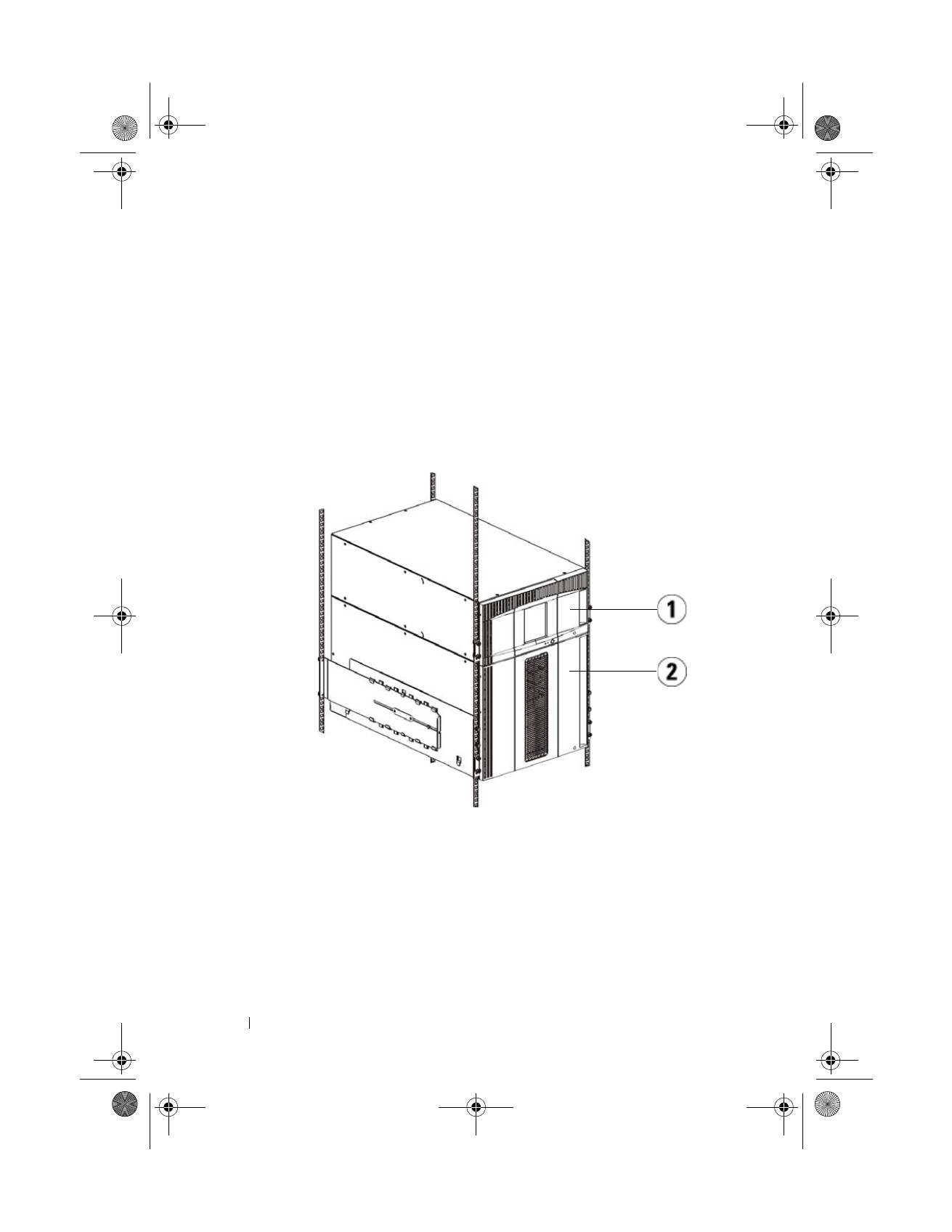
ML6010 CM is a single 5U Library Control Module.
•
ML6020 CM consists of one (1) ML6010 CM 5U Library Control Module
and one (1) ML6000 EM 9U Library Expansion Module (14U total).
•
ML6030 CM consists of one (1) ML6010 CM 5U Library Control Module
and two (2) ML6000 EM 9U Library Expansion Modules (23U total).
Special Instructions for LTO-5 Tape Drives
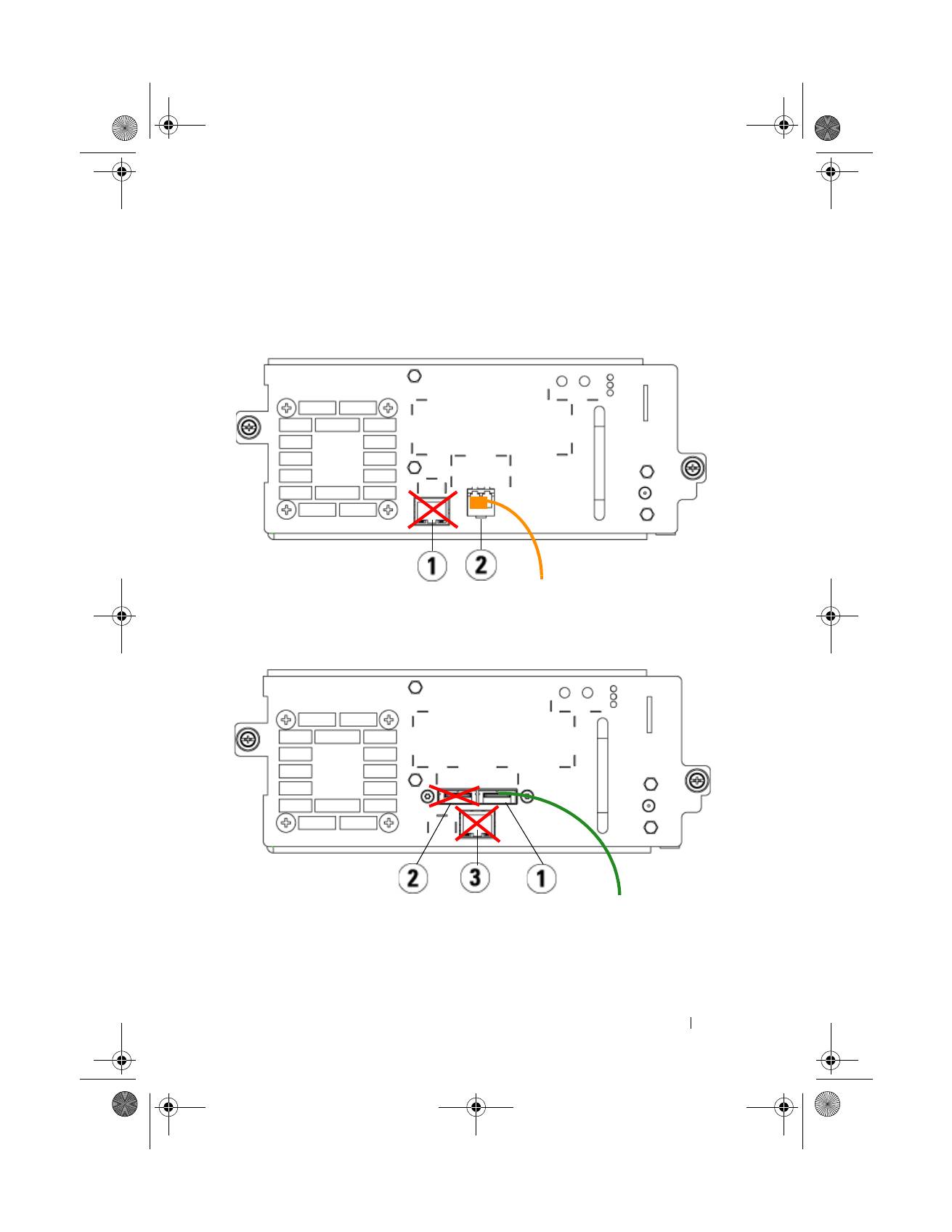
Currently, the library does not support using the following features on LTO-5
tape drives:
•
Ethernet port
1
5U Library Control Module
2
9U Library Expansion Module
EMEA1.book Page 14 Tuesday, March 9, 2010 4:38 PM
Dell PowerVault ML6000 Getting Started Guide
15
•
Port 2 on dual-port tape drives
See the following two figures for details.
LTO-5 Fibre Channel Tape Drive
LTO-5 SAS Tape Drive
1
Ethernet port - do not use
2
Fibre Channel port - use this port
1
SAS port 1 - use this port
2
SAS port 2 - do not use
3
Ethernet port - do not use
EMEA1.book Page 15 Tuesday, March 9, 2010 4:38 PM
16
Dell PowerVault ML6000 Getting Started Guide
Connecting Parallel SCSI Cables
Perform this step if your library contains parallel SCSI tape drives.
There are two recommended ways to cable SCSI tape drives: one tape drive per
SCSI bus or two tape drives per SCSI bus.
NOTE:
To avoid possible performance issues, do not connect more than two tape
drives per SCSI bus.
To connect one tape drive per SCSI bus:
1
Use a SCSI cable to connect the bottom port of the tape drive to your host
system.
2
Attach a SCSI terminator to terminate the top port of the tape drive.
To connect two tape drives per SCSI bus:
1
Connect one end of a SCSI cable to the top SCSI port of the bottom tape
drive.
2
Connect the other end of the cable to the bottom SCSI port of the tape
drive above.
3
Use another SCSI cable to connect the bottom tape drive of the SCSI bus
to your host system.
4
Use a SCSI terminator to terminate the top tape drive of the SCSI bus.
EMEA1.book Page 16 Tuesday, March 9, 2010 4:38 PM

Dell PowerVault ML6000 Getting Started Guide
17
1
Connecting one tape drive per SCSI
bus
2
Connecting two tape drives per SCSI
bus
3
SCSI cable to host
4
SCSI terminator
EMEA1.book Page 17 Tuesday, March 9, 2010 4:38 PM
18
Dell PowerVault ML6000 Getting Started Guide
Connecting Fibre Channel Cables to a Host or Switch
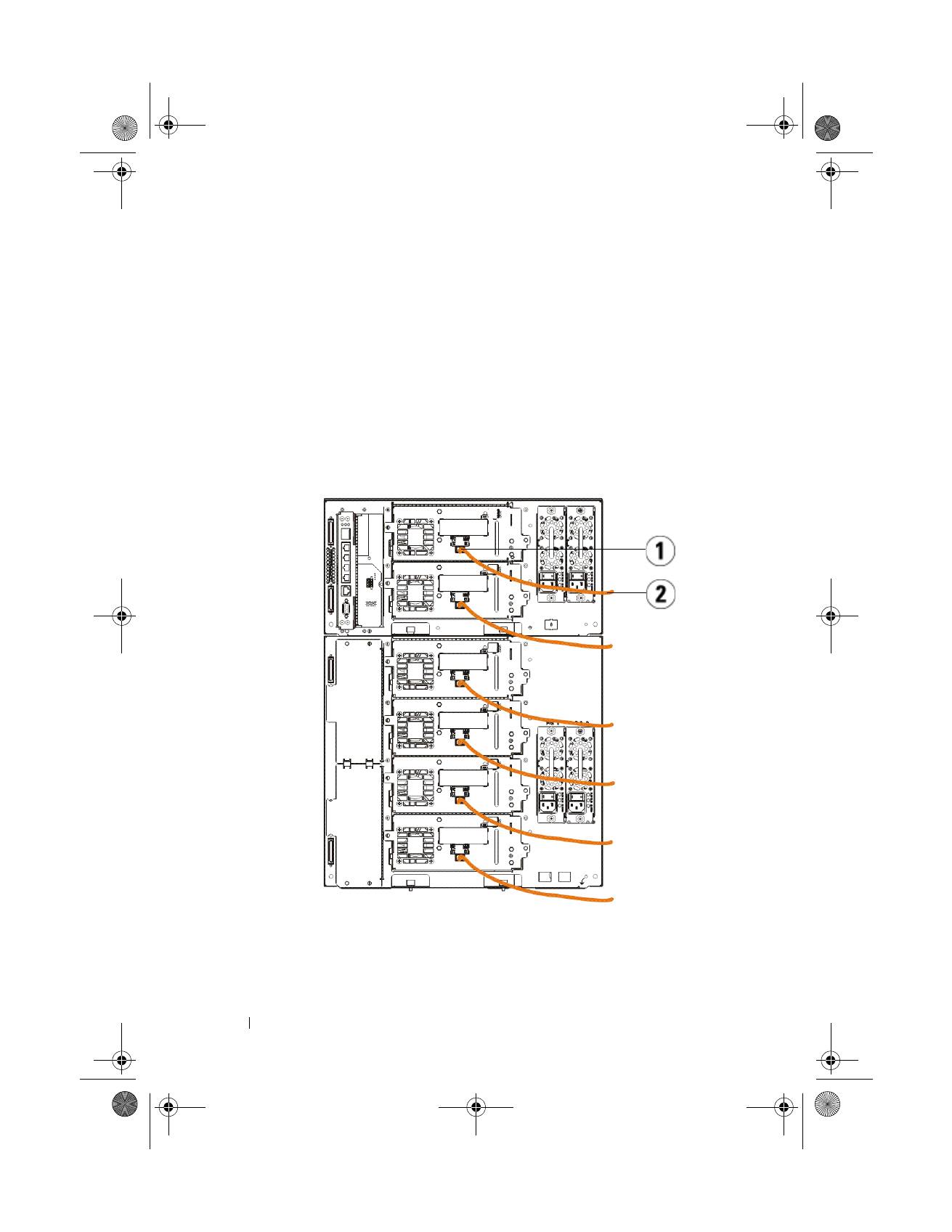
Perform this step if your library contains Fibre Channel tape drives that you will
be connecting directly to a host or switch.
Use Fibre Channel cables to connect your host (or switch) to the library. For
each tape drive:
1
Connect one end of the Fibre Channel cable to the Fibre Channel port on
the tape drive.
2
Connect the other end of the Fibre Channel cable to your host or switch.
1
Fibre Channel port
2
Fibre Channel cable
EMEA1.book Page 18 Tuesday, March 9, 2010 4:38 PM
Dell PowerVault ML6000 Getting Started Guide
19
Connecting Fibre Channel Cables Through a Fibre Channel I/O Blade
Perform this step if your library contains Fibre Channel tape drives that you will
be connecting to your host or switch through a Fibre Channel I/O blade.
1
For each tape drive: Connect one end of a Fibre Channel cable to the Fibre
Channel port on the tape drive. Connect the other end of the Fibre
Channel cable to an initiator port (lower ports 3 – 6) on the nearest Fibre
Channel I/O blade.
2
For each Fibre Channel I/O blade: Connect one end of a Fibre Channel
cable to one of the target ports (upper ports 1 and 2) on the Fibre Channel
I/O blade. Connect the other end of the Fibre Channel cable to your host
or switch.
Use Ethernet cables to connect the LCB in the 5U Library Control Module to
each 9U Library Expansion Module that contains a Fibre Channel I/O blade.
For each Fibre Channel I/O blade installed in a 9U Library Expansion Module:
3
Connect one end of the Ethernet cable to any of the four middle Ethernet
ports on the LCB Ethernet hub.
4
Connect the other end of the cable to the appropriate port on the 9U
Library Expansion Module. If the Fibre Channel I/O blade is installed in
the upper bay, use the port labelled "UPPER." If the Fibre Channel I/O
blade is installed in the lower bay, use the port labelled "LOWER."
EMEA1.book Page 19 Tuesday, March 9, 2010 4:38 PM

20
Dell PowerVault ML6000 Getting Started Guide
Connecting Serial Attached SCSI (SAS) Cables
Perform this step if your library contains serial attached SCSI (SAS) tape drives.
Use SAS cables to connect the SAS tape drives directly to the host. For each
tape drive:
1
Connect one end of the SAS cable to the SAS port on the tape drive.
2
Connect the other end of the SAS cable directly to the host.
1
LCB middle Ethernet ports
2
Fibre Channel I/O blade
3
Target ports
4
Initiator ports
5
Fibre Channel port
6
Ethernet cables
7
"UPPER" and "LOWER" ports
EMEA1.book Page 20 Tuesday, March 9, 2010 4:38 PM
