
Dell PowerVault ML6000: LTO-5 Fibre Channel Tape Drive LTO-5 SAS Tape Drive
LTO-5 Fibre Channel Tape Drive LTO-5 SAS Tape Drive: Dell PowerVault ML6000
Table of contents
- Notes, Cautions, and Warnings
- Contents
- Dell PowerVault ML6000 Getting Started Guide (English)
- Installing Your Library in a Rack Special Instructions for LTO-5 Tape Drives
- LTO-5 Fibre Channel Tape Drive LTO-5 SAS Tape Drive
- Connecting Parallel SCSI Cables
- Dell PowerVault ML6000 Getting Started Guide
- Connecting Fibre Channel Cables to a Host or Switch
- Connecting Fibre Channel Cables Through a Fibre Channel I/O Blade
- Connecting Serial Attached SCSI (SAS) Cables
- Dell PowerVault ML6000 Getting Started Guide
- Finishing Cabling the Library
- Powering On the Library
- Getting Started
Dell PowerVault ML6000 Getting Started Guide
15
•
Port 2 on dual-port tape drives
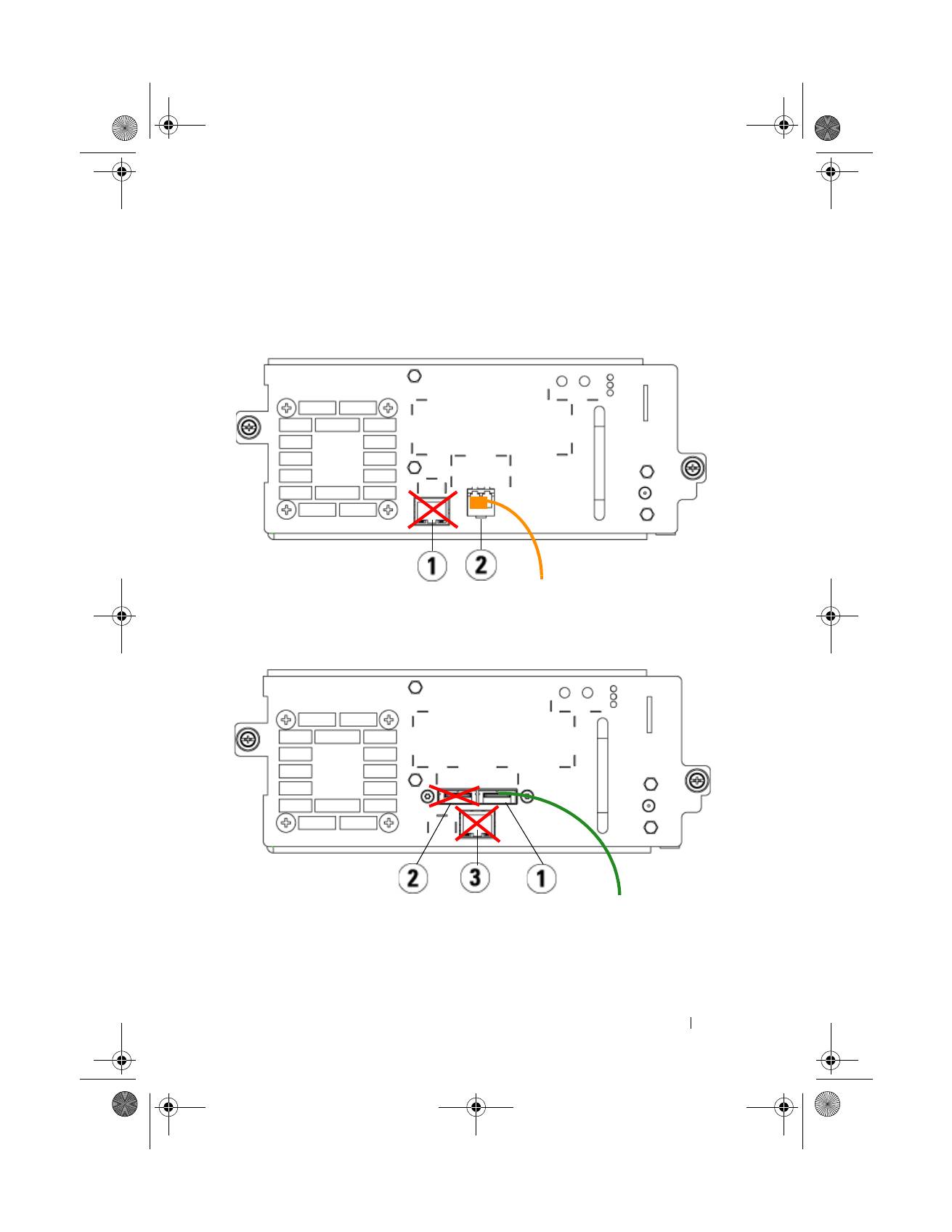
See the following two figures for details.
LTO-5 Fibre Channel Tape Drive
LTO-5 SAS Tape Drive
1
Ethernet port - do not use
2
Fibre Channel port - use this port
1
SAS port 1 - use this port
2
SAS port 2 - do not use
3
Ethernet port - do not use
EMEA1.book Page 15 Tuesday, March 9, 2010 4:38 PM
Top 10 manuals
100.00
NZXT HALE90 1000W99.99
Samsung SM-R38099.97
AEG BSB 18C99.97
Dell 2700W99.97
Smeg KSEC70X99.96
Beurer HDE 4099.96
Pyramida KH 50 v.299.96
MSI CSM-H81M-P3299.96
AEG HR 562799.95
Melissa 640-048