
Sony TMR-BR100: 3D Sync Transmitter and 3D Glasses Communication Range Overhead view Side view Connections Troubleshooting
3D Sync Transmitter and 3D Glasses Communication Range Overhead view Side view Connections Troubleshooting: Sony TMR-BR100
Table of contents
- Product Overview Specifications
- Disposal of the 3D Sync Transmitter
- Caution
- Parts and Components Setting up the 3D Sync Transmitter
- Adjust the angle of the 3D Sync Transmitter based on the installation.
- 3D Sync Transmitter and 3D Glasses Communication Range Overhead view Side view Connections Troubleshooting
TMR-BR100 4-180-471-26(1)
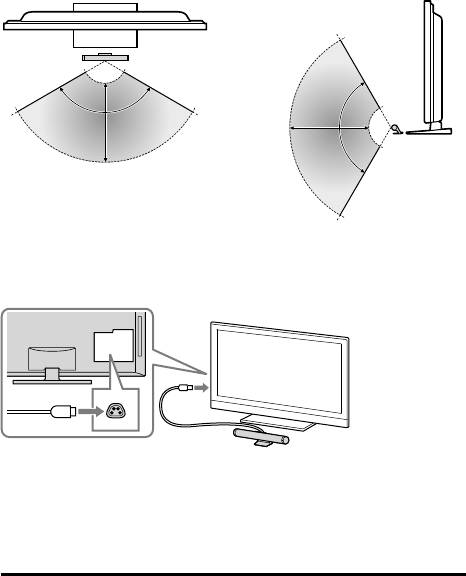
3D Sync Transmitter and 3D Glasses Communication
Range
Attach the 3D Sync Transmitter in front of the TV and ensure that there are no
obstacles between the 3D Sync Transmitter and the 3D Glasses.
Overhead view Side view
120˚
1 m ~ 6 m
typical
1 m ~ 6 m
120˚
typical
Connections
Turn off the TV and connect the 3D Sync Transmitter to the 3D SYNC terminal
on your TV.
Turn on the TV and confirm that the 3D menu items appear on the OPTIONS
menu list.
Be sure to turn off the TV once in order for the TV to recognise the 3D Sync
Transmitter.
Refer to TV’s instruction manual for details on how to enjoy 3D viewing.
Troubleshooting
In the event of a problem, refer to the TV’s instruction manual.
7 (GB)
TMR-BR100 4-180-471-26(1)
Top 10 manuals
100.00
NZXT HALE90 1000W99.99
Samsung SM-R38099.97
AEG BSB 18C99.97
Dell 2700W99.97
Smeg KSEC70X99.96
Beurer HDE 4099.96
Pyramida KH 50 v.299.96
MSI CSM-H81M-P3299.96
AEG HR 562799.95
Melissa 640-048