
Sony TDG-BT400A: Overview Steps To turn on and off
Overview Steps To turn on and off: Sony TDG-BT400A
Table of contents
Overview
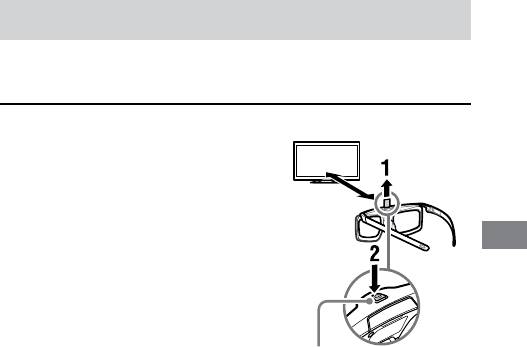
Active 3D glasses needs registration to TV.
When using Active 3D glasses with another TV, re-registration is necessary.
Steps
1 Remove the battery’s
Insulating
insulating sheet before using
sheet
the product for the first time.
2
When using Active 3D Glasses
for the first time, hold the
GB
glasses within a 50 cm range of
the TV and turn on the TV and
hold the
(Power) button/
indicator for 2 seconds. The
Active 3D Glasses turn on and
registration starts
(Power)
(The
(Power) button/
button / indicator
indicator blinks green and
yellow). When registration is
finished, a message appears in
the bottom right of the screen
for 5 seconds, and the indicator
will light up green for
3 seconds. This process is only
required one time.
If registration fails, the Active
3D Glasses will turn off
automatically. In this case,
repeat the above.
To turn on and off
To turn on : Press once the power button.
To turn off : Hold the power button down for 2 seconds.
GB
5
