
Sony SU-46NX1: 6 Attach the Neck Cover to the Step 3: Neck. Safety measures to prevent toppling over 7 Attach the Rear Cover to the TV Stand.
6 Attach the Neck Cover to the Step 3: Neck. Safety measures to prevent toppling over 7 Attach the Rear Cover to the TV Stand.: Sony SU-46NX1
Table of contents
- On Safety WARNING CAUTION
- CAUTION
- Step 2: Installing the TV Step 1: Checking the parts 1 Hold the TV at the specified point when moving the TV.
- 2 Install the TV onto the TV Stand. 4 Attach the Bottom Cover to the 5 Secure the TV and the TV Stand with the Angle Adjustment Screw 3 Secure the TV and the TV Stand (PSW5 × 10) silver (supplied). with the four TV Neck
- 6 Attach the Neck Cover to the Step 3: Neck. Safety measures to prevent toppling over 7 Attach the Rear Cover to the TV Stand.
- Specifications Adjusting the viewing angle of the TV 1 2
- 3 4
6
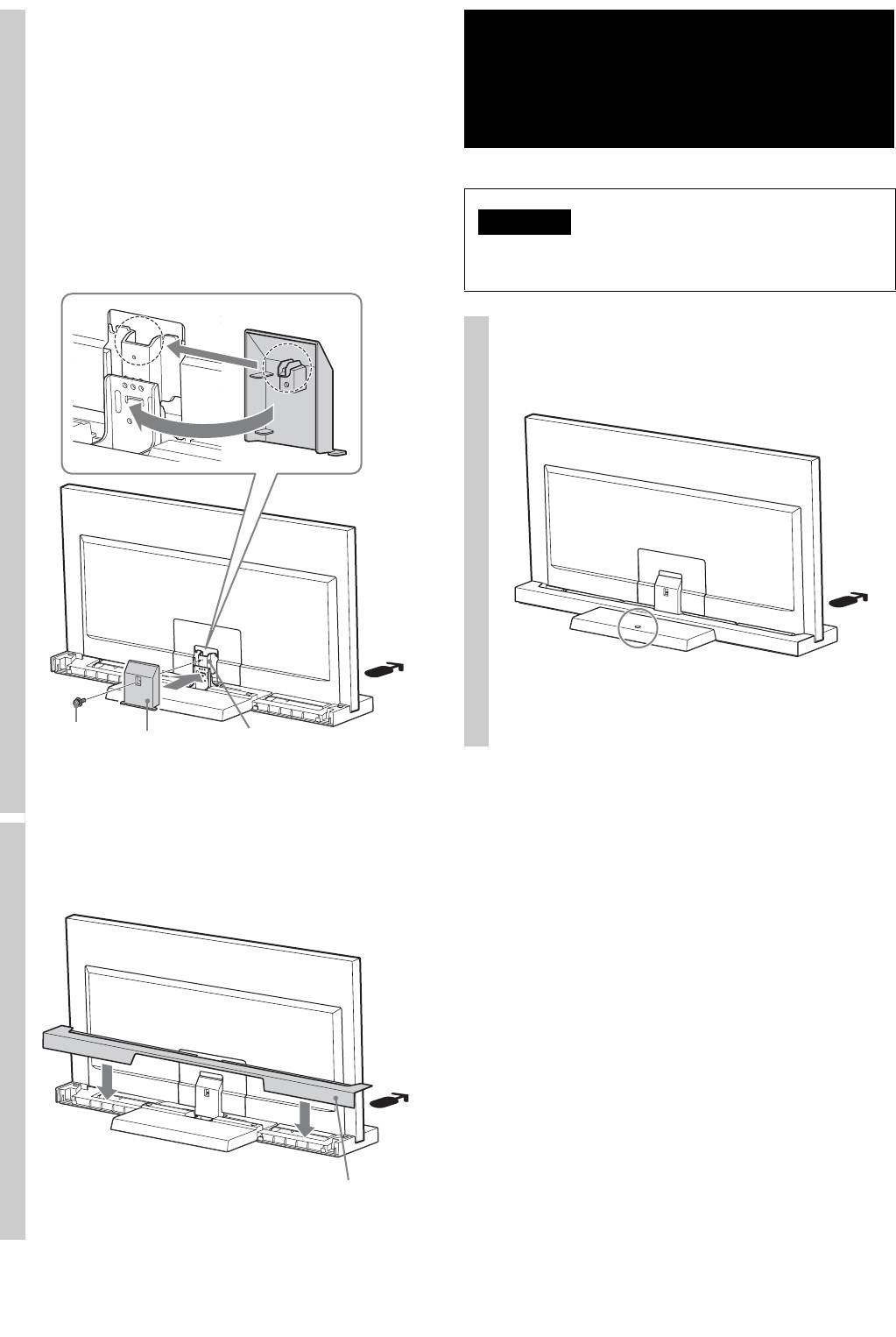
Attach the Neck Cover to the
Step 3:
Neck.
Safety measures to
Align the Neck Cover with the Neck and slide it down
as shown in the illustration below. Secure the Neck
prevent toppling over
Cover and Neck with the Neck Cover Screw (PSW5 ×
16) black (supplied).
If you want to adjust the viewing angle of the TV,
adjust the angle before attaching the Neck Cover. Refer
WARNING
to Step 2 of “Adjusting the viewing angle of the TV” on
Be sure to take measures to prevent the TV Stand from
page 7.
toppling over, and causing possible injury and damage.
There is a hole to allow you to take measures to prevent
the TV Stand from toppling over, as shown in the
illustration below.
For details on the procedure, refer to the instruction
manual supplied with the TV.
Neck Cover
Neck
Screw
Neck Cover
(PSW5 × 16)
black
7
Attach the Rear Cover to the TV
Stand.
Rear Cover
6 (GB)
