
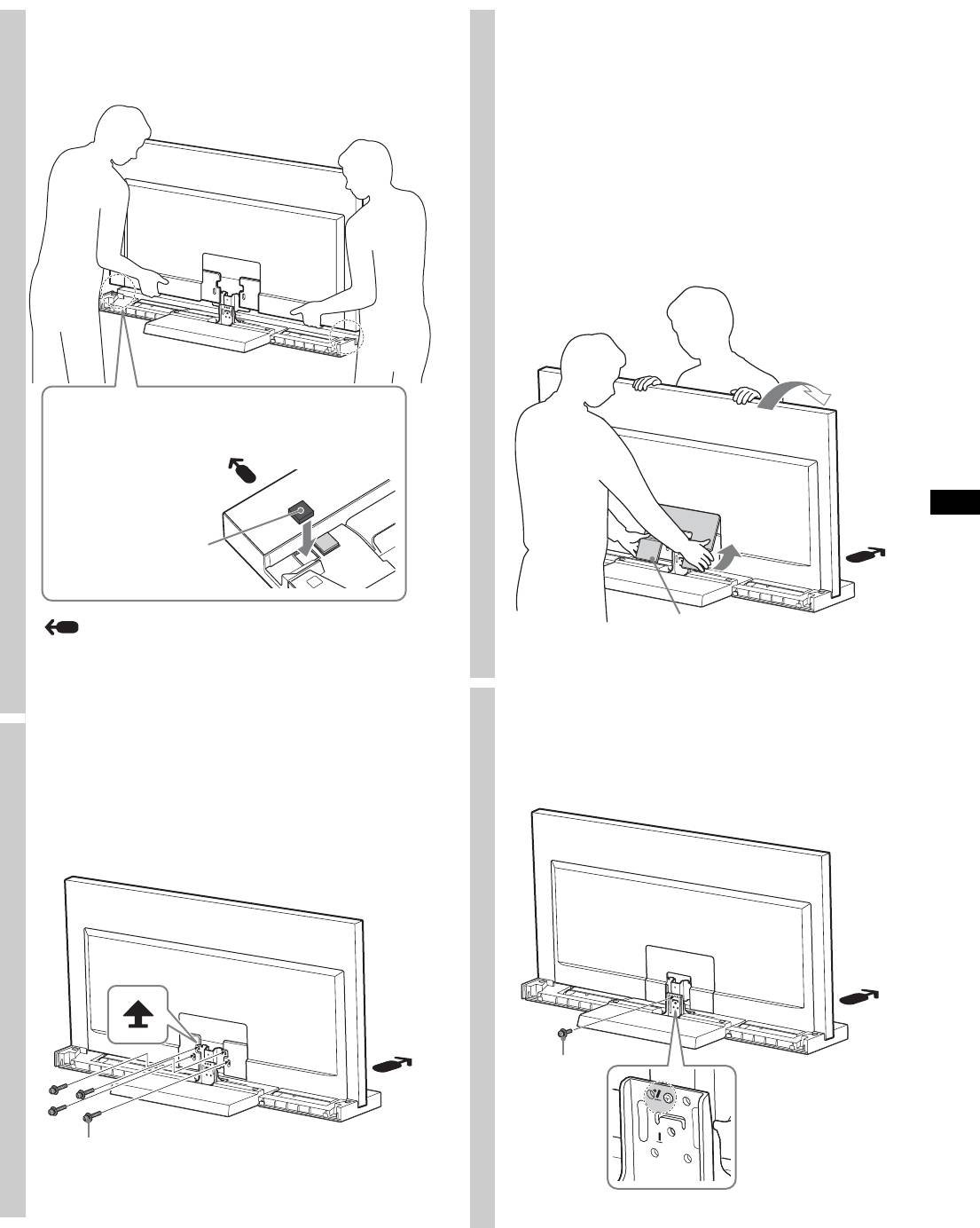
Sony SU-46NX1: 2 Install the TV onto the TV Stand. 4 Attach the Bottom Cover to the 5 Secure the TV and the TV Stand with the Angle Adjustment Screw 3 Secure the TV and the TV Stand (PSW5 × 10) silver (supplied). with the four TV Neck
2 Install the TV onto the TV Stand. 4 Attach the Bottom Cover to the 5 Secure the TV and the TV Stand with the Angle Adjustment Screw 3 Secure the TV and the TV Stand (PSW5 × 10) silver (supplied). with the four TV Neck: Sony SU-46NX1
Table of contents
- On Safety WARNING CAUTION
- CAUTION
- Step 2: Installing the TV Step 1: Checking the parts 1 Hold the TV at the specified point when moving the TV.
- 2 Install the TV onto the TV Stand. 4 Attach the Bottom Cover to the 5 Secure the TV and the TV Stand with the Angle Adjustment Screw 3 Secure the TV and the TV Stand (PSW5 × 10) silver (supplied). with the four TV Neck
- 6 Attach the Neck Cover to the Step 3: Neck. Safety measures to prevent toppling over 7 Attach the Rear Cover to the TV Stand.
- Specifications Adjusting the viewing angle of the TV 1 2
- 3 4
2
Install the TV onto the TV Stand.
4
Attach the Bottom Cover to the
The TV is installed by placing it in the groove of the
TV set.
TV Stand.
(KDL-40NX80s/KDL-46NX80s/
KDL-52NX80s only)
1 Before attaching the Bottom Cover, connect the AC
power cord.
For details on the procedure, refer to the instruction
manuals supplied with the TV.
2 When attaching the Bottom Cover, tilt the TV
forward, and then after attaching, tilt the TV back.
For KDL-40NX80s/KDL-46NX80s/KDL-52NX80s
Attach the TV Support Pads to both sides of the TV Stand.
(The TV Support Pads have double-faced tape on the
downside.)
TV Support Pad
Arrow direction shows front of the TV Stand.
Bottom cover
~
• Be careful not to pinch your fingers when installing the TV.
5
Secure the TV and the TV Stand
with the Angle Adjustment Screw
3
Secure the TV and the TV Stand
(PSW5 × 10) silver (supplied).
with the four TV Neck
Attachment Screws (PSW5 × 16)
black (supplied).
Angle
Adjustment
Screw
(PSW5 × 10)
silver
TV Neck Attachment Screw
(PSW5 × 16) black
(Continued)
5 (GB)
