
Sony MPK-WB: Handling the O-ring 1 Remove the O-ring. 2 Inspect the O-ring.
Handling the O-ring 1 Remove the O-ring. 2 Inspect the O-ring.: Sony MPK-WB
Table of contents
- What is the O-ring?
- Handling the O-ring 1 Remove the O-ring. 2 Inspect the O-ring.
- 3 Inspect the O-ring groove. 4 Inspect the contact surface on the other side of the O-ring in the same way. 5 Apply the special grease supplied to the O-ring. 6 Fit the O-ring into the groove of the Marine Pack.
- Handling the O-ring (continued)
Handling the O-ring
Fit the O-ring
Avoid fitting the O-ring in dusty or sandy locations.
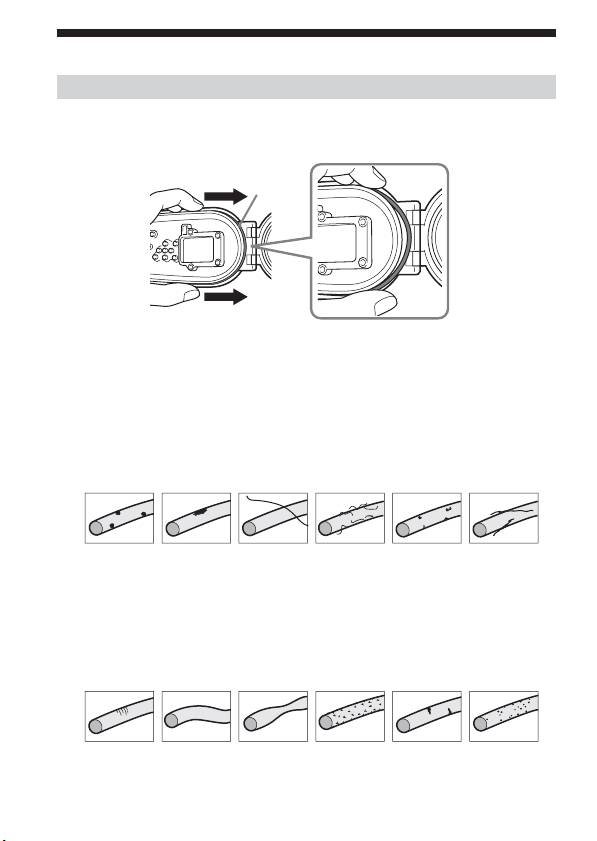
1 Remove the O-ring.
O-ring
To remove the O-ring, press it lightly and slide it in the direction of the
arrow as illustrated. The O-ring has enough slack to be able to be removed
easily. Be careful not to scratch the O-ring with your fingernail.
2 Inspect the O-ring.
• Check carefully for the following. If found, wipe off with a soft cloth or
tissue paper.
– Is there any dirt, sand, hair, dust, salt, thread scraps, etc. on the O-ring?
– Is there any old grease on the O-ring?
v Dirt v Sand v Hair v Dust v Salt
v Thread
scraps
• Lightly run your fingertip around the O-ring to check for any invisible
dirt.
• Be careful not to leave any cloth or tissue paper fibers on the O-ring after
wiping it.
• Check the O-ring for cracks, skewing, distortion, fine splitting, scratches,
sand inclusion, etc. Replace the O-ring if it is cracked or scratched.
v Cracks
v
Skewing
v
Distortion
v Fine
v Scratches
v Sand
Splitting
inclusion
2-GB
