
Sony DEV-5: Using the product
Using the product: Sony DEV-5
Table of contents
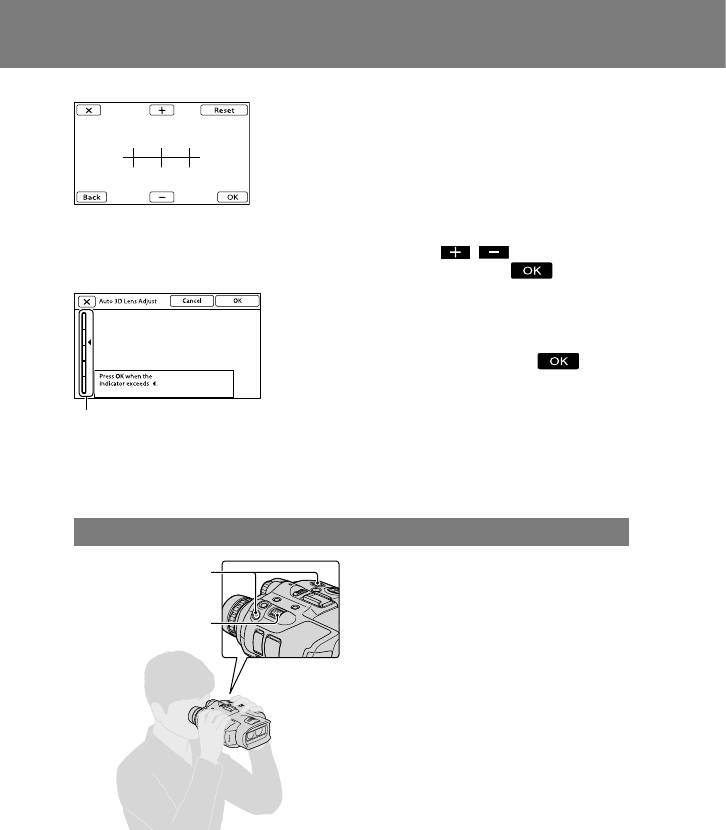
Adjust the relative vertical position
of the right and left viewfinder.
Make sure that the horizontal line
overlaps the vertical lines.
If the horizontal line and the vertical
lines do not overlap, adjust the
position of the horizontal line by
selecting / until the lines
overlap, then select .
Select [Run] and adjust the 3D lens.
Display a subject on the screen.
When the scale shows a level higher
than the mark, select .
The scale shows a higher level when
bright subjects such as objects outdoors
in daylight or subjects with various
Scale
colors and shapes are displayed on the
[Auto 3D Lens Adjust] screen.
Refer to the operating guide or Digital Recording Binoculars Handbook for details.
Using the product
Hold this product with both hands and
START/STOP button
aim it at the subject.
You can magnify images with the power
Power zoom lever
zoom lever of this product.
This product adjusts the focus automatically
with the auto-focus function (default
setting). You can also adjust the focus
manually.
You can record a movie by pressing START/
STOP.
Refer to the operating guide or Digital
Recording Binoculars Handbook for details.
ENG
4
