
Sony CDX-C5000RV: Overview of the RDS function Retuning the same programme automatically Displaying the station name
Overview of the RDS function Retuning the same programme automatically Displaying the station name: Sony CDX-C5000RV
Table of contents
- Welcome ! Precautions
- Notes on CDs
- Table of Contents
- Location of controls
- Location of controls
- Resetting the unit Detaching the front panel
- Turning the unit on/off Setting the clock How to use the menu
- Listening to a CD
- Locating a specific track Locating a specific point in a track Automatically scrolling a disc name Locating a disc
- Playing tracks repeatedly Playing tracks in random order — Shuffle Play
- Labelling a CD — Disc Memo (For
- Locating a disc by name
- Selecting specific tracks for playback
- Memorising only the desired stations Memorising stations automatically
- Receiving the memorised stations
- Overview of the RDS function Retuning the same programme automatically Displaying the station name
- Listening to traffic announcements
- Presetting the RDS stations with the AF and TA data
- Locating a station by programme type
- Setting the clock automatically Labelling the rotary commander (optional)
- Using the rotary commander (optional)
- Adjusting the sound characteristics
- Attenuating the sound Changing the sound and display settings
- Boosting the bass sound Maintenance
- Dismounting the unit
- Specifications
- Troubleshooting guide General CD/MD playback
- Radio reception RDS
- Error displays (when an optional CD/MD unit is connected)
Tip
The Motion Display mode can be turned off. (See
“Changing the sound and display settings” on
RDS
page 24.)
Note
“NO NAME” appears if the received station does
not transmit RDS data.
Overview of the RDS
function
Radio Data System (RDS) is a broadcasting
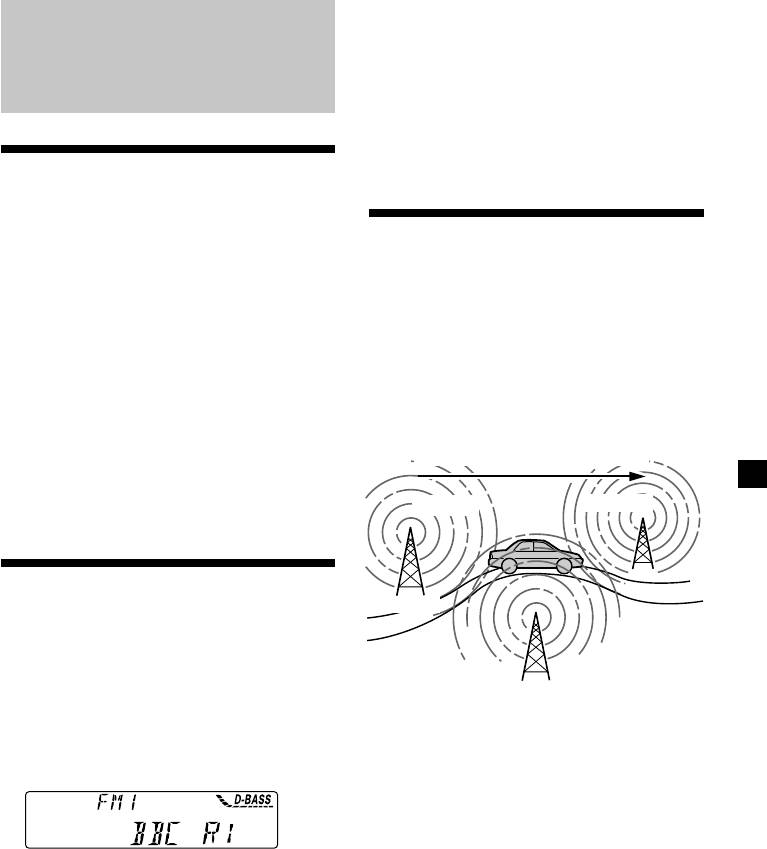
Retuning the same
service that allows FM stations to send
programme automatically
additional digital information along with the
regular radio programme signal. Your car
— Alternative Frequencies (AF)
stereo offers you a variety of services. Here are
The Alternative Frequencies (AF) function
just a few: retuning the same programme
automatically selects and retunes the station
automatically, listening to traffic
with the strongest signal in a network. By
announcements, and locating a station by
using this function, you can continuously
programme type.
listen to the same programme during a long-
Notes
distance drive without having to retune the
• Depending on the country or region, not all of
station manually.
the RDS functions are available.
Frequencies change automatically.
• RDS may not work properly if the signal strength
is weak or if the station you are tuned to is not
transmitting RDS data.
98.5MHz
96.0MHz
Displaying the station
Station
name
The name of the current station lights up in the
102.5MHz
display.
Select an FM station (page 16).
1 Select an FM station (page 16).
When you tune in an FM station that
transmits RDS data, the station name
2 Press (AF) repeatedly until “AF-ON”
appears in the display.
appears.
The unit starts searching for an alternative
station with a stronger signal in the same
network.
Note
The “*” indication means that an RDS station is
being received.
Changing the displayed item
Each time you press (DSPL/PTY), the item
changes as follows:
Station Name (Frequency) y PTY data
After you select the desired item, the display
will automatically change to the Motion
Display mode after a few seconds.
In the Motion Display mode, all the items are
scrolled in the display one by one in order.
17
