
Sony CDX-C5000RV: Location of controls
Location of controls: Sony CDX-C5000RV
Table of contents
- Welcome ! Precautions
- Notes on CDs
- Table of Contents
- Location of controls
- Location of controls
- Resetting the unit Detaching the front panel
- Turning the unit on/off Setting the clock How to use the menu
- Listening to a CD
- Locating a specific track Locating a specific point in a track Automatically scrolling a disc name Locating a disc
- Playing tracks repeatedly Playing tracks in random order — Shuffle Play
- Labelling a CD — Disc Memo (For
- Locating a disc by name
- Selecting specific tracks for playback
- Memorising only the desired stations Memorising stations automatically
- Receiving the memorised stations
- Overview of the RDS function Retuning the same programme automatically Displaying the station name
- Listening to traffic announcements
- Presetting the RDS stations with the AF and TA data
- Locating a station by programme type
- Setting the clock automatically Labelling the rotary commander (optional)
- Using the rotary commander (optional)
- Adjusting the sound characteristics
- Attenuating the sound Changing the sound and display settings
- Boosting the bass sound Maintenance
- Dismounting the unit
- Specifications
- Troubleshooting guide General CD/MD playback
- Radio reception RDS
- Error displays (when an optional CD/MD unit is connected)
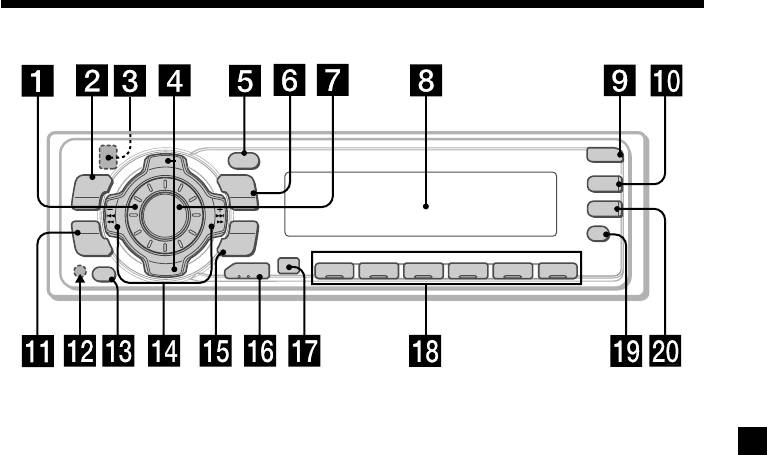
Location of controls
PTY
OPEN
D
I
S
C
+
-
P
DSPL
R
S
T
+
MENU
LIST
D-BASS
TA
SOURCE
-
SEEK/AMS
AF
SOUND
ENTER
P
R
S
REP SHUF
T
-
-
D
I
S
C
–
MODE
OFF
1 2 3 4 56
CDX-C5000RX/C5000RV
/C5000R/C4900R
Refer to the pages listed for details.
1 Volume control dial 19
qf SEEK/AMS –/+ (cursor left/right) buttons
8, 10, 12, 14, 15, 16, 18, 19, 21, 23, 24
2 MENU button 8, 10, 12, 13, 14, 15, 16,
Automatic Music Sensor 10, 14
18, 19, 21, 24
Manual Search 10
3
Z (eject) button (located on the front
Seek 15, 16, 18
side of the unit behind the front panel)
9
qg ENTER button 8, 10, 12, 13, 14, 15, 16,
18, 19, 20, 21, 24
4 DISC/PRST +/– (cursor up/down) buttons
8, 10, 12, 13, 14, 15, 16, 18, 19, 20, 21, 24
qh MODE button 19
During CD or MD playback:
During CD/MD playback:
CD/MD unit select 9, 13
Disc change 10, 13
During radio reception:
During radio reception:
BAND select 15, 16
Preset stations select 16
qj Receptor for the card remote
5 DSPL/PTY (display mode change/
commander
programme type) button 9, 10, 12, 17,
20
qk Number buttons
During radio reception:
6 LIST button 12
Preset number select 15, 16, 18, 19
List-up 13
During CD/MD playback:
7 SOURCE (TUNER/CD) button
(1) REP 11
8, 9, 10, 13, 15, 16, 19
(2) SHUF 11
8 Display window
ql AF button 17, 18, 19
9 OPEN button 7, 9, 26
w; TA button 18, 19
q; D-BASS button 25
* Warning when installing in a car
qa SOUND button 23
without ACC (accessory) position on
qs Reset button (located on the front side
the ignition key switch
of the unit behind the front panel) 7
Be sure to press (OFF) on the unit for two
seconds to turn off the clock display after
qd OFF button* 7, 8, 9
turning off the engine.
When you press (OFF) only momentarily,
the clock display does not turn off and this
causes battery wear.
5
