
Sony CDX-C4900R: Getting Started Resetting the unit Detaching the front panel
Getting Started Resetting the unit Detaching the front panel: Sony CDX-C4900R
Table of contents
- Welcome ! Precautions
- Notes on CDs
- Table of Contents
- Location of controls
- Location of controls
- Getting Started Resetting the unit Detaching the front panel
- Turning the unit on/off Setting the clock How to use the menu
- CD Player CD/MD Unit (optional) Listening to a CD
- Locating a specific track Locating a specific point in a track Automatically scrolling a disc name
- Playing tracks repeatedly Playing tracks in random order — Shuffle Play
- Labelling a CD — Disc Memo (For
- Locating a disc by name
- Selecting specific tracks for playback
- Memorising only the desired stations Memorising stations automatically
- Receiving the memorised stations
- Overview of the RDS function Retuning the same programme automatically Displaying the station name
- Listening to traffic announcements
- Presetting the RDS stations with the AF and TA data
- Locating a station by programme type
- Setting the clock Other Functions Labelling the rotary commander (optional)
- Using the rotary commander (optional)
- Adjusting the sound characteristics
- Attenuating the sound Changing the sound and display settings
- Boosting the bass sound Maintenance
- Cleaning the connectors Dismounting the unit
- Specifications
- Troubleshooting guide General CD/MD playback
- Radio reception RDS
- Error displays (when an optional CD/MD unit is connected)
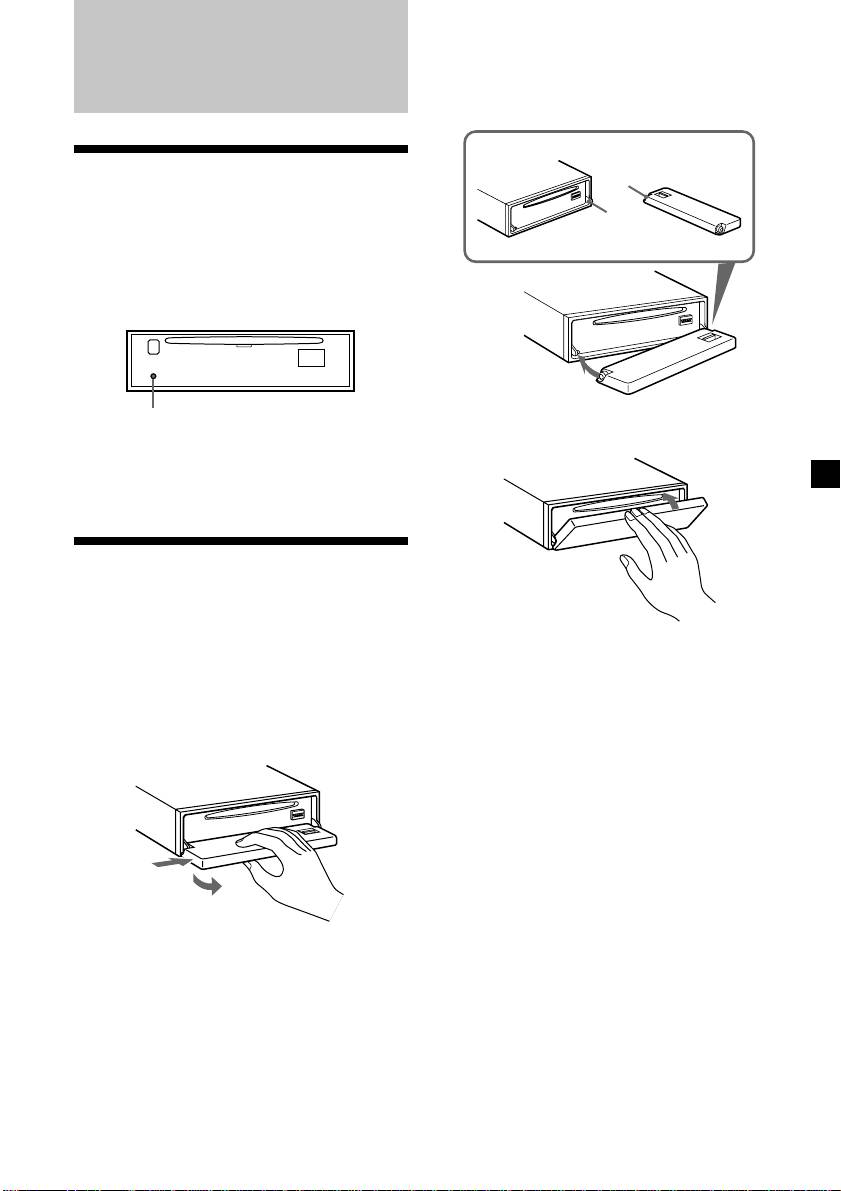
Attaching the front panel
Place the hole A in the front panel onto the
spindle B on the unit as illustrated, then push
Getting Started
the left side in.
Resetting the unit
A
Before operating the unit for the first time or
B
after replacing the car battery, you must reset
the unit.
Remove the front panel and press the reset
button with a pointed object, such as a ball-
point pen.
Reset button
x
Note
Pressing the reset button will erase the clock
setting and some memorised functions.
Detaching the front panel
You can detach the front panel of this unit to
protect the unit from being stolen.
Notes
• Be careful not to attach the front panel upside
1 Press (OFF).
down.
• Do not press the front panel too hard against the
2 Press (OPEN), then slide the front panel
unit when attaching it.
to the right side, and pull out the left
• Do not press too hard or put excessive pressure
on the display window of the front panel.
side of the front panel.
• Do not expose the front panel to direct sunlight
or heat sources such as hot air ducts, and do not
leave it in a humid place. Never leave it on the
dashboard of a car parked in direct sunlight or
where there may be a considerable rise in
temperature.
1
Caution alarm
2
If you turn the ignition key switch to the OFF
position without removing the front panel, the
caution alarm will beep for a few seconds.
Notes
If you connect an optional power amplifier and
• Do not put anything on the inner surface of the
do not use the built-in amplifier, the beep
front panel.
sound will be deactivated.
• Be sure not to drop the panel when detaching it
from the unit.
• If you detach the panel while the unit is still
turned on, the power will turn off automatically
to prevent the speakers from being damaged.
• When carrying the front panel with you, use the
supplied front panel case.
7

