
Sony CDX-4000RV: Listening to a CD
Listening to a CD: Sony CDX-4000RV
Table of contents
- Welcome ! Precautions
- Notes on CDs
- Table of Contents
- Location of controls
- Resetting the unit Detaching the front panel
- Turning the unit on/off Setting the clock How to use the menu
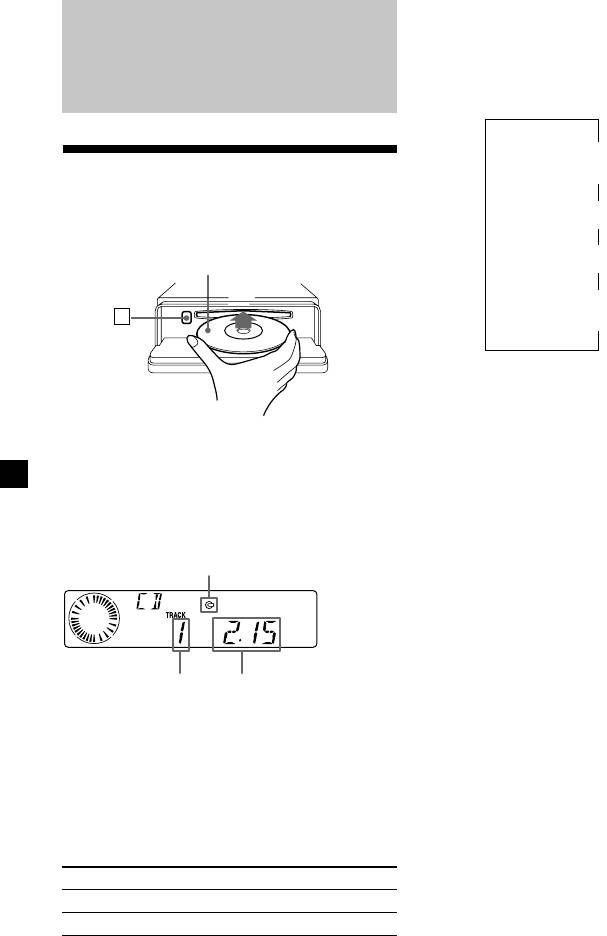
- Listening to a CD
- Automatically scrolling a disc name Locating a specific track Locating a specific point in a track
- Playing a CD in various modes Memorising stations automatically
- Receiving the memorised stations Memorising only the desired stations
- Overview of the RDS function Displaying the station name
- Retuning the same programme automatically
- Listening to traffic announcements
- Presetting the RDS stations with the AF and TA data
- Locating a station by programme type
- Setting the clock automatically Labelling the rotary commander (optional)
- Using the rotary commander (optional)
- Adjusting the sound characteristics
- Attenuating the sound Changing the sound and display settings
- Boosting the bass sound Maintenance
- Dismounting the unit
- Specifications
- Troubleshooting guide General CD playback
- Radio reception RDS
Changing the display item
Each time you press (DSPL/PTY) during CD
TEXT disc playback, the item changes as
CD Player
follows:
V
Track number/
Elapsed playback time
Listening to a CD
(with this unit only)
V
1
Disc name/Artist name*
1 Press (OPEN) and insert the CD.
V
2
Track name*
Labelled side up
V
FM1 frequency or
Z
3
station name*
*
1
If you play a CD TEXT disc, the artist name
appears in the display after the disc name. (Only
for CD TEXT discs with the artist name.)
*
2
If the track name of a CD TEXT disc is not
prerecorded, “TRACK“ and “NO NAME” appear
2 Close the front panel.
in the display.
Playback starts automatically.
*
3
While the AF/TA function is activated.
If a CD is already inserted, press (SOURCE)
After you select the desired item, the display
repeatedly until “CD” appears to start
will automatically change to the Motion
playback.
Display mode after a few seconds.
In the Motion Display mode, all the items are
CD indication
scrolled in the display one by one in order.
Tip
The Motion Display mode can be turned off. (See
“Changing the sound and display settings” on
page 20).
Elapsed playing timeTrack number
When the last track on the CD is
over
The track number indication returns to “1,”
and playback restarts from the first track of the
CD.
To Press
Stop playback (OFF)
Eject the CD (OPEN) then Z
8
