
Sony KDL-46W905A: Troubleshooting
Troubleshooting: Sony KDL-46W905A
Table of contents
The “Parental Lock” password has
Troubleshooting
been forgotten.
Enter 9999 for the PIN code. (PIN code 9999 is
When the illumination LED is flashing
always accepted.)
in red, count how many times it
flashes (interval time is three
seconds).
The TV surrounds become warm.
Press "/1 on the TV to turn it off, disconnect
When the TV is used for an extended period, the
the AC power cord (mains lead), and inform
TV surrounds become warm.
your dealer or Sony service centre of how the
You may feel hot when touching there by the
indicator flashes (number of flashes).
hand.
GB
When the illumination LED is not
flashing, check the items in the tables
Frozen audio or video, a blank screen,
as follows.
or the TV does not respond to TV or
Also refer to “Troubleshooting” in the
remote buttons.
i-Manual. If the problem persists, have your
Perform a simple reset of the TV by unplugging
TV serviced by qualified service personnel.
the AC power cord for two minutes, then plug it
in again.
There is no picture (screen is dark) and
no sound.
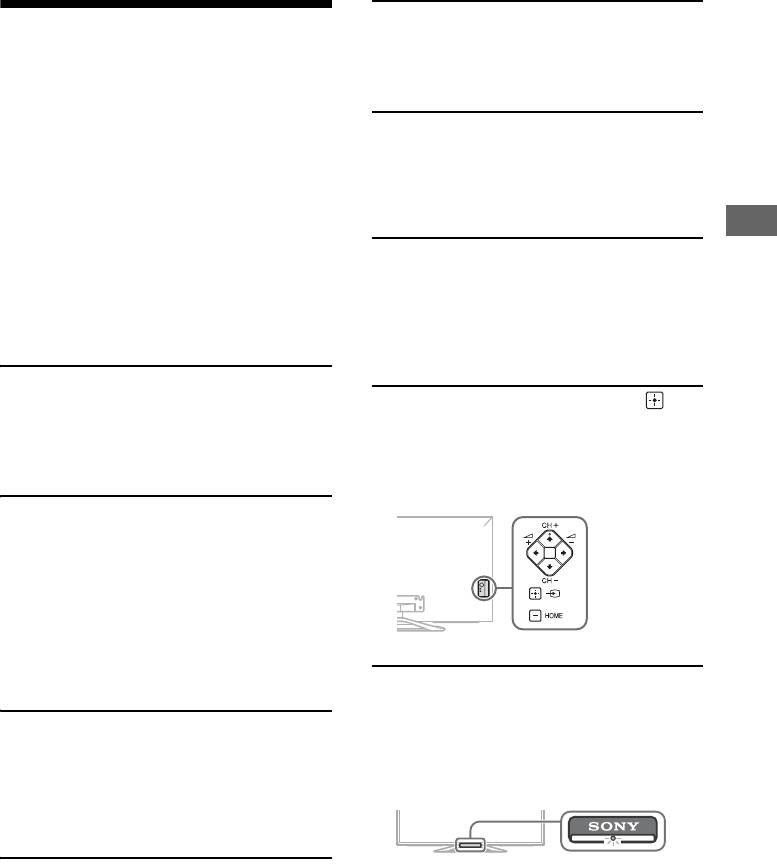
The CH+/–, +/–, ///, , and
Check the antenna (aerial)/cable connection.
HOME buttons cannot be located on
Connect the TV to the AC power (mains), and
the TV.
press "/1 on the TV or remote.
See below illustration for location of the buttons
on the TV.
Some programmes cannot be tuned.
Check the antenna (aerial) or dish.
The satellite cable might be short-circuited or
there might be connection problems of the
cable. Check the cable connection and then turn
the TV off with the Mains power On/Off switch,
and turn it on again.
The frequency that you entered is out of range.
Consult the received satellite broadcasting
company.
The illumination LED is turned on.
If you do not wish to light up the illumination
LED, you can turn it off.
There is no Cable TV services
Press HOME, then select “Settings” t “System
(programmes) found.
Settings” t “General Set-up” t “Illumination
Check the cable connection or tuning
LED” t “Off”. You can also press OPTIONS,
configuration.
then select “Illumination LED” t “Off”.
Attempt the “Digital Auto Tuning” by selecting
“Antenna” instead of “Cable”.
The remote does not function.
Replace the batteries.
Your TV may be in SYNC mode.
Press SYNC MENU, select “TV Control” and then
select “Home (Menu)” or “Options” to control
the TV.
GB
3
Rear of TV
