
Dell AXIM X3: Installing and Removing the Battery
Installing and Removing the Battery: Dell AXIM X3
Table of contents
- System Information Guide
- Notes, Notices, and Cautions
- Contents
- 4 Contents
- CAUTION: Safety Instructions General
- Power Battery
- Air Travel EMC Instructions
- Ergonomic Computing Habits Protecting Against Electrostatic Discharge
- Finding Information What Are You Looking For? Find It Here: Setting Up Your Device
- Front, Side, and Back Views Front and Side Views
- Back View Using the Battery
- Installing and Removing the Battery
- Charging the Battery
- Connecting to a Computer Using the Cradle You can use the cradle to: To connect your device to the cradle: Place the cradle on a flat, level surface near your computer. Connect the cradle cable to the USB connector on your computer.
- Connect the AC adapter to the cradle and to an electrical outlet.
- Align the connector on the bottom of the device with the connector on the cradle, and, keeping the front of the device flush with the front of the cradle, lower the device onto the cradle.
- Using the Sync Cable Using Secure Digital Memory Cards
- Performing a Reset Soft Reset
- Hard Reset
- Regulatory Notices
Installing and Removing the Battery
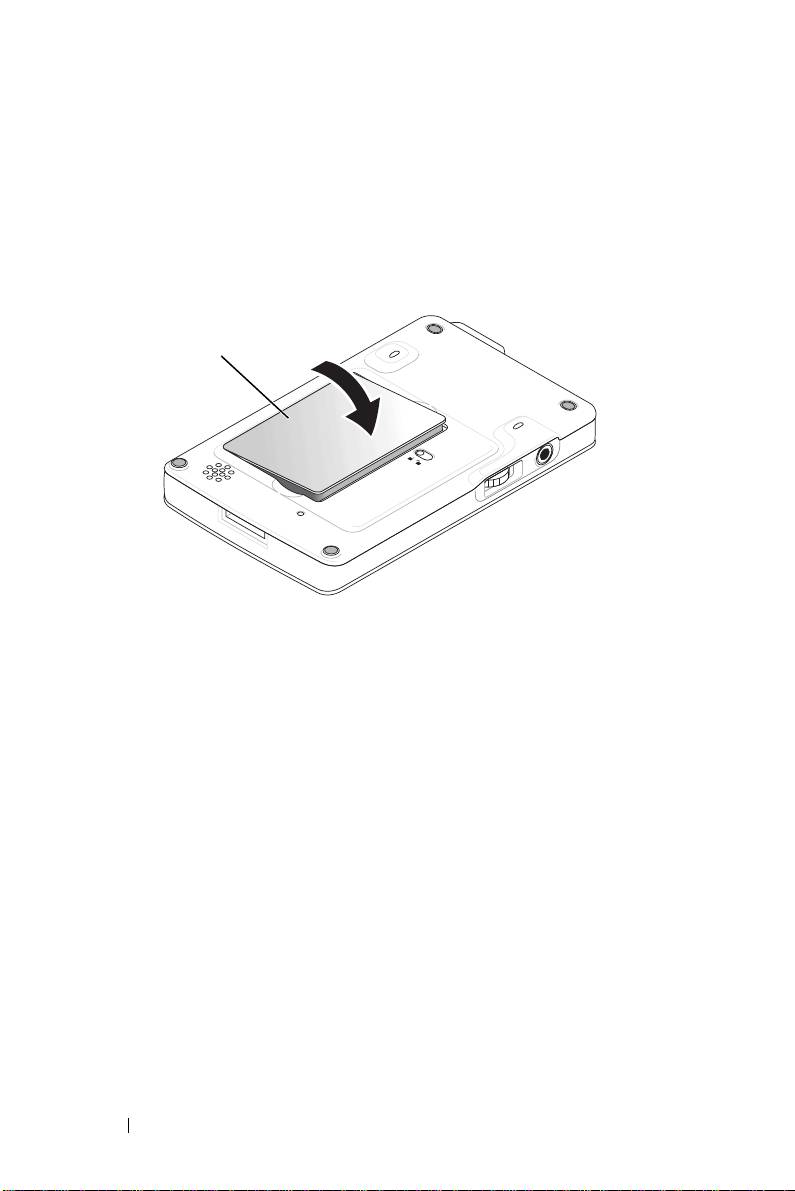
To install the battery:
1
Ensure that the device is turned off.
2
Insert the left side of the battery into the battery slot at an angle, and
lower the right side into the slot until it clicks.
battery
www.dell.com | support.euro.dell.com
To remove the battery:
1
Insert the tip of the stylus into the battery lock.
2
Slide and hold the lock in the unlock position.
3
Lift the battery out of the slot.
12 System Information Guide
Top 10 manuals
100.00
NZXT HALE90 1000W99.99
Samsung SM-R38099.97
AEG BSB 18C99.97
Dell 2700W99.97
Smeg KSEC70X99.96
Beurer HDE 4099.96
Pyramida KH 50 v.299.96
MSI CSM-H81M-P3299.96
AEG HR 562799.95
Melissa 640-048