
Dell Precision 370: The Card Cooling Fan
The Card Cooling Fan: Dell Precision 370
Table of contents
- Notes, Notices, and Cautions Abbreviations and Acronyms
- Contents
- Finding Information and Assistance What Are You Looking For? Find it Here
- What Are You Looking For? Find it Here
- What Are You Looking For? Find it Here
- What Are You Looking For? Find it Here
- Setting Up Your Mini-Tower Computer Connect the keyboard and the mouse. Connect the modem or the network cable.
- Connect the monitor.
- For single- and dual-monitor capable cards with a single connector
- For dual-monitor capable cards with 1 DVI and 1 VGA connector For dual-monitor capable cards with 2 DVI connectors
- Connect the speakers. Connect the power cables and turn on the computer and monitor.
- Install additional software or devices. Congratulations! You have completed the setup for your mini-tower computer. Setting Up Your Desktop Computer Connect the keyboard and the mouse.
- Connect the modem or the network cable. Connect the monitor.
- For single- and dual-monitor capable cards with a single connector
- For dual-monitor capable cards with 1 DVI and 1 VGA connector For dual-monitor capable cards with 2 DVI connectors
- Connect the speakers. Connect the power cables and turn on the computer and monitor. Install additional software or devices.
- Locating Your User’s Guide To access the User’s Guide from your hard drive: To access your User’s Guide from the Dell Support Site:
- Opening Your Mini-Tower Computer
- Quick Reference Guide 21
- The Card Cooling Fan
- Opening Your Desktop Computer
- Caring for Your Computer
- Solving Problems Troubleshooting Tips Resolving Software and Hardware Incompatibilities Windows XP Windows 2000
- Using Microsoft Windows XP System Restore Creating a Restore Point Restoring the Computer to an Earlier Operating State
- Undoing the Last System Restore Enabling System Restore
- Using Last Known Good Configuration Other Options to Help Resolve Additional Device or Software Conflicts Dell Diagnostics When to Use the Dell Diagnostics
- Starting the Dell Diagnostics From Your Hard Drive Starting the Dell Diagnostics From the Drivers and Utilities CD
- Before You Start Testing Beep Codes Code Cause
- Code Cause Diagnostic Lights
- Light Pattern Problem Description Suggested Resolution
- Light Pattern Problem Description Suggested Resolution
- Light Pattern Problem Description Suggested Resolution
- Light Pattern Problem Description Suggested Resolution
- Frequently Asked Questions How Do I... Solution Where to Find Additional Information
- How Do I... Solution Where to Find Additional Information
- Index
- 40 Index
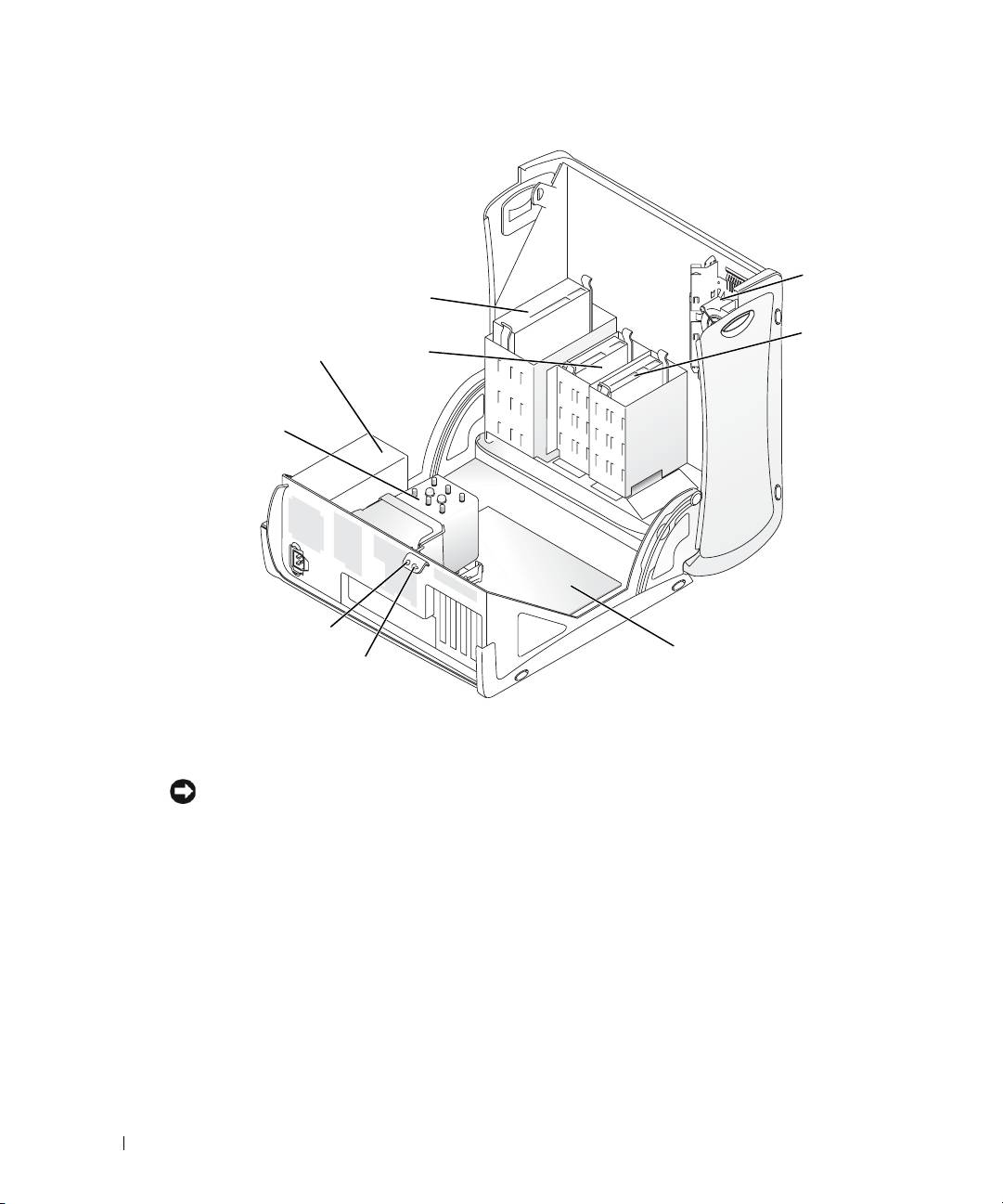
card fan
CD/DVD drive
floppy drive
hard drive
(optional)
power supply
processor
www.dell.com | support.dell.com
airflow shroud
and fan
security cable slot
system board
padlock ring
The Card Cooling Fan
NOTICE: PCI Express graphics cards that run higher than 75 watts (W) require an additional cooling fan
installed. Otherwise, your card could overheat and damage your computer.
If you ordered your computer with a graphics card that requires the fan, the fan is included. If a
card fan is not present in your computer and you are installing a graphics card that runs higher than
75 W, contact Dell to purchase a card fan.
If the computer detects that you have installed a card that requires a fan, an error message appears.
For Dell contact information, see your
User's Guide
or go to
support.dell.com
and click
Contact Us
.
22 Quick Reference Guide
