
Dell Precision 370: Light Pattern Problem Description Suggested Resolution
Light Pattern Problem Description Suggested Resolution: Dell Precision 370
Table of contents
- Notes, Notices, and Cautions Abbreviations and Acronyms
- Contents
- Finding Information and Assistance What Are You Looking For? Find it Here
- What Are You Looking For? Find it Here
- What Are You Looking For? Find it Here
- What Are You Looking For? Find it Here
- Setting Up Your Mini-Tower Computer Connect the keyboard and the mouse. Connect the modem or the network cable.
- Connect the monitor.
- For single- and dual-monitor capable cards with a single connector
- For dual-monitor capable cards with 1 DVI and 1 VGA connector For dual-monitor capable cards with 2 DVI connectors
- Connect the speakers. Connect the power cables and turn on the computer and monitor.
- Install additional software or devices. Congratulations! You have completed the setup for your mini-tower computer. Setting Up Your Desktop Computer Connect the keyboard and the mouse.
- Connect the modem or the network cable. Connect the monitor.
- For single- and dual-monitor capable cards with a single connector
- For dual-monitor capable cards with 1 DVI and 1 VGA connector For dual-monitor capable cards with 2 DVI connectors
- Connect the speakers. Connect the power cables and turn on the computer and monitor. Install additional software or devices.
- Locating Your User’s Guide To access the User’s Guide from your hard drive: To access your User’s Guide from the Dell Support Site:
- Opening Your Mini-Tower Computer
- Quick Reference Guide 21
- The Card Cooling Fan
- Opening Your Desktop Computer
- Caring for Your Computer
- Solving Problems Troubleshooting Tips Resolving Software and Hardware Incompatibilities Windows XP Windows 2000
- Using Microsoft Windows XP System Restore Creating a Restore Point Restoring the Computer to an Earlier Operating State
- Undoing the Last System Restore Enabling System Restore
- Using Last Known Good Configuration Other Options to Help Resolve Additional Device or Software Conflicts Dell Diagnostics When to Use the Dell Diagnostics
- Starting the Dell Diagnostics From Your Hard Drive Starting the Dell Diagnostics From the Drivers and Utilities CD
- Before You Start Testing Beep Codes Code Cause
- Code Cause Diagnostic Lights
- Light Pattern Problem Description Suggested Resolution
- Light Pattern Problem Description Suggested Resolution
- Light Pattern Problem Description Suggested Resolution
- Light Pattern Problem Description Suggested Resolution
- Frequently Asked Questions How Do I... Solution Where to Find Additional Information
- How Do I... Solution Where to Find Additional Information
- Index
- 40 Index
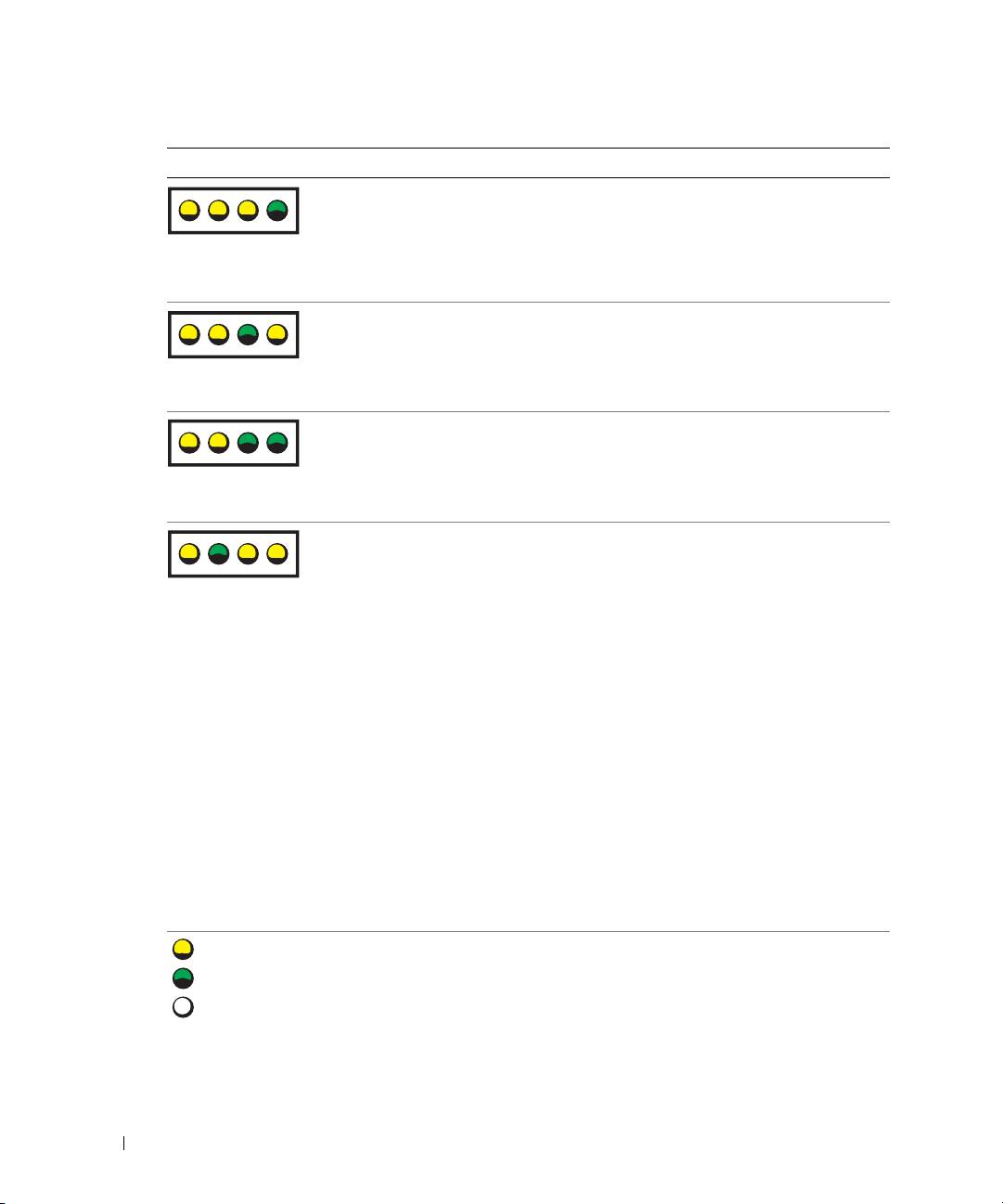
Light Pattern Problem Description Suggested Resolution
A possible BIOS failure has occurred; the
Run the BIOS Recovery utility, wait for
computer is in the recovery mode.
recovery completion, and then restart
the computer.
ABCD
A possible processor failure has occurred. Reinstall the processor and restart the
computer. For more information on
reinstalling the processor, see your
ABCD
User’s Guide.
www.dell.com | support.dell.com
Memory modules are detected, but
1
Reseat the memory modules.
a memory failure has occurred.
2
Restart the computer.
3
Run the Dell Diagnostics.
ABCD
4
If the problem persists, contact Dell.
A possible expansion card failure has
1
Determine if a conflict exists by
occurred.
removing a card (not the graphics
card) and then restarting the
ABCD
computer. For more information
on removing a card, see your
User’s
Guide
.
2
If the problem persists, reinstall the
card that you removed, remove a
different card, and then restart the
computer.
3
Repeat this process for each card.
If the computer starts normally,
troubleshoot the last card you
removed for resource conflicts (see
"Resolving Software and Hardware
Incompatibilities").
4
If the problem persists, contact Dell.
For more information on contacting
Dell, see your
User’s Guide
.
= yellow
= green
= off
32 Quick Reference Guide
