
Sharp PN-80TC3: Turning Power On/Off
Turning Power On/Off: Sharp PN-80TC3
Turning Power On/Off
Caution
ENGLISH
• Turn on the monitor rst before turning on the computer or
playback device.
• To keep the performance of the WHITEBOARD stable, put
the monitor in the Power off (Standby mode) state once a
day.
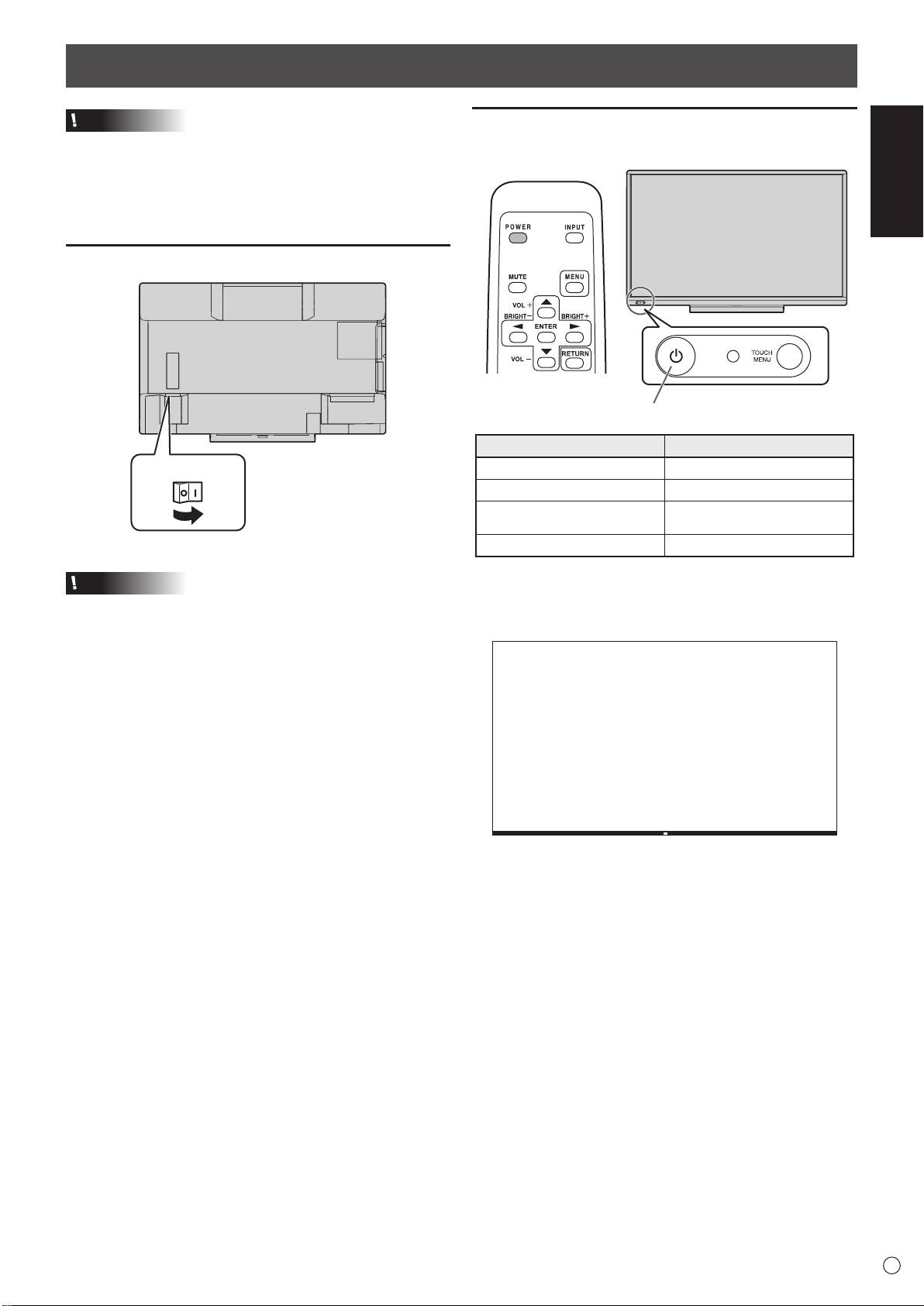
Turning on the main power
7
E
Main power switch
Turning power on
1. Press the POWER button.
The monitor enters the Power off (Standby mode) state.
Caution
• The main power must be turned on/off with the main power
switch. Do not connect/disconnect the power cord or turn
the breaker on/off while the main power switch is on.
• When switching the main power switch or the POWER
button off and back on, always wait for at least 5 seconds.
• For a complete electrical disconnection, pull out the main
plug.
• Before switching off the main power switch, always put the
monitor in the Power off (Standby mode) state. (Hold down
the POWER button until the exit screen appears.)
POWER button / Power LED
Status Status of the monitor
Green lit Power on
Orange lit Power off (Standby mode)
Power off
Orange ashing
(Whiteboard standby mode)
Green ashing Input signal waiting mode
• The WHITEBOARD appears.
(Factory setting. Can be changed in START INPUT MODE
in the SETUP menu.)
Оглавление
- Contents
- SAFETY PRECAUTIONS
- SAFETY PRECAUTIONS (Continued)
- MOUNTING PRECAUTIONS
- Supplied Components
- Connections
- Turning Power On/Off
- Turning Power On/Off (Continued)
- Mounting Precautions (For SHARP dealers and service engineers)
- Table des matières
- PRÉCAUTIONS DE SÉCURITÉ
- PRÉCAUTIONS DE SÉCURITÉ (Suite)
- PRÉCAUTIONS POUR LE MONTAGE
- Composants fournis
- Connexions
- Mise sous tension et hors tension
- Mise sous tension et hors tension (Suite)
- Précautions pour le montage (À l’attention des revendeurs et techniciens SHARP)
- Índice
- PRECAUCIONES DE SEGURIDAD
- PRECAUCIONES DE SEGURIDAD (Continuación)
- PRECAUCIONES DE MONTAJE
- Componentes suministrados
- Conexiones
- Encendido/apagado
- Encendido/apagado (Continuación)
- Precauciones de montaje (para distribuidores y técnicos de servicio de SHARP)
- Inhalt
- SICHERHEITSVORKEHRUNGEN
- SICHERHEITSVORKEHRUNGEN (Fortsetzung)
- WICHTIGE HINWEISE ZUR BEFESTIGUNG
- Mitgelieferte Komponenten
- Anschlüsse
- Ein- und ausschalten
- Ein- und ausschalten (Fortsetzung)
- Содержание
- ПРАВИЛА ТЕХНИКИ БЕЗОПАСНОСТИ
- ПРАВИЛА ТЕХНИКИ БЕЗОПАСНОСТИ (Продолжение)
- МЕРЫ ПРЕДОСТОРОЖНОСТИ ПРИ КРЕПЛЕНИИ
- Комплектные принадлежности Подготовка пульта дистанционного управления и Стилус
- Соединения
- Включение/выключение питания
- Включение/выключение питания (Продолжение)
- Меры предосторожности при креплении (Для дилеров и инженеров по обслуживанию SHARP)
