
Dell Precision 390: Front View (Desktop Orientation) 6 IEEE 1394 connector (optional)
Front View (Desktop Orientation) 6 IEEE 1394 connector (optional): Dell Precision 390
Table of contents
- Notes, Notices, and Cautions Abbreviations and Acronyms
- Contents
- Finding Information What Are You Looking For? Find It Here
- What Are You Looking For? Find It Here
- What Are You Looking For? Find It Here
- What Are You Looking For? Find It Here
- Setting Up Your Computer (Tower Orientation) Connect the keyboard and the mouse. Connect the modem or the network cable.
- Connect the monitor.
- For single- and dual-monitor capable cards with a single connector
- For dual-monitor capable cards with one DVI connector and one VGA connector For dual-monitor capable cards with two DVI connectors
- Connect the speakers. Connect the power cables and turn on the computer and monitor.
- Install additional software or devices. Setting Up Your Computer (Desktop Orientation) Connect the keyboard and the mouse.
- Connect the modem or the network cable. Connect the monitor.
- For single- and dual-monitor capable cards with a single connector
- For dual-monitor capable cards with one DVI connector and one VGA connector For dual-monitor capable cards with two DVI connectors
- Connect the speakers. Connect the power cables and turn on the computer and monitor. Install additional software or devices.
- About Your Computer Front View (Tower Orientation) 1 CD- or DVD-drive activity light
- 14 network link light The network light is on when the computer sends or receives data over a network
- Back View (Tower Orientation)
- Front View (Desktop Orientation) 6 IEEE 1394 connector (optional)
- 13 network link light The network light is on when the computer sends or receives data over a network
- Back View (Desktop Orientation)
- Back-Panel Connectors 3 link integrity light
- 11 keyboard connector If you have a standard keyboard, plug it into the purple keyboard connector.
- Inside View
- Cable Colors System Board Components
- 12 PCI-Express x1 card slot 24 processor connector (CPU) Locating Your User’s Guide
- To access the User’s Guide from your hard drive: To access your User’s Guide from the Dell Support website: Removing the Computer Cover
- Caring for Your Computer
- Solving Problems Troubleshooting Tips Resolving Software and Hardware Incompatibilities Using Microsoft Windows XP System Restore Creating a Restore Point
- Restoring the Computer to an Earlier Operating State Undoing the Last System Restore Enabling System Restore
- Using the Last Known Good Configuration Other Options to Help Resolve Additional Device or Software Conflicts Dell Diagnostics When to Use the Dell Diagnostics
- Starting the Dell Diagnostics From Your Hard Drive Starting the Dell Diagnostics From the Drivers and Utilities CD
- Before You Start Testing Beep Codes Code Cause
- Code Cause Error Messages Diagnostic Lights Light Pattern Problem Description Suggested Resolution
- Light Pattern Problem Description Suggested Resolution
- Light Pattern Problem Description Suggested Resolution
- Light Pattern Problem Description Suggested Resolution
- Light Pattern Problem Description Suggested Resolution
- Light Pattern Problem Description Suggested Resolution Frequently Asked Questions How Do I... Solution Where to Find Additional Information
- How Do I... Solution Where to Find Additional Information
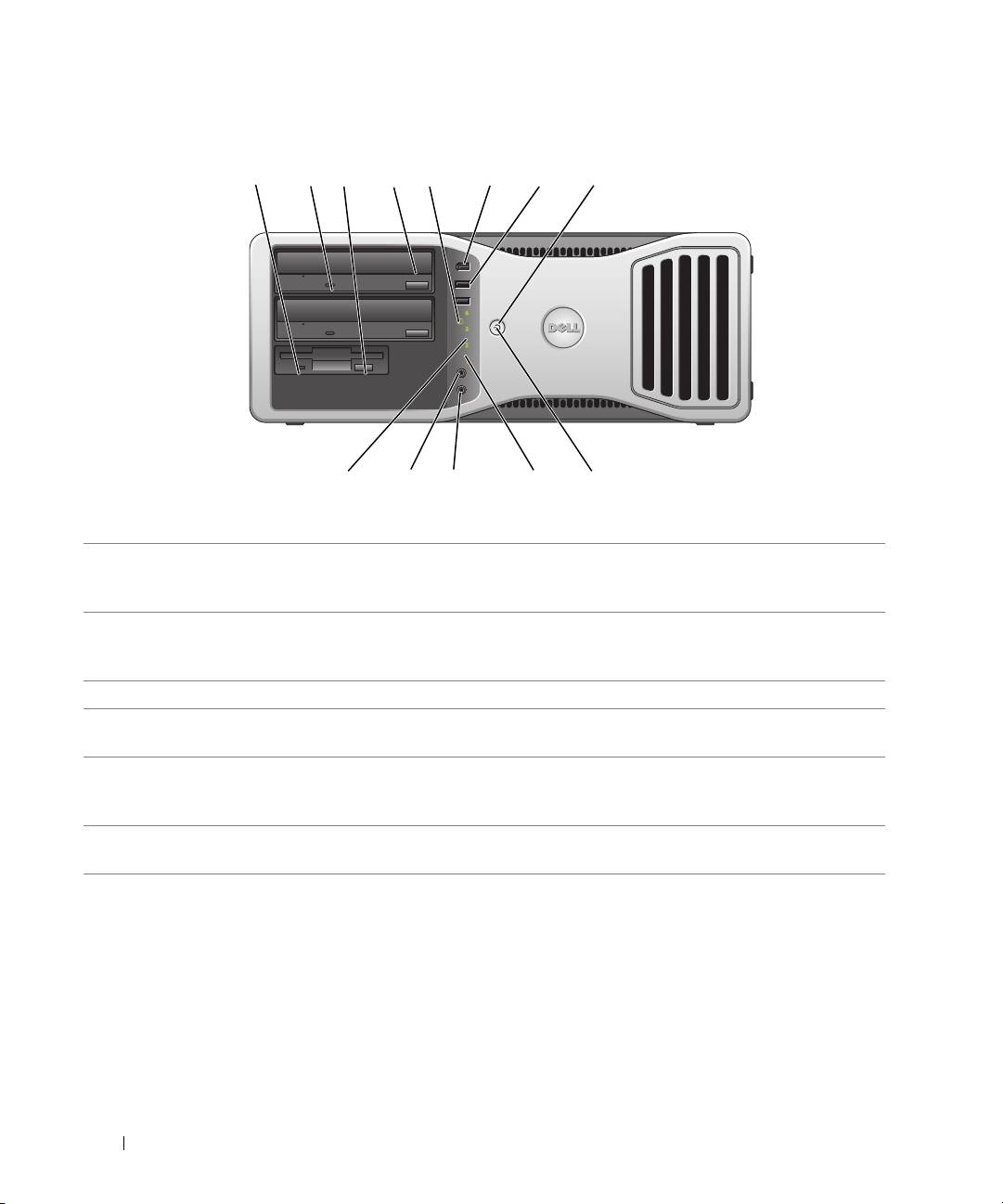
Front View (Desktop Orientation)
22 Quick Reference Guide
1 2 7
910111213
3
4
5 6 8
1 floppy-drive activity
The floppy-drive activity light is on when the computer reads data from or writes
light
data to the optional floppy drive. Wait until this light turns off before you remove
the floppy from the drive.
2 CD- or DVD-drive
The CD/DVD-drive activity light is on when the computer reads data from or
activity light
writes data to the CD/DVD drive. Wait until this light turns off before you remove
the CD or DVD from the drive.
3 floppy-drive eject button Press this button to eject a floppy disk from the optional floppy drive.
4 CD- or DVD-drive
Press this button to eject a disc from the CD or DVD drive.
eject button
5 hard-drive activity light The hard-drive activity light is on when the computer reads data from or writes
data to the hard drive. The light might also be on when a device such as your CD
player is operating.
6 IEEE 1394 connector
Use the optional IEEE 1394 connectors for high-speed data devices such as digital
(optional)
video cameras and external storage devices.
