
Beurer BM 75: 7. Displaying and deleting measurements
7. Displaying and deleting measurements: Beurer BM 75
Table of contents
- 2. Important information 1. Getting to know your instrument Signs and symbols
- Advice on use
- Advice on batteries Storage and Care Repair and disposal
- 3. Device description
- Information on the display: USB interface System requirements for the Beurer „HealthManager“ PC software
- 4. Preparing the measurement Setting the hour format, date and time Inserting the batteries
- 5. Measuring blood pressure Positioning cuff Operation with the mains part
- Performing the blood pressure measurement Correct posture
- WHO classification: 6. Evaluating results Cardiac arrhythmia:
- Range of blood pressure values Systolic Resting indicator measurement (using HSD diagnostics) RED: Lack of haemodynamic stability GREEN: Haemodynamic stability
- 7. Displaying and deleting measurements
- 8. Transferring measurements USB interface NFC
- 9. Cleaning and storing the instrument 11. Specifications 10. Rectifying faults
- 12. Mains part
blood pressure measurements as having been taken when the
– To view the measurements for user memory , press
circulatory system had not been sufficiently rested.
the M1 memory button.
In this case, nervousness or inner anxiety may be the cause and
this cannot be cured by brief periods of rest. Existing cardiac ar-
– To view the measurements for user memo-
rhythmias may also prevent a stable blood pressure measurement.
ry
, press the M2 memory button.
A lack of restin
g blood pressure can have various causes, such
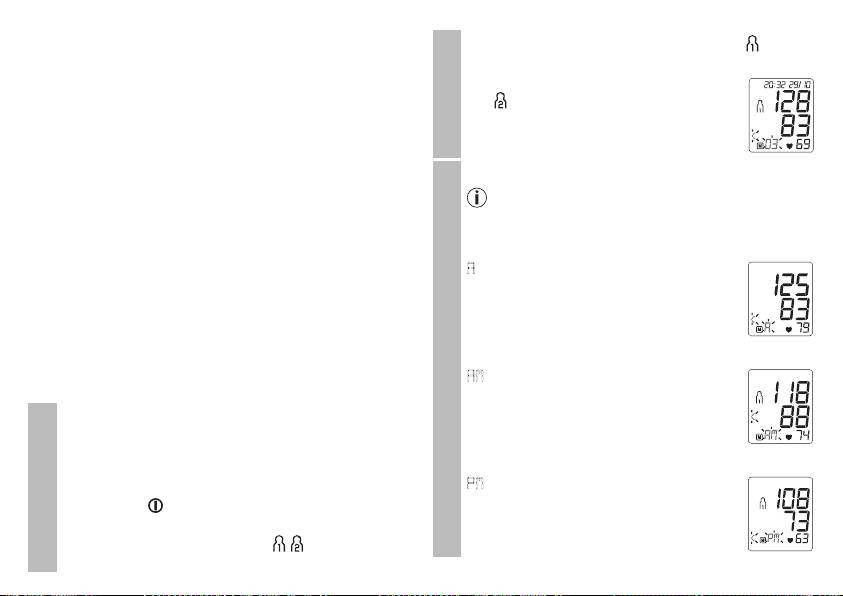
Your last measurement will appear on the
User memory
as physical or mental strain or distraction, speaking or experi-
display.
encing cardiac arrhythmias during the measurement.
In an overwhelming number of cases, the HSD diagnosis will
•
Press the relevant memory button (M1 or M2).
give a very good guide as to whether the circulatory system
If you have selected user memory1, the M1 memory
is rested when taking the measurement. Certain patients suf-
button must be pressed.
fering from cardiac arrhythmia or chronic mental conditions
If you have selected user memory2, the M2 memory
can remain haemodynamically unstable in the long-term,
button must be pressed.
something which persists even after repeated periods of rest.
The accuracy of the resting blood pressure results is reduced
A
flashes on the display.
in these users. Like any medical measurement method, the
The average value of all saved measured
precision of the HSD diagnosis is limited and can lead to incor-
values in this user memory is displayed.
rect results in some cases. The blood pressure measurements
taken when the circulatory system was at rest represent par-
•
Press the relevant memory button (M1 or M2).
ticularly reliable results.
AM
flashes on the display.
7. Displaying and deleting measurements
The average value of the morning measure-
Average values
The results of every successful measurement are stored
ments for the last 7 days is displayed (morn-
together with the date and time. If there are more than 60
ing: 5.00 a.m. – 9.00 a.m.).
measurements, the oldest measurements are lost.
•
Press the relevant memory button (M1 or M2).
•
To access memory recall mode, the blood pressure
monitor must first be started. To do this press the Start/
PM
flashes on the display.
stop button .
The average value of the evening measure-
ments for the last 7 days is displayed (even-
User memory
•
Within 3 seconds of the full-screen display appearing,
ing: 6.00 p.m. – 08.00 p.m.).
select the desired user memory ( ) with the M1 or
M2 memory button.
27
