
Beurer BM 75: Information on the display: USB interface System requirements for the Beurer „HealthManager“ PC software
Information on the display: USB interface System requirements for the Beurer „HealthManager“ PC software: Beurer BM 75
Table of contents
- 2. Important information 1. Getting to know your instrument Signs and symbols
- Advice on use
- Advice on batteries Storage and Care Repair and disposal
- 3. Device description
- Information on the display: USB interface System requirements for the Beurer „HealthManager“ PC software
- 4. Preparing the measurement Setting the hour format, date and time Inserting the batteries
- 5. Measuring blood pressure Positioning cuff Operation with the mains part
- Performing the blood pressure measurement Correct posture
- WHO classification: 6. Evaluating results Cardiac arrhythmia:
- Range of blood pressure values Systolic Resting indicator measurement (using HSD diagnostics) RED: Lack of haemodynamic stability GREEN: Haemodynamic stability
- 7. Displaying and deleting measurements
- 8. Transferring measurements USB interface NFC
- 9. Cleaning and storing the instrument 11. Specifications 10. Rectifying faults
- 12. Mains part
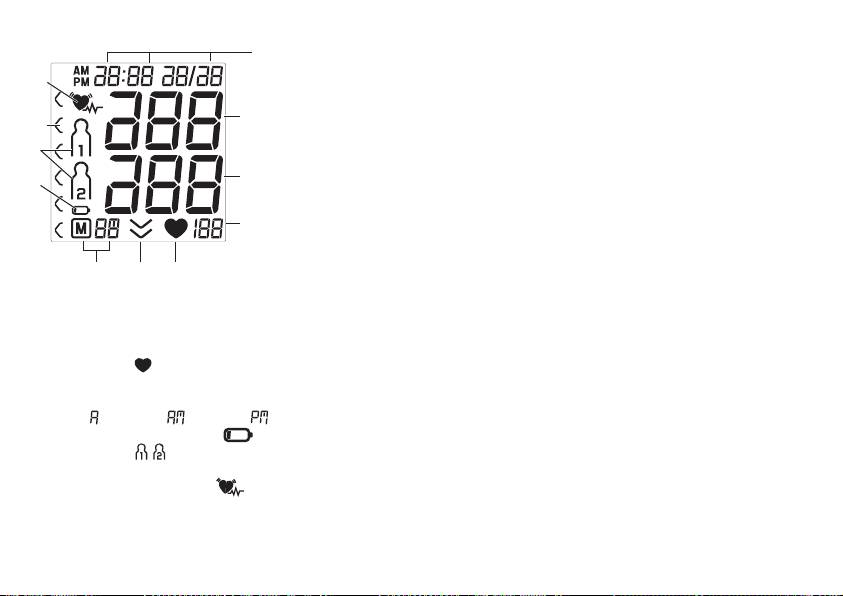
Information on the display:
USB interface
1
The blood pressure monitor also allows you to transfer your
measured values to the PC.
11
To do this, you need a regular USB cable (included in delivery)
and the „HealthManager“ PC software.
2
10
The software can be downloaded free of charge from the
download area under Service at www.beurer.com.
9
System requirements for the Beurer „HealthManager“ PC
3
8
software
1. Supported operating systems:
4
• Windows XP SP3
• Windows Vista SP1 or later
• Windows 7
5 67
• Windows 7 SP1
1. Date / time
• Windows 8
2. Systolic pressure
2. Supported architectures:
3. Diastolic pressure
• x86 (32 bit)
4. Pulse value
• x64 (64 bit)
5. Pulse symbol
3. Hardware requirements:
6. Release air (arrow)
• Recommended: At least Pentium 1 GHz or faster with at
7. Number of memory space/memory display average
least 1 GB RAM
value ( ), morning ( ), evening ( )
• Free memory on the primary partition of at least:
8. Battery replacement symbol
– x86 – 600 MB
9. User memory
– x64 – 1.5 GB
10. WHO classification
• Graphic resolution from: 1024 x 768 pixels
11. Cardiac arrhythmia symbol
• USB port 1.0 or later
21
