
Toshiba TDP P5: НАСТРОЙКА С ПОМОЩЬЮ МЕНЮ
НАСТРОЙКА С ПОМОЩЬЮ МЕНЮ: Toshiba TDP P5
Оглавление
- INHALTSVERZEICHNIS TABLE DES METIERES INDICE INDICE СОДЕРЖАНИЕ INNHOLDSFORTEGNELSE
- MATERIALE FORNITO КОМПЛЕКТ ПОСТАВКИ VEDLAGT MATERIELL
- BESTANDTEILE PRESENTATION VISTA GENERAL PROSPETTO ОБЗОР OVERSIKT
- PROCEDIMENTO DI IMPOSTAZIONE УСТАНОВКА И ПОДКЛЮЧЕНИЕ OPPSETT
- PROCEDIMENTO DI IMPOSTAZIONE УСТАНОВКА И ПОДКЛЮЧЕНИЕ OPPSETT
- PROCEDIMENTO DI IMPOSTAZIONE УСТАНОВКА И ПОДКЛЮЧЕНИЕ OPPSETT
- START - STOP ALLUMER - ÉTEINDRE INICIO - PARADA AVVIO - ARRESTO НАЧАЛО И ЗАВЕРШЕНИЕ РАБОТЫ START - STOP
- ADJUSTE DE LA IMAGEN REGOLAZIONE ELL’ IMMAGINE НАСТРОЙКА ИЗОБРАЖЕНИЯ JUSTERE BILDET
- CONTROL REMOTO Y TECLADO TELECOMANDO E TASTIERA ПУЛЬТ ДИСТАНЦИОННОГО УПРАВЛЕНИЯ И КНОПОЧНАЯ ПАНЕЛЬ
- CONTROL REMOTO Y TECLADO TELECOMANDO E TASTIERA ПУЛЬТ ДИСТАНЦИОННОГО УПРАВЛЕНИЯ И КНОПОЧНАЯ ПАНЕЛЬ
- CONTROL REMOTO Y TECLADO TELECOMANDO E TASTIERA ПУЛЬТ ДИСТАНЦИОННОГО УПРАВЛЕНИЯ И КНОПОЧНАЯ ПАНЕЛЬ
- CONTROL REMOTO Y TECLADO TELECOMANDO E TASTIERA ПУЛЬТ ДИСТАНЦИОННОГО УПРАВЛЕНИЯ И КНОПОЧНАЯ ПАНЕЛЬ
- НАСТРОЙКА С ПОМОЩЬЮ МЕНЮ
- НАСТРОЙКА С ПОМОЩЬЮ МЕНЮ
- НАСТРОЙКА С ПОМОЩЬЮ МЕНЮ
- НАСТРОЙКА С ПОМОЩЬЮ МЕНЮ
- НАСТРОЙКА С ПОМОЩЬЮ МЕНЮ
- НАСТРОЙКА С ПОМОЩЬЮ МЕНЮ
- НАСТРОЙКА С ПОМОЩЬЮ МЕНЮ
- НАСТРОЙКА С ПОМОЩЬЮ МЕНЮ
- НАСТРОЙКА С ПОМОЩЬЮ МЕНЮ
- НАСТРОЙКА С ПОМОЩЬЮ МЕНЮ
- НАСТРОЙКА С ПОМОЩЬЮ МЕНЮ
- НАСТРОЙКА С ПОМОЩЬЮ МЕНЮ
- LOGOTIPO DEL USUARIO LOGO DELL’UTENTE ЗАСТАВКА
- LOGOTIPO DEL USUARIO LOGO DELL’UTENTE ЗАСТАВКА
- MESSAGGI LUMINOSI СИГНАЛЫ ИНДИКАТОРОВ LYSSIGNALER (LED)
- MESSAGGI LUMINOSI СИГНАЛЫ ИНДИКАТОРОВ LYSSIGNALER (LED)
- DELL’OPERATIVITÀ (DPMS) УПРАВЛЕНИЕ ПИТАНИЕМ ДИСПЛЕЯ (DPMS) INNSTILLINGER FOR STRØMSPARING (DPMS)
- ПОИСК И УСТРАНЕНИЕ НЕИСПРАВНОСТЕЙ
- ПОИСК И УСТРАНЕНИЕ НЕИСПРАВНОСТЕЙ
- ПОИСК И УСТРАНЕНИЕ НЕИСПРАВНОСТЕЙ ТЕХНИЧЕСКАЯ ИНФОРМАЦИЯ
- ТЕХНИЧЕСКАЯ ИНФОРМАЦИЯ
- ТЕХНИЧЕСКАЯ ИНФОРМАЦИЯ
- ИНФОРМАЦИЯ ОБ ОБСЛУЖИВАНИИ
- SUSTITUCIÓN DE LA BOMBILLA SOSTITUZIONE LAMPADINA ЗАМЕНА ЛАМПЫ SKIFTE LAMPEN
- N DE LA BOMBILLA SOSTITUZIONE DELLA LAMPADINA ЗАМЕНА ЛАМПЫ SKIFTE LAMPEN
- MANUTENZIONE ТЕХНИЧЕСКОЕ ОБСЛУЖИВАНИЕ VEDLIKEHOLD
- MANUTENZIONE ТЕХНИЧЕСКОЕ ОБСЛУЖИВАНИЕ VEDLIKEHOLD
P5 Ruby UG .qxd 13.05.2002 14:21 Page 25
MENU ADJUSTMENTS MENÜEINSTELLUNGEN OPTIONS DE MENU
MEN
Ú DE AJUSTES IMPOSTAZIONI DAL MENU
НАСТРОЙКА С ПОМОЩЬЮ МЕНЮ
MENYINNSTILLINGER
PICTURE IN PICTURE
MENU FUNCTION
PICTURE IN PICTURE MENÜFUNKTIONEN FONCTIONS DU MENU "PICTURE IN PICTURE" FUNCIONES
DEL MENÚ PICTURE IN PICTURE
FUNZIONI DEL MENU PICTURE IN PICTURE (IMMAGINE IN IMMAGINE) ФУНКЦИИ МЕНЮ PICTURE IN PICTURE
(КАРТИНКА В КАРТИНКЕ) FUNKSJONER PÅ BILDE I BILDE-MENYEN
5.7
5.7.1
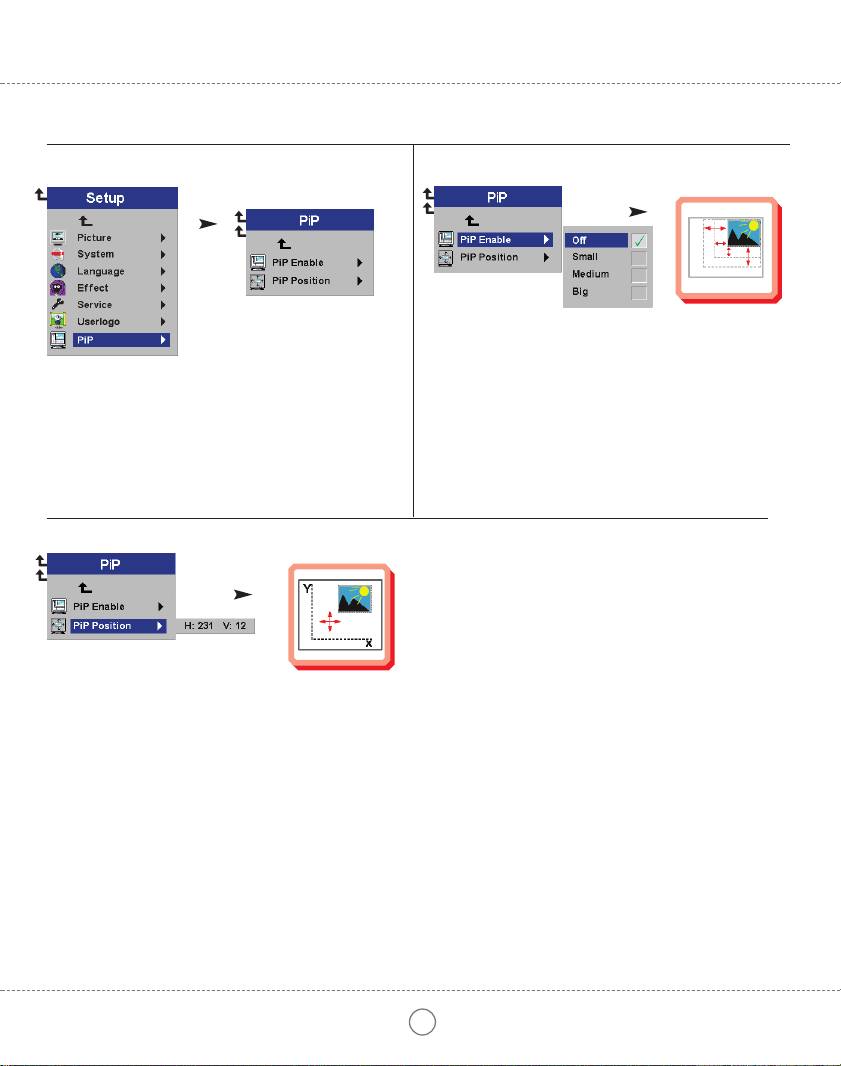
Select Picture in Picture Enable to size the Picture in Picture (PiP) image.
Wählen Sie "Picture in Picture Enable", um die Größe des Bildes in
Picture in Picture (PiP) auszuwählen.
Sélectionnez "Picture in Picture Enable" pour modifier la taille de l'image
dans Picture in Picture (PiP).
Seleccione "Picture in Picture Enable" para ajustar el tamaño de la imagen
Picture in Picture (PiP).
Selezionare "Abilitare Picture in Picture (Immagine in Immagine)" per
dimensionare l'immagine Picture in Picture (Immagine in Immagine) (PiP).
Выберите Picture in Picture Enable (Включение режима «Картинка в
картинке» [PiP]) для определения размера наложенного изображения.
Velg "Bilde i bilde Aktiver" hvis du vil endre størrelse på bildet i bildet.
5.7.2
Select Picture in Picture Position to move the video image around on your screen.
Wählen Sie "Picture in Picture Position", um das Videobild auf Ihrem Bildschirm zu bewegen.
Sélectionnez "Picture in Picture Position" pour déplacer l'image de la vidéo sur votre écran.
Seleccione "Picture in Picture Position" para desplazar la imagen de vídeo por la pantalla.
Selezionare "Posizione Picture in Picture (Immagine in Immagine)" per muovere l'immagine video sul vostro schermo.
Выберите Picture in Picture Position (Положение наложенного изображения) для перемещения изображения по экрану.
Velg "Bilde i bilde Plasser" hvis du vil flytte videobildet rundt på skjermen.
25
