
Toshiba JournE F800-F801: инструкция
Раздел: Аксессуары для фото- и видеотехники
Тип:
Инструкция к Toshiba JournE F800-F801
Оглавление
- Правила техники безопасности
- Далее изложен порядок установки и эксплуатации устройства. Действие 1: проверка компонентов Требования к системе:
- Передние органы управления Задние органы управления
- Действие 2: установка регулируемой подставки
- Действие 3: подключение адаптера переменного тока.
- Действие 4 (факультативно): установка карты памяти.
- Действие 5: включение устройства. Действие 6: работа с устройством.
- Работа устройства в фоторежиме Работа в режиме календаря
- Работа в режиме музыки Работа в видеорежиме
- Дополнительные средства (присутствуют только в модели PA3702*-1ET2) Встроенная батарея
- Встроенный датчик наклона Встроенный датчик освещения
- Ответы на типичные вопросы
- Техническая поддержка TOSHIBA Информация о соответствии законодательным требованиям Условия эксплуатации
- Другие условия, не связанные с электромагнитной совместимостью
- Изложенная далее информация актуальна только в странах-членах ЕС Утилизация изделий Утилизация батарей и/или аккумуляторов
GMH300056020.book Page 1 Tuesday, September 2, 2008 10:46 PM
User’s Manual
BG
HU
SK
CZ
PL
SL
FR
RO
TR
GR
RS
HE
HR
RU
GMH300056020.book Page 2 Tuesday, September 2, 2008 10:46 PM
Introduction
Welcome and thank you for choosing a TOSHIBA product.
Table of Contents
Safety Instructions . . . . . . . . . . . . . . . . . . . . . . . . . . . . . . . . . . . . . . . . . . . . 3
Before operating this unit (Journe F800/F801), please carefully read and
follow the instructions below. . . . . . . . . . . . . . . . . . . . . . . . . . . . . . . . . . . . 3
Follow the instructions below to install and operate the unit.. . . . . . . . . . . 4
Step 1: Check the components . . . . . . . . . . . . . . . . . . . . . . . . . . . . . . 4
System Requirements: . . . . . . . . . . . . . . . . . . . . . . . . . . . . . . . . . . 4
Controls on the front . . . . . . . . . . . . . . . . . . . . . . . . . . . . . . . . . . . . 5
Controls on the back . . . . . . . . . . . . . . . . . . . . . . . . . . . . . . . . . . . . 5
Step 2: Install the adjustable foot stand.. . . . . . . . . . . . . . . . . . . . . . . . 6
Step 3: Connect the AC power. . . . . . . . . . . . . . . . . . . . . . . . . . . . . . . 7
Step 4: (Optional) Insert a memory card. . . . . . . . . . . . . . . . . . . . . . . . 8
Step 5: Turn on the unit. . . . . . . . . . . . . . . . . . . . . . . . . . . . . . . . . . . . . 9
Step 6: Operate the unit. . . . . . . . . . . . . . . . . . . . . . . . . . . . . . . . . . . . 9
Using the Photo mode . . . . . . . . . . . . . . . . . . . . . . . . . . . . . . . . . . 10
Using the Calendar mode . . . . . . . . . . . . . . . . . . . . . . . . . . . . . . . 10
Using the Music mode . . . . . . . . . . . . . . . . . . . . . . . . . . . . . . . . . . 11
Using the Video mode . . . . . . . . . . . . . . . . . . . . . . . . . . . . . . . . . . 11
Additional features (available on PA3702*-1ET2 only). . . . . . . . . . . . 12
Built-in battery . . . . . . . . . . . . . . . . . . . . . . . . . . . . . . . . . . . . . . . . 12
Built-in tilt sensor . . . . . . . . . . . . . . . . . . . . . . . . . . . . . . . . . . . . . . 13
Built-in light sensor . . . . . . . . . . . . . . . . . . . . . . . . . . . . . . . . . . . . 13
Frequently asked questions . . . . . . . . . . . . . . . . . . . . . . . . . . . . . . . . 14
TOSHIBA support . . . . . . . . . . . . . . . . . . . . . . . . . . . . . . . . . . . . . . . . . . . . 15
Regulatory Information . . . . . . . . . . . . . . . . . . . . . . . . . . . . . . . . . . . . . . . 15
EU Conformity Statement. . . . . . . . . . . . . . . . . . . . . . . . . . . . . . . . . . 15
Working Environment . . . . . . . . . . . . . . . . . . . . . . . . . . . . . . . . . . . . . 16
Additional environments not related to EMC . . . . . . . . . . . . . . . . . . . 16
Following information is only valid for EU-member states . . . . . . . . . 17
Disposal of products . . . . . . . . . . . . . . . . . . . . . . . . . . . . . . . . . . . 17
Disposal of batteries and/or accumulators . . . . . . . . . . . . . . . . . . 17
EN-2 User’s Manual
GMH300056020.book Page 3 Tuesday, September 2, 2008 10:46 PM
Safety Instructions
Before operating this unit (Journe F800/F801),
please carefully read and follow the instructions
below.
n The operating temperature is between 0 and 40 degrees Celsius.
n Do not use or store this unit in the environments listed below:
n Direct sunlight
n A high-humidity area such as bathroom
n Dusty places
n Next to an air conditioner, electric heater or other heat sources
n In a closed car that is in direct sunlight
n Unstable locations
n If this unit becomes wet, wipe it with a dry cloth as soon as
possible.
n Salt or seawater may cause severe damage to this unit.
n Do not use solvents (such as alcohol) to clean this unit.
n If the screen is dirty, use a lens brush or soft cloth to clean the
screen.
n To prevent electric shock, do not attempt to disassemble or repair
this unit by yourself.
n Water may cause a fire or electric shock. Therefore, store this unit
in a dry place.
n Do not use this unit outdoors when it is raining or snowing.
n Do not use this unit in or near water.
n If a foreign substance or water gets in this unit, please turn the
power off immediately and disconnect the power adapter. Next,
remove the foreign substance or water, and then send it to your
nearest service center.
User’s Manual EN-3
GMH300056020.book Page 4 Tuesday, September 2, 2008 10:46 PM
Follow the instructions below to install and operate
the unit.
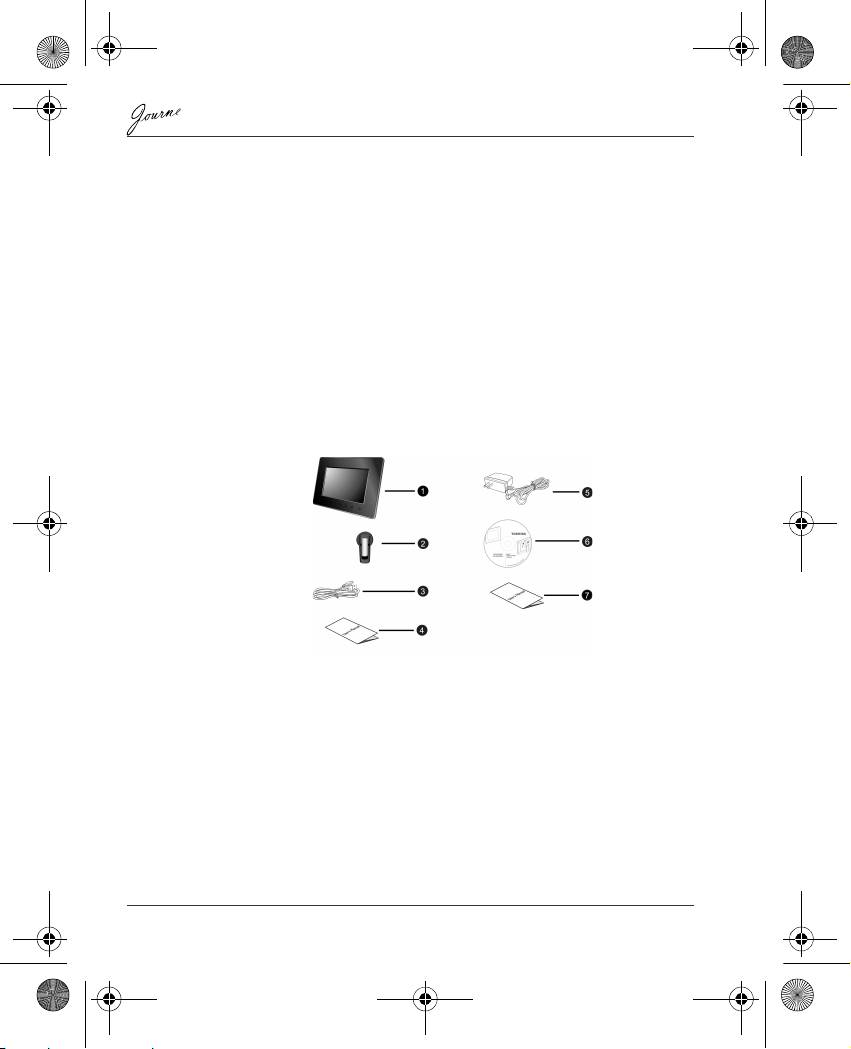
Step 1: Check the components
Carefully open the packing box and ensure that you have the
following items.
1. Journe F800/F801
2. Adjustable foot stand
3. USB cable
4. User’s Manual
5. AC power adapter
6. Software CD
7. Warranty Leaflet
System Requirements:
n USB 2.0 interface
n Windows 2000/XP/Vista
EN-4 User’s Manual
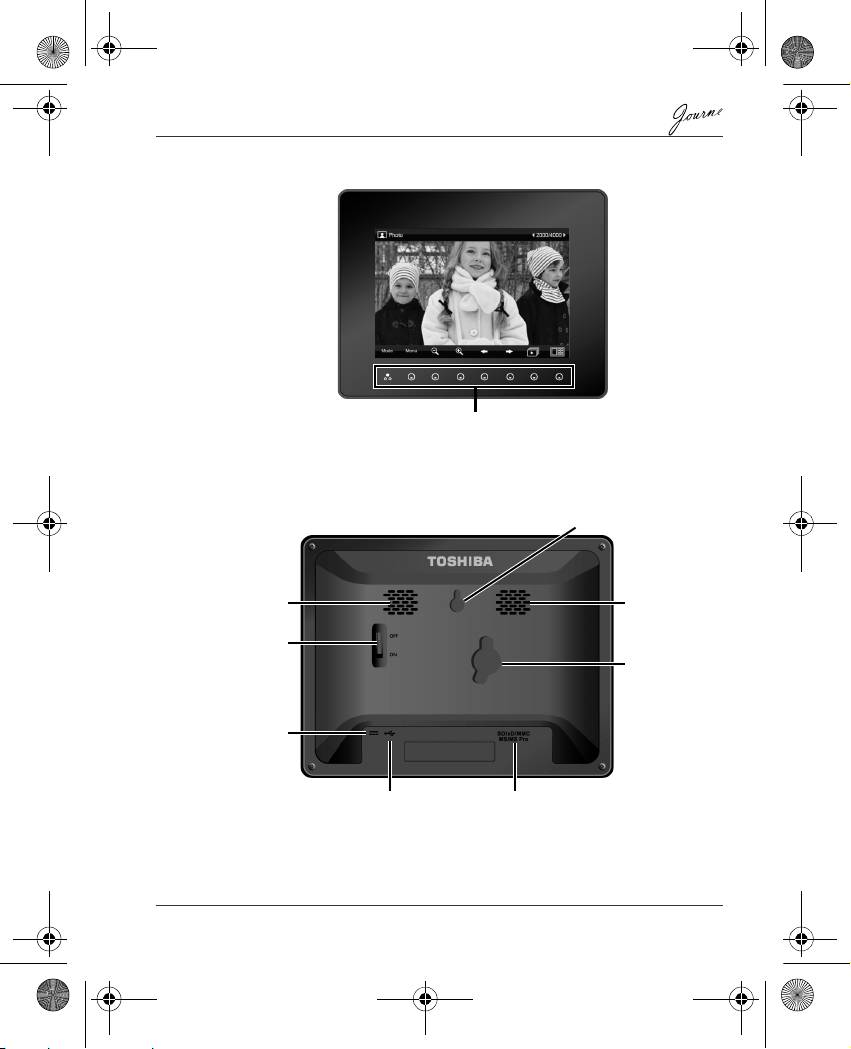
Controls on the front
Controls on the back
User’s Manual EN-5
Control panel
Hanging slot
Speaker
Speaker
Power switch
Lock slot
Power jack
USB jack (for connecting to a
5-in-1 card slot:
computer so the computer can edit
SD/xD/MMC/MS/MS Pro
files in the unit)
GMH300056020.book Page 5 Tuesday, September 2, 2008 10:46 PM
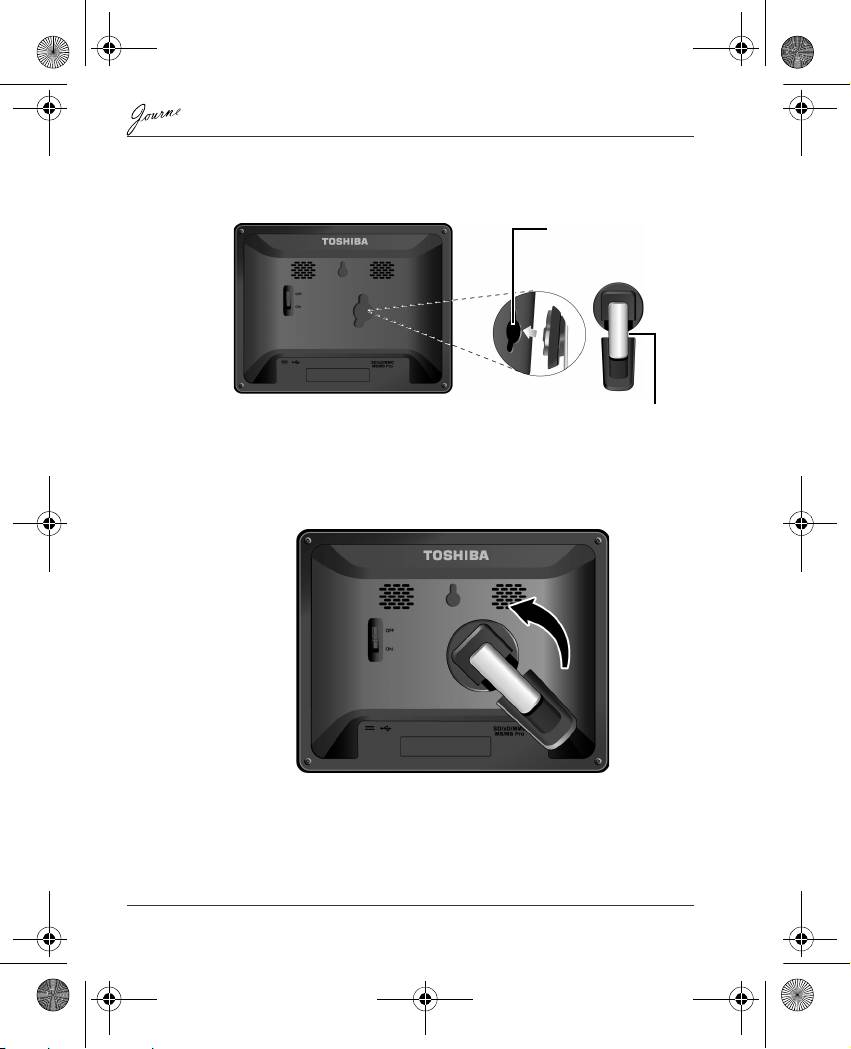
Step 2: Install the adjustable foot stand.
1. On the back of the unit, attach the foot stand to the lock slot.
2. To place the photo frame vertically, rotate the foot stand counter-
clockwise until it is secured to the photo frame.
EN-6 User’s Manual
Lock slot
Adjustable foot stand
GMH300056020.book Page 6 Tuesday, September 2, 2008 10:46 PM
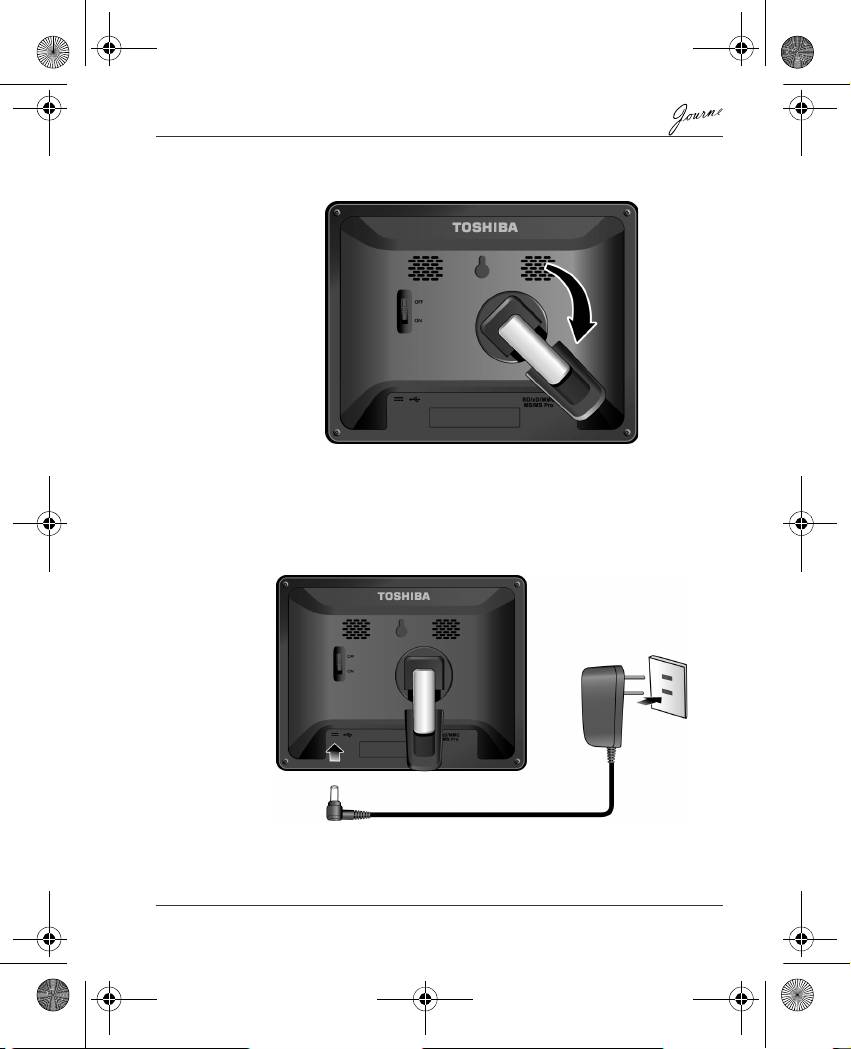
GMH300056020.book Page 7 Tuesday, September 2, 2008 10:46 PM
3. To place the photo frame horizontally, rotate the foot stand
clockwise until it is secured to the photo frame.
Step 3: Connect the AC power.
1. Plug one end of the AC power adapter into the power jack on the
back of this unit.
2. Plug the other end into a power outlet.
User’s Manual EN-7
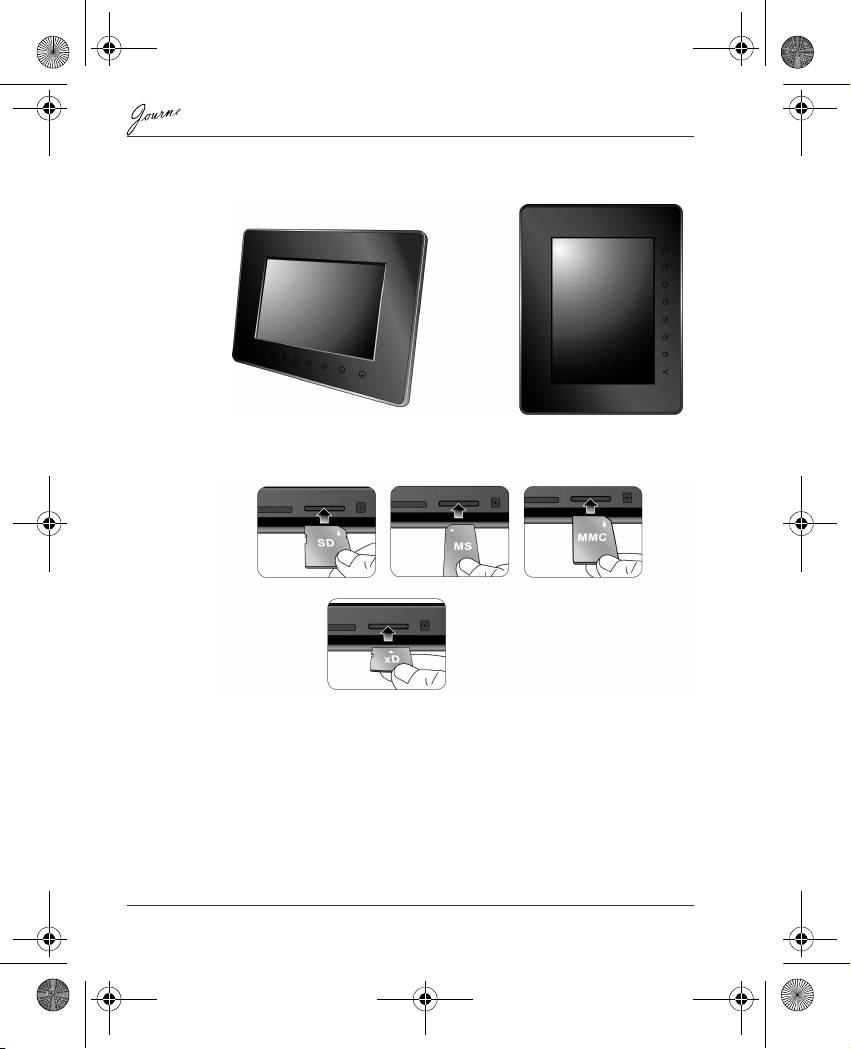
GMH300056020.book Page 8 Tuesday, September 2, 2008 10:46 PM
3. Place this unit horizontally (recommended direction) or vertically
on a stable surface.
Step 4: (Optional) Insert a memory card.
The unit is preloaded with some demo images and music in the
internal memory. On the back of the unit, you can also insert a
memory card containing the content you want to show on the unit.
EN-8 User’s Manual
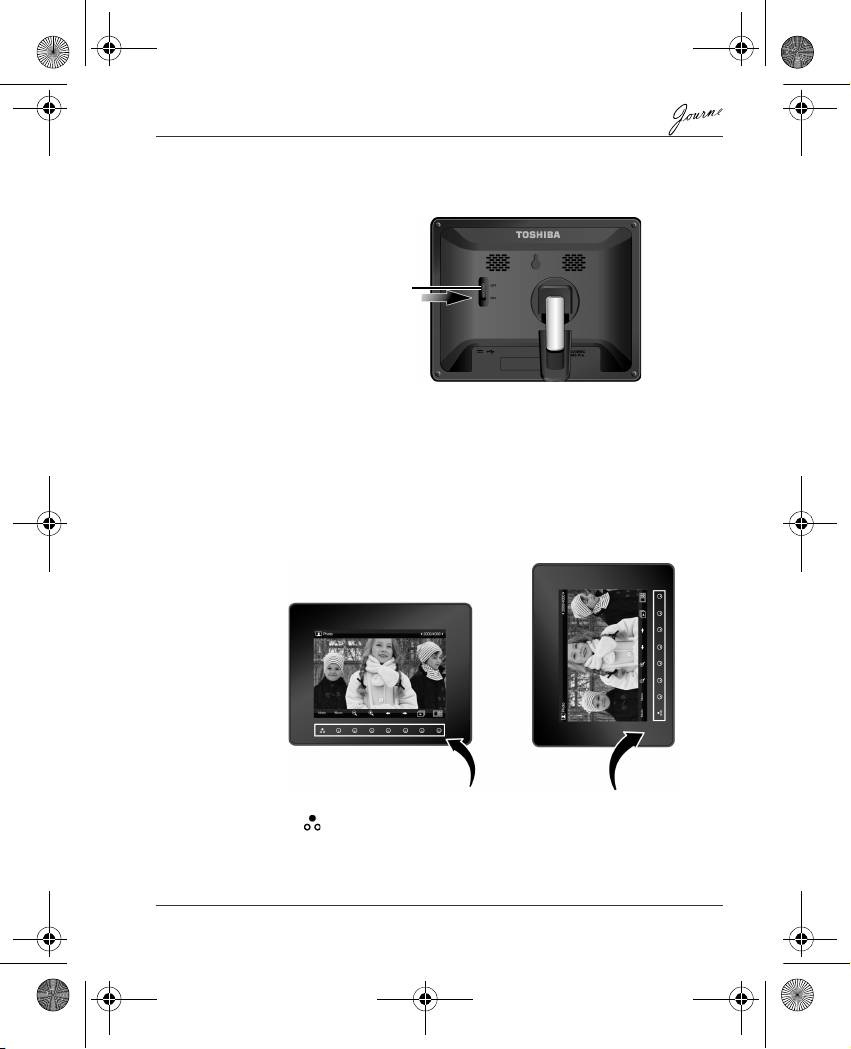
Step 5: Turn on the unit.
Sliding the power switch to ON turns on the unit.
Step 6: Operate the unit.
After the unit is turned on, available functions (represented by name
or icon) show on the screen. Their corresponding buttons also light
up on the control panel for a period of time.
Simply press the corresponding button below (if the unit is placed
horizontally) or beside (if the unit is placed vertically) the name or
icon indicating the function you want to use.
n To toggle among Photo, Calendar, Music, and Video modes,
press under Mode.
n If the control panel is unused for a certain period of time, the LED
turns off automatically. To turn on the backlight again, press
anywhere on the control panel.
User’s Manual EN-9
Power switch
Control panel
GMH300056020.book Page 9 Tuesday, September 2, 2008 10:46 PM
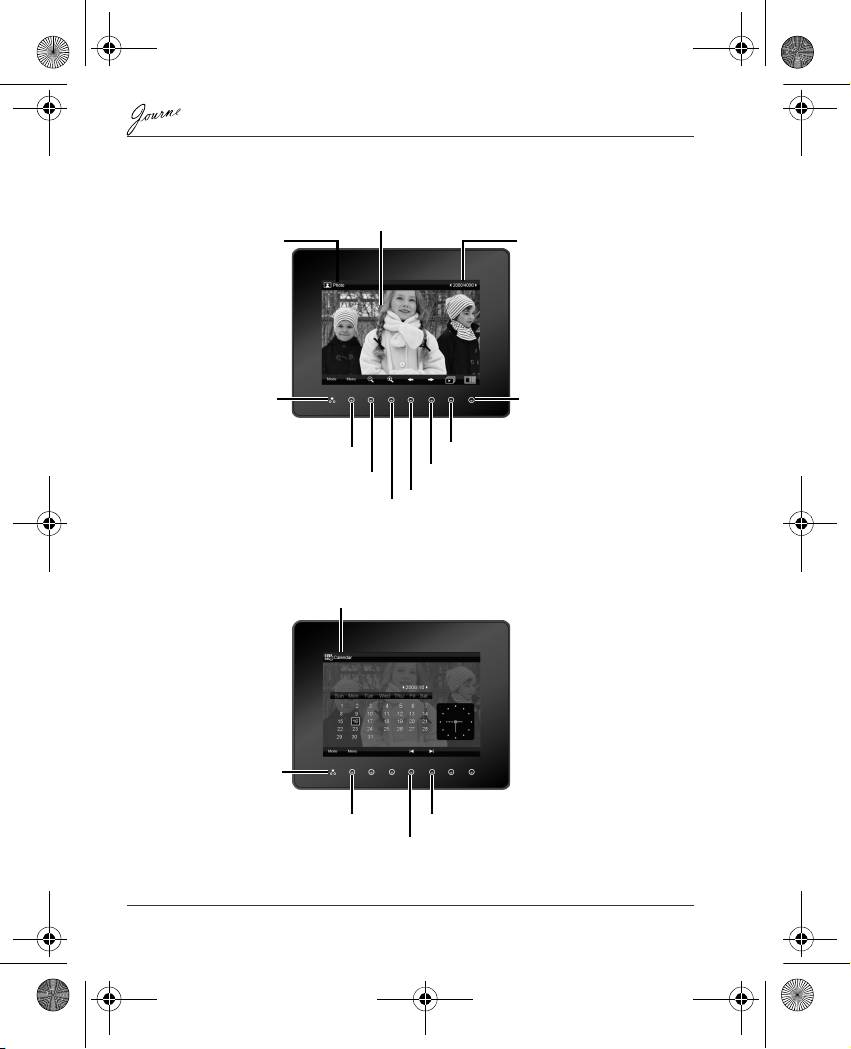
Using the Photo mode
Using the Calendar mode
EN-10 User’s Manual
LCD screen
Current mode
Current file number/Total
number of files
Mode selection Thumbnail view
Slideshow
Menu
Next file
Zoom-out
Previous file
Zoom-in
Current mode
Mode selection
Menu
Next month
Previous month
GMH300056020.book Page 10 Tuesday, September 2, 2008 10:46 PM
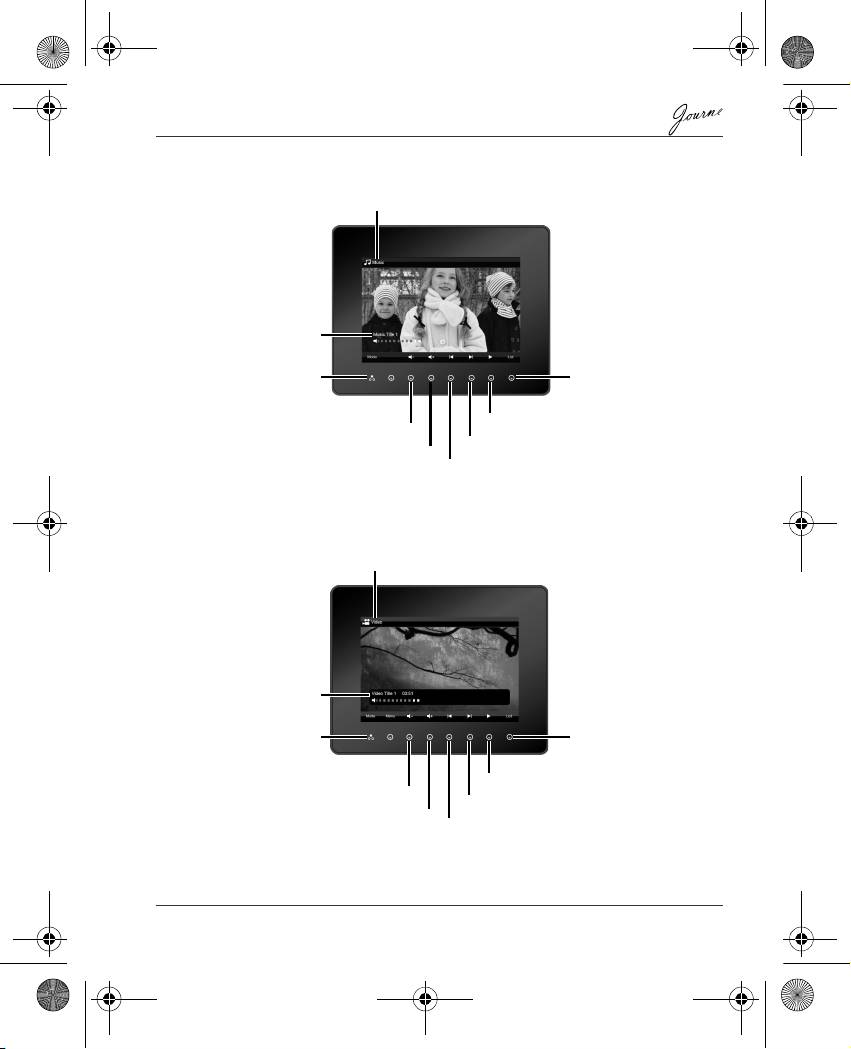
Using the Music mode
Using the Video mode
User’s Manual EN-11
Current mode
Track name, elapsed
time, and volume level
List of all music
tracks and access
Mode selection
to menu
Play or Pause
Volume down
Next track
Volume up
Previous track
Current mode
Video file name,
elapsed time, and
volume level
List of all video files
Mode selection
and access to menu
Play or Pause
Volume down
Next video file
Volume up
Previous video file
GMH300056020.book Page 11 Tuesday, September 2, 2008 10:46 PM
GMH300056020.book Page 12 Tuesday, September 2, 2008 10:46 PM
Additional features (available on
PA3702*-1ET2 only)
Built-in battery
On the PA3702*-1ET2 model, the photo frame is equipped with a
built-in lithium polymer battery.
To charge the battery, follow the steps below:
1. Connect one end of the AC power adapter to the power jack on
the back of the photo frame.
2. Connect the other end to a power outlet.
3. Place the photo frame horizontally or vertically on a stable
surface, and then keep the power connected until the battery is
fully charged.
n When the battery charge is running out of power, a warning
message will appear on the screen. Charge the battery as
described above.
n The fully charged battery usually lasts about 30 minutes,
depending on your use and settings.
n Power system and plug types may vary depending on your
country/region.
Do not disassemble or modify the battery.
EN-12 User’s Manual
Built-in tilt sensor
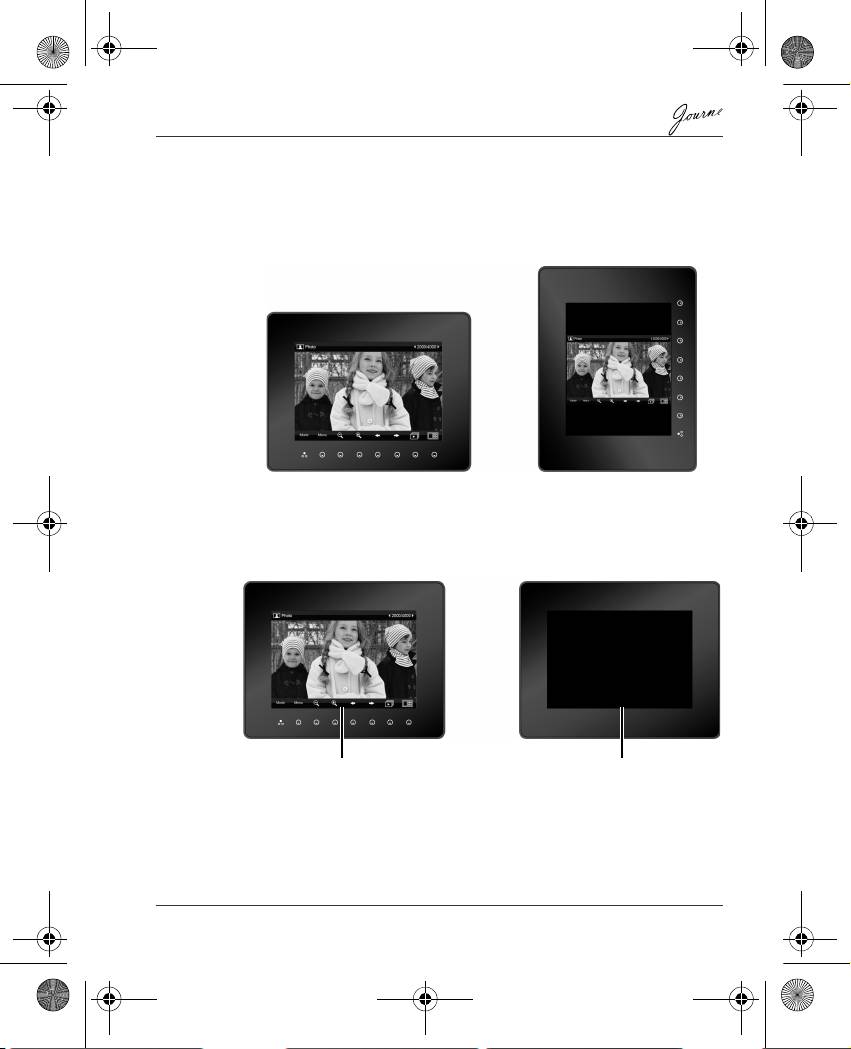
On the PA3702*-1ET2 model, the photo frame has a built-in tilt
sensor that allows the photo frame to determine its own orientation
relative to gravity and thereby automatically switch from displaying
pictures vertically to displaying pictures horizontally.
Built-in light sensor
On the PA3702*-1ET2 model, the photo frame has a built-in light
sensor that can automatically turn on/off the panel display, when the
ambient lights in a room are turned on/off.
User’s Manual EN-13
When lights in a room are turn on When lights in a room are turn off
GMH300056020.book Page 13 Tuesday, September 2, 2008 10:46 PM
GMH300056020.book Page 14 Tuesday, September 2, 2008 10:46 PM
Frequently asked questions
After copying photos, how can I check if files are
already stored in this unit?
Once photos are copied, a confirmation message will
appear on the screen.
What memory card types are compatible with the
unit?
Secure Digital™ Card (SD), xD-Picture Card™ (xD),
Multi Media Card™ (MMC), Memory Stick™ (MS), and
Memory Stick Pro™ (MS Pro) memory card types are
compatible with the unit.
Why do some pictures load faster than others?
Higher resolution pictures load slower. Using a lower
resolution when taking pictures will speed up loading
time.
EN-14 User’s Manual
GMH300056020.book Page 15 Tuesday, September 2, 2008 10:46 PM
TOSHIBA support
Need help?
For the latest driver updates, user manuals & FAQs please have a
look at the TOSHIBA options & services support page:
computers.toshiba.eu/options-support
Please see computers.toshiba.eu/options-warranty
for the TOSHIBA hotline numbers.
Regulatory Information
EU Conformity Statement
“This product and - if applicable - the supplied accessories too are
marked with “CE” and complies therefore with the applicable
harmonized European standards listed under the EMC Directive
2004/108/EC and/or the Low Voltage Directive 2006/95/EC.”
Responsible for CE-marking:
TOSHIBA EUROPE GMBH, Hammfelddamm 8, 41460 Neuss,
Germany.
Manufacturer:
Toshiba Corporation, 1-1 Shibaura 1-chome, Minato-ku, Tokyo,
105-8001, Japan
The complete official EU CE Declaration can be obtained on
following internet page: http://epps.toshiba-teg.com/
User’s Manual EN-15
GMH300056020.book Page 16 Tuesday, September 2, 2008 10:46 PM
Working Environment
The Electromagnetic Compliance (EMC) of this product has been
verified typically for this product category for a so called Residential,
Commercial & Light Industry Environment. Any other working
environment has not been verified by Toshiba and the use of this
product in these working environments is maybe restricted or cannot
be recommended. Possible consequences of the use of this product
in non verified working environments can be: Disturbances of other
products or of this product in the nearby surrounding area with
temporarily malfunction or data loss/corruption as result. Example of
non verified working environments and related advices:
n Industrial environment (e.g. environments where a mains voltage
of 380V three-phase is being used mainly): Danger of
disturbances of this product due to possible strong
electromagnetic fields especially near to big machinery or power
units.
n Medical environment: The compliance to the Medical Product
Directive has not been verified by Toshiba, therefore this product
cannot be used as a medical product without further verification.
The use in usual office environments e.g. in hospitals should be
no problem if there is no restriction by the responsible
administration.
This product is not certified as a medical product according to the
Medical Product Directive 93/42 EEC.
n Automotive environment: Please search the owner instructions of
the related vehicle for advices regarding the use of this product
(category).
n Aviation environment: Please follow the instructions of the flight
personnel regarding restrictions of use.
Additional environments not related to EMC
Outdoor use: As a typical home/office equipment this product has no
special resistance against ingress of moisture and is not strong
shock proofed.
Explosive atmosphere: The use of this product in such special
working environment (Ex) is not allowed.
EN-16 User’s Manual
Following information is only valid for
EU-member states
Disposal of products
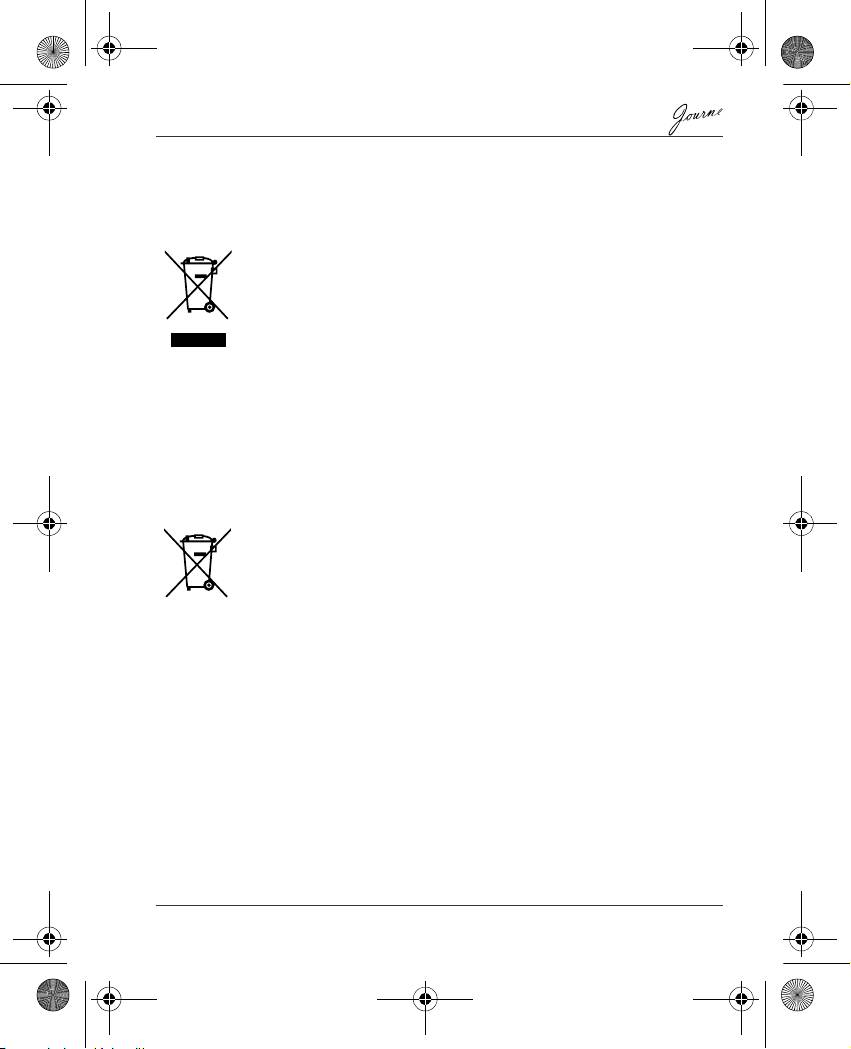
The crossed out wheeled dust bin symbol indicates that products must be
collected and disposed of separately from household waste. Integrated
batteries and accumulators can be disposed of with the product. They will be
separated at the recycling centres.
The black bar indicates that the product was placed on the market after
August 13, 2005.
By participating in separate collection of products and batteries, you will help
to assure the proper disposal of products and batteries and thus help to
prevent potential negative consequences for the environment and human
health.
For more detailed information about the collection and recycling programmes
available in your country, please visit our website (http://eu.computers.toshiba-
europe.com) or contact your local city office or the shop where you purchased
the product.
Disposal of batteries and/or accumulators
The crossed out wheeled dust bin symbol indicates that batteries and/or
accumulators must be collected and disposed of separately from household
waste.
If the battery or accumulator contains more than the specified values of lead
(Pb), mercury (Hg), and/or cadmium (Cd) defined in the Battery Directive
(2006/66/EC), then the chemical symbols for lead (Pb), mercury (Hg) and/or
cadmium (Cd) will appear below the crossed out wheeled dust bin symbol.
By participating in separate collection of batteries, you will help to assure the
proper disposal of products and batteries and thus help to prevent potential
negative consequences for the environment and human health.
For more detailed information about the collection and recycling programmes
available in your country, please visit our website (http://eu.computers.toshiba-
europe.com) or contact your local city office or the shop where you purchased
the product.
© 2008 TOSHIBA Europe GmbH. All rights reserved.
TOSHIBA reserves the right to make technical changes. TOSHIBA assumes
no liability for damages incurred directly or indirectly from errors, omissions or
discrepancies between this product and the documentation.
User’s Manual EN-17
Pb, Hg, Cd
GMH300056020.book Page 17 Tuesday, September 2, 2008 10:46 PM
GMH300056020.book Page 1 Tuesday, September 2, 2008 10:46 PM
Ръководство по експлоатация
Увод
Добре дошли и благодарим Ви, че избрахте продукт на TOSHIBA
Съдържание
Инструкции за безопасност . . . . . . . . . . . . . . . . . . . . . . . . . . . . . . . . . . . 2
Преди да включите устройството (Journe F800/F801), внимателно
прочетете и спазвайте дадените по-долу инструкции.. . . . . . . . . . . . . 2
За инсталиране и работа с устройството следвайте инструкциите,
изложени долу.. . . . . . . . . . . . . . . . . . . . . . . . . . . . . . . . . . . . . . . . . . . . . 3
Стъпка 1: Проверете компонентите . . . . . . . . . . . . . . . . . . . . . . . . . 3
Системни изисквания: . . . . . . . . . . . . . . . . . . . . . . . . . . . . . . . . . . 3
Органи за управление на предния панел . . . . . . . . . . . . . . . . . . 4
Органи за управление на задния панел . . . . . . . . . . . . . . . . . . . 4
Стъпка 2: Монтирайте стойката. . . . . . . . . . . . . . . . . . . . . . . . . . . . . 5
Стъпка 3: Свързване на AC захранване. . . . . . . . . . . . . . . . . . . . . . 6
Стъпка 4: (Опция
) Поставете карта за памет. . . . . . . . . . . . . . . . . . 7
Стъпка 5: Включете устройството. . . . . . . . . . . . . . . . . . . . . . . . . . . 8
Стъпка 6: Работа с устройството. . . . . . . . . . . . . . . . . . . . . . . . . . . . 8
Използване на режим Photo (Фото) . . . . . . . . . . . . . . . . . . . . . . . 9
Използване на режим Calendar (Календар). . . . . . . . . . . . . . . . . 9
Използване на режим Music (Музика) . . . . . . . . . . . . . . . . . . . . 10
Използване на режим Video (Видео) . . . . . . . . . . . . . . . . . . . . . 10
Допълнителни функции (само за PA3702*-1ET2) . . . . . . . . . . . . . 11
Вградена батерия . . . . . . . . . . . . . . . . . . . . . . . . . . . . . . . . . . . . 11
Вграден датчик за наклон . . . . . . . . . . . . . . . . . . . . . . . . . . . . . . 12
Вграден светлинен датчик . . . . . . . . . . . . . . . . . . . . . . . . . . . . . 12
Често задавани въпроси . . . . . . . . . . . . . . . . . . . . . . . . . . . . . . . . . 13
Поддръжка от TOSHIBA . . . . . . . . . . . . . . . . . . . . . . . . . . . . . . . . . . . . . . 14
Съответствие с регулаторните изисквания. . . . . . . . . . . . . . . . . . . . . 14
Декларация
за съответствие на ЕС . . . . . . . . . . . . . . . . . . . . . . . . 14
Работна среда. . . . . . . . . . . . . . . . . . . . . . . . . . . . . . . . . . . . . . . . . . 15
Допълнителни, несвързани с ЕМС среди. . . . . . . . . . . . . . . . . . . . 15
Долуизложената информация е предназначена само за страни-
членки на ЕС: . . . . . . . . . . . . . . . . . . . . . . . . . . . . . . . . . . . . . . . . . . 16
Третиране на продуктите като отпадъци. . . . . . . . . . . . . . . . . . 16
Изхвърляне на батериите и акумулаторите . . . . . . . . . . . . . . . 16
BG-1 Ръководство по експлоатация
GMH300056020.book Page 2 Tuesday, September 2, 2008 10:46 PM
Инструкции за безопасност
Преди да включите устройството
(Journe F800/F801), внимателно прочетете и
спазвайте дадените по-долу инструкции.
n Работната температура на устройството е между и 40 градуса
по Целзий.
n Не използвайте и не съхранявайте устройството при следните
условия на околната среда:
n Директна слънчева светлина
n Място с високо ниво на влажност, напр. баня
n Запрашени места
n В близост до климатик, електрическа печка или друг източник
на топлина
n В затворен автомобил, намиращ се на директна слънчева
светлина
n Нестабилни места
n Ако това устройство се намокри, незабавно го избършете със сух
парцал.
n Солта или морската вода могат да причинят сериозно
повреждане на това устройство.
n Не използвайте разредители (например спирт) за почистване на
това устройство.
n Ако екранът е мръсен, използвайте четка за почистване на
обективи или мек парцал за почистване на екрана.
n За да предотвратите поражение с електрически ток, не се
опитвайте да разглобявате или поправяте устройството
самостоятелно.
n Намокрянето с вода може да предизвика пожар или поражение с
електрически ток. Затова съхранявайте устройството на сухо
място.
n Не използвайте устройството навън, когато вали дъжд или сняг.
n Не използвайте устройството във вода или в близост до вода.
n Ако в устройството попадне вода или друго вещество, незабавно
изключете захранването и откачете захранващия адаптер. След
това отстранете водата или другото вещество и изпратете
устройството в най-близкия сервизен център.
Ръководство по експлоатация BG-2
GMH300056020.book Page 3 Tuesday, September 2, 2008 10:46 PM
За инсталиране и работа с устройството
следвайте инструкциите, изложени долу.
Стъпка 1: Проверете компонентите
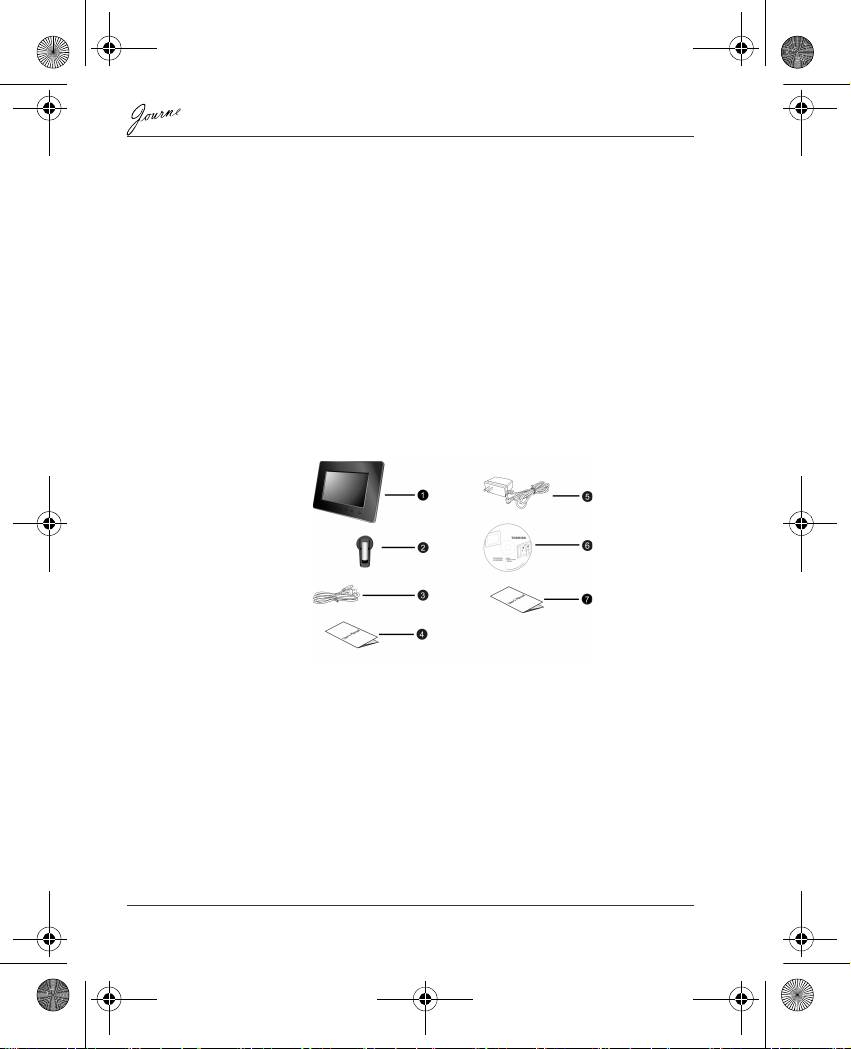
Внимателно отворете опаковъчната кутия и се уверете, че тя
съдържа следните неща:
1. Journe F800/F801
2. Нагласяща се стойка
3. Кабел USB
4. Ръководство по експлоатация
5. Захранващ AC адаптер
6. Компакт диск (CD) с програми
7. Листовка за гаранцията
Системни изисквания:
n USB 2.0 интерфейс
n Windows 2000/XP/Vista
BG-3 Ръководство по експлоатация
