
Dell Precision M60: Removing a Reserve Battery
Removing a Reserve Battery: Dell Precision M60
Table of contents
- Notes, Notices, and Cautions Abbreviations and Acronyms
- Contents
- CAUTION: Safety Instructions General
- CAUTION: Safety Instructions (continued) Power
- CAUTION: Safety Instructions (continued) Battery
- CAUTION: Safety Instructions (continued) Air Travel EMC Instructions California Residents
- When Using Your Computer
- When Using Your Computer (continued) Ergonomic Computing Habits When Working Inside Your Computer
- When Using Your Computer (continued) Protecting Against Electrostatic Discharge Battery Disposal
- Finding Information for Your Computer What are you looking for? Find It Here
- What are you looking for? Find It Here
- What are you looking for? Find It Here Setting Up Your Computer 1 Unpack the accessories box. 2 Set aside the contents of the accessories box, which you will need to complete the setup of your computer.
- 3 Connect the AC adapter to the AC adapter connector on the computer and to the electrical outlet. 4 Open the computer display and press the power button to turn on the computer.
- About Your Computer
- Front View
- Left Side View Right Side View
- Back View
- Bottom View Removing a Battery
- Installing a Battery
- Removing a Reserve Battery
- Installing a Reserve Battery Running the Dell Diagnostics 1 Shut down the computer.
- 7 After the Dell Diagnostics loads and the Main Menu screen appears, click the button for the option you want.
- Option Function Tab Function 10 When you have finished running a test, close the screen to return to the Main Menu
- Regulatory Notices
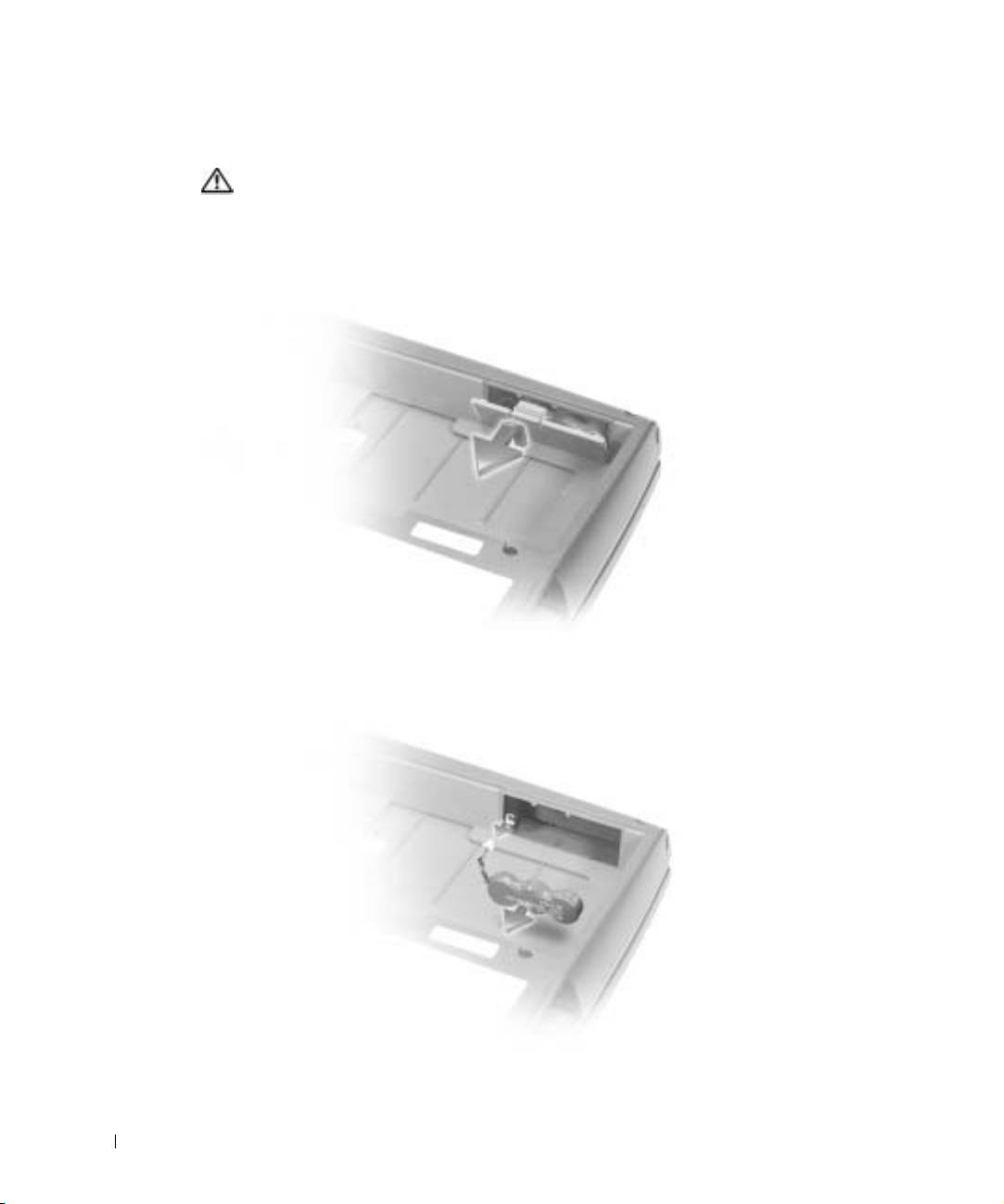
Removing a Reserve Battery
CAUTION: Before performing these procedures, read and follow the safety
instructions that begin on page 5.
1
Remove the battery.
2 Remove the reserve battery cover.
www.dell.com | support.euro.dell.com
3 Pull the reserve battery out of its compartment, and disconnect the cable from the
connector.
22 System Information Guide
Top 10 manuals
100.00
NZXT HALE90 1000W99.99
Samsung SM-R38099.97
AEG BSB 18C99.97
Dell 2700W99.97
Smeg KSEC70X99.96
Beurer HDE 4099.96
Pyramida KH 50 v.299.96
MSI CSM-H81M-P3299.96
AEG HR 562799.95
Melissa 640-048