
Dell OptiPlex GX240: When Using Your Computer System
When Using Your Computer System: Dell OptiPlex GX240
Table of contents
- Contents
- Setup and Quick Reference Guide
- Notes, Notices, and Cautions
- About This Guide Finding Information and Assistance Resources and Support Tools Resource Contents Using the Resource
- Resources and Support Tools Resource Contents Using the Resource
- Resources and Support Tools Resource Contents Using the Resource Solving Problems
- Using the Dell OptiPlex ResourceCD
- Drivers for Your Computer Running the Dell Diagnostics Changing the Boot Sequence
- Running the Dell IDE Hard Drive Diagnostics Safety Instructions When Working Inside Your Computer
- In addition, take note of these safety guidelines when appropriate:
- When Using Your Computer System
- Ergonomic Computing Habits
- Regulatory Information
When Using Your Computer System
As you use your computer system, observe the following safety guidelines.
CAUTION: Do not operate your computer system with any cover(s)
(including computer covers, bezels, filler brackets, and front-
panel inserts) removed.
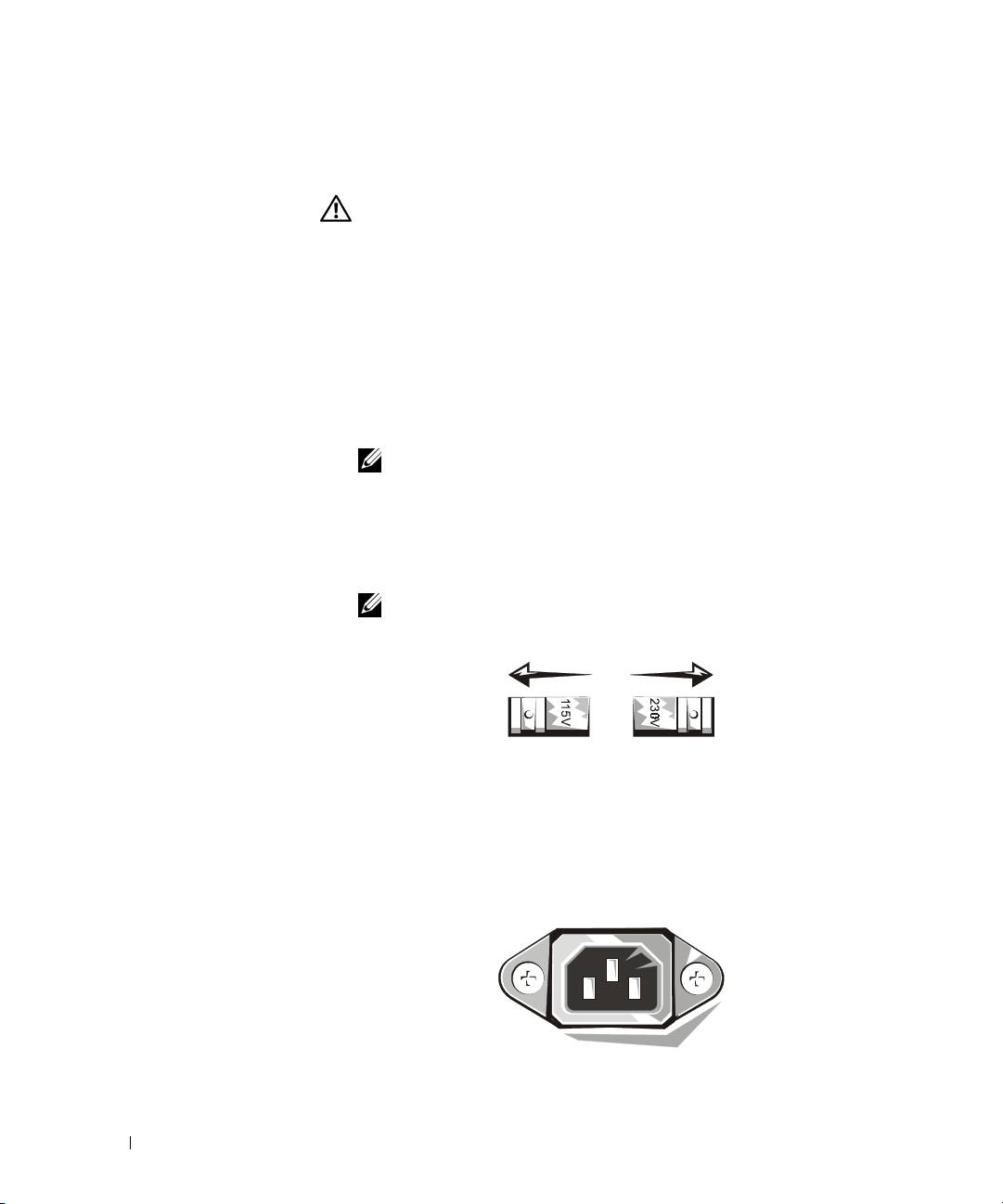
• To help avoid damaging your computer, be sure the voltage selection
switch on the power supply is set to match the AC power available at
your location:
– 115 volts (V)/60 hertz (Hz) in most of North and South America
and some Far Eastern countries such as South Korea and Taiwan
www.dell.com | support.dell.com
– 100 V/50 Hz in eastern Japan and 100 V/60 Hz in western Japan
NOTE: The voltage selection switch must be set to the 115V position
even though the AC supply in Japan is 100 V.
– 230 V/50 Hz in most of Europe, the Middle East, and the Far East
Also be sure your monitor and attached peripherals are electrically
rated to operate with the AC power available in your location.
NOTE: Auto-select power supplies do not require a voltage selection
switch. Your power supply may not have this switch.
• To help prevent electric shock, plug the computer and peripheral
power cables into properly grounded power sources. These cables are
equipped with three-prong plugs to help ensure proper grounding. Do
not use adapter plugs or remove the grounding prong from a cable. If
you must use an extension cable, use a three-wire cable with properly
grounded plugs.
12 Setup and Quick Reference Guide
