
Dell Latitude D430: Back View Connector Description
Back View Connector Description: Dell Latitude D430
Table of contents
- Media Base Setup Guide
- Notes, Notices, and Cautions Abbreviations and Acronyms
- Contents
- CAUTION: Safety Instructions SAFETY: General Safety
- SAFETY: Power Safety Equipment Protection Instructions
- Protecting Against Electrostatic Discharge
- About Your Media Base Left View Right View
- Back View Connector Description
- Connector Description
- Top View
- Setting Up Your Media Base
- Securing the Media Base
- Docking Your Computer
- Undocking Your Computer 6
- 7 Lift the back of the computer up and slide the computer out towards the back of the
- Installing the Optical Drive
- Removing the Optical Drive Using External Drives
- Specifications
- Ports and Connectors
- Regulatory Notices
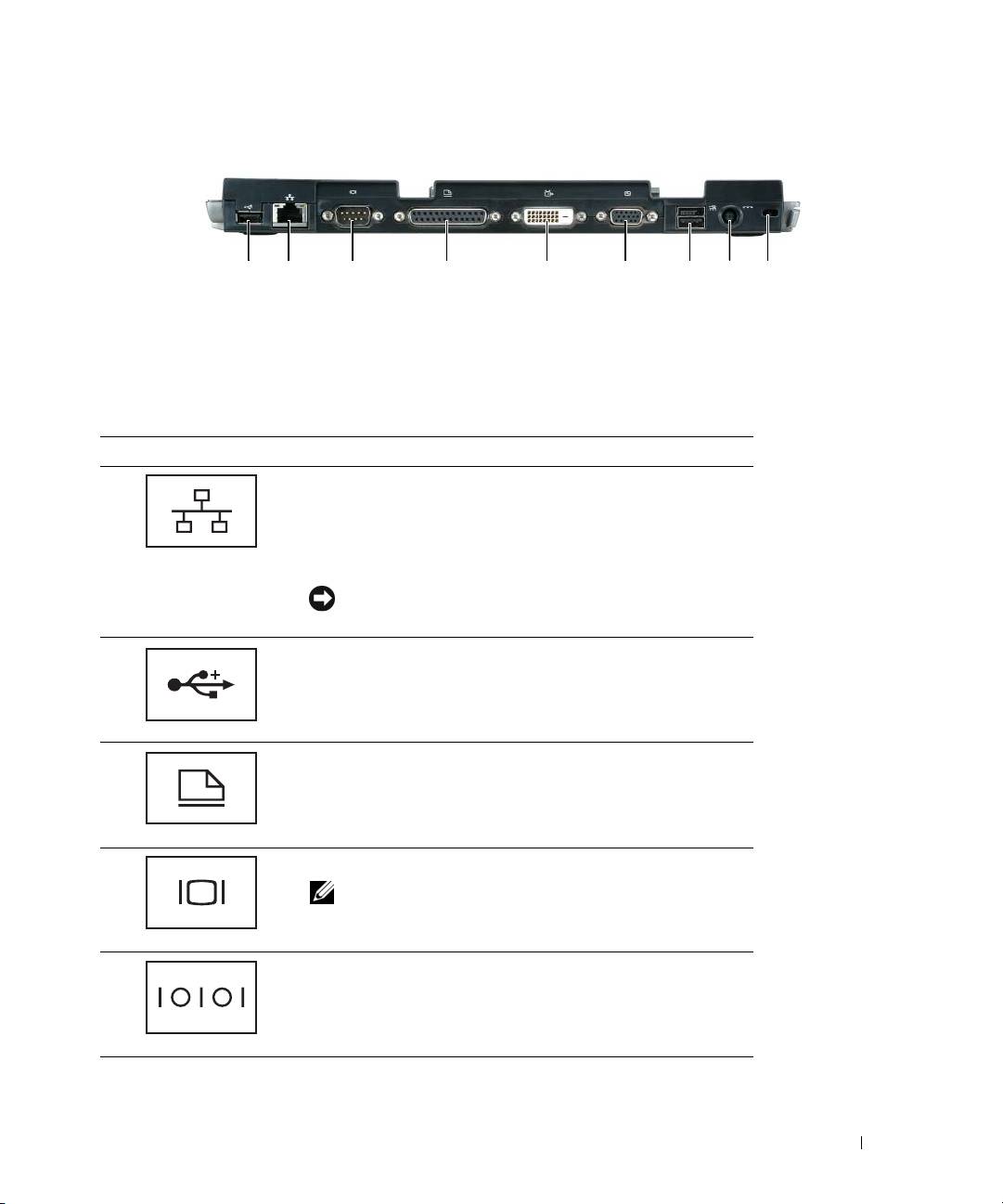
Back View
1 2 3 4 5 6 87 9
1 USB connector 2 network connector 3 serial connector
4 parallel connector 5 digital video connector (DVI) 6 VGA video connector
7 Powered USB connector 8 AC adapter connector 9 security slot
Connector Description
NETWORK CONNECTOR — Connects the media base to a
network. The two lights next to the connector indicate link
status and activity for a wired network connection.
For information on using the network adapter, see the
documentation that came with your computer.
NOTICE: Do not plug a telephone cable into the network
connector.
USB 2.0
CONNECTORS — Connects up to four USB
2.0-compliant devices; including a powered USB.
PARALLEL CONNECTOR — Connects a parallel device, such as a
parallel printer.
VIDEO CONNECTOR — Connects an external VGA monitor.
NOTE: When your computer is docked, use the video
connector on the media base.
SERIAL CONNECTOR — Connects a serial device, such as a
serial mouse or a handheld device.
Media Base Setup Guide 9
