
Dell UPS 10000R: Replacing the Battery Retaining Brackets Replace the left (L)and right (R) battery retaining brackets: Installing the UPS Front Cover
Replacing the Battery Retaining Brackets Replace the left (L)and right (R) battery retaining brackets: Installing the UPS Front Cover: Dell UPS 10000R
Table of contents
- Notes and Warnings
- System Features
- Finding Information What are You Looking For? Find It Here
- Installation and Startup
- Unpacking the Cabinet To unpack the system: Using a forklift or pallet jack, move the shipping carton and pallet near the rack where you will install the UPS. Detach and remove the outer carton.
- Remove the two accessory boxes tucked into the channels in the top Styrofoam section. Open the accessory boxes and set them on a flat, stable surface nearby. Remove the top Styrofoam section and set it on a flat, stable surface nearby.
- Remove both retaining brackets from the UPS: Ensure all battery connectors are disconnected.
- Remove the battery trays from the UPS:
- With one person on each side, carefully lift the cabinet out of the styrofoam using the handles on the cardboard. Place the cabinet on a flat, stable surface in a protected area near the rack where you will install it.
- Rackmount Setup To install the UPS in a rack:
- Installing the Rails Remove the rails from the rail kit accessory box. Select the proper holes in the rail for positioning the cabinet in the desired location in the rack. Locate the rails at the bottom of the 5U space allocated for the UPS. Position the left and right rails as illustrated. Attach the the left and right rails to the rack:
- Installing and Securing the Cabinet Slide the cabinet onto the rails and into the rack. Secure the front of the cabinet to the rack using the four thumbscrews on the mounting brackets. Tighten the thumbscrews clockwise by hand; do not use power tools. Installing the Battery Trays Locate the battery trays you placed near the rack.
- Install the battery trays: Tuck the loop tabs into the plastic sleeve on the front of each battery tray to move them out of the way. Connecting Internal Battery Connectors Connect the internal battery connectors:
- Replacing the Battery Retaining Brackets Replace the left (L)and right (R) battery retaining brackets: Installing the UPS Front Cover
- Install the UPS front cover:
- Connecting the Equipment To install the UPS:
- Hardwiring the UPS Input
- Removing the Terminal Block Cover
- Manufacturer Type Rating
- Installing the Input and Ground Wires
- Starting the UPS To start up the UPS: Verify that the internal batteries are connected.
- Charge the batteries.
- Identifying the UPS Rear Panels 10 kW 208V UPS (DELL10KWOLHVUS)
- 10 kW 230V UPS (DELL10KWOLHV)
- 10 kW 230V UPS (DELL10KWOLHVB)
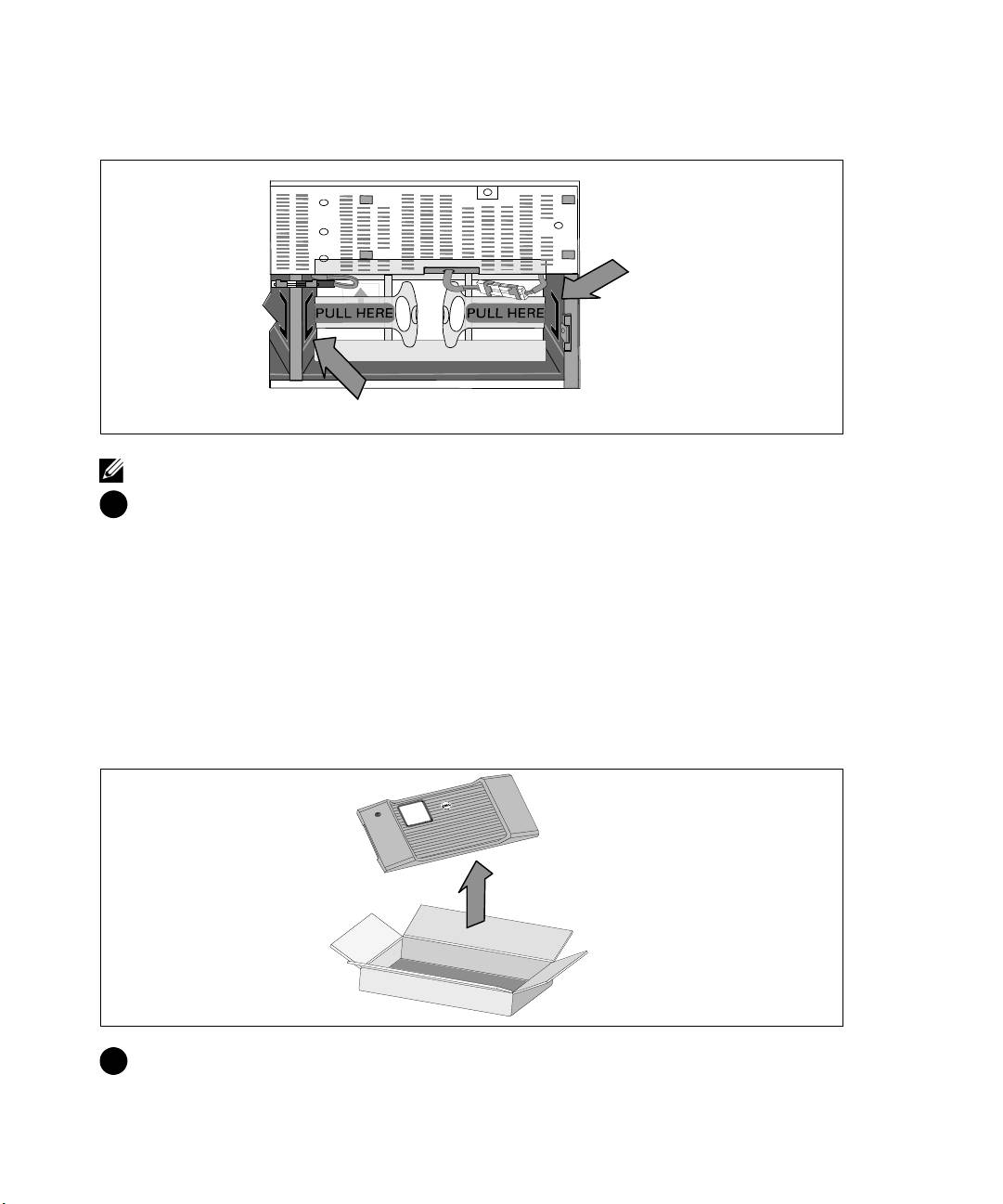
Replacing the Battery Retaining Brackets
Chassis Side Channel
Center Post Side Channel
NOTE:
The battery retaining brackets are labeled L (Left) and R (Right) to indicate where they must be installed.
11
Replace the left (L)and right (R) battery retaining brackets:
For the first battery retaining bracket, insert the bracket tab into the channel on the side of the
center post. Fit the connected battery cables snugly behind the retaining bracket.
Align the end of the battery retaining bracket wi th the channel on the side of the chassis. Push the
bracket until it is firmly seated into the side channel.
Turn the thumbscrew clockwise to secure the bracket.
Repeat to replace the second battery retaining bracket.
Installing the UPS Front Cover
12
Remove the front cover f rom the accessory box.
Installation and Startup
|
15
