
Dell Precision M70: Bottom View Using a Battery Battery Performance
Bottom View Using a Battery Battery Performance: Dell Precision M70
Table of contents
- Notes, Notices, and Cautions Abbreviations and Acronyms
- Contents
- Finding Information for Your Computer What Are You Looking For? Find It Here
- What Are You Looking For? Find It Here
- What Are You Looking For? Find It Here Setting Up Your Computer
- NOTE: Do not connect the computer to the docking device until the computer has been turned on and shut down at least once.
- About Your Computer
- Front View
- Left View Right View
- Back View
- Bottom View Using a Battery Battery Performance
- Checking the Battery Charge Dell QuickSet Battery Meter
- The following icons appear in the Battery Meter window: Microsoft Windows Power Meter Charge Gauge Health Gauge
- Low-Battery Warning Charging the Battery Removing a Battery
- Installing a Battery Storing a Battery Solving Problems Notebook System Software (NSS)
- Lockups and Software Problems The computer does not start up The computer stops responding A program stops responding A program crashes repeatedly
- A program is designed for an earlier Windows operating system A solid blue screen appears Other software problems
- Running the Dell Diagnostics When to Use the Dell Diagnostics Starting the Dell Diagnostics From Your Hard Drive
- Starting the Dell Diagnostics From the Optional Drivers and Utilities CD
- Dell Diagnostics Main Menu 1 Option Function 2 3 Tab Function
- 4 5
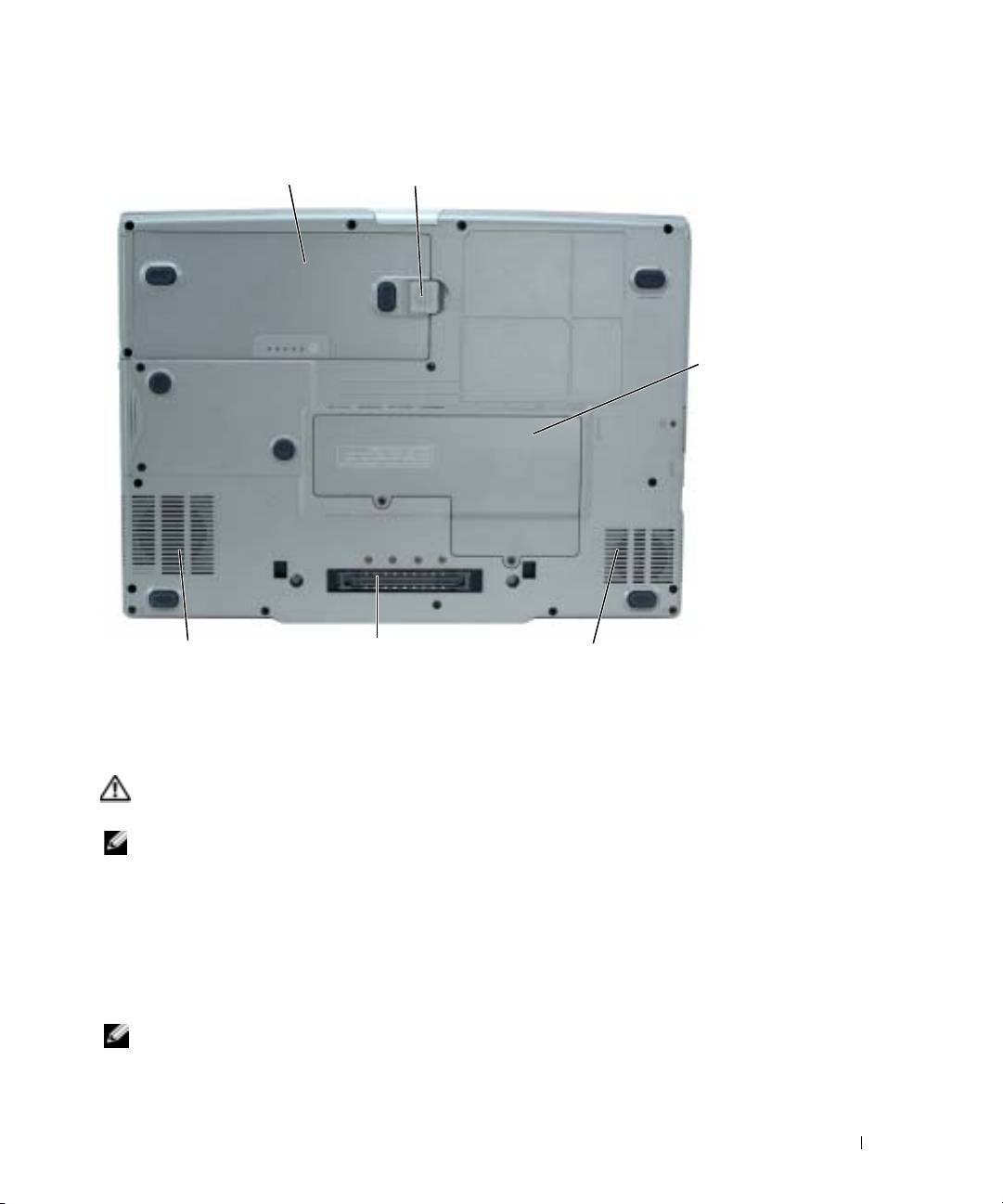
Bottom View
battery
battery-bay latch release
Mini PCI
card/modem/DIMM
module cover
docking device slotprocessor-fan air vent
video-fan air vent
Using a Battery
Battery Performance
CAUTION: Before you begin any of the procedures in this section, follow the safety instructions
located in the Product Information Guide.
NOTE: For information about the Dell warranty for your computer, see the Product Information Guide or
separate paper warranty document that shipped with your computer.
For optimal computer performance and to help preserve BIOS settings, operate your Dell™
portable computer with the main battery installed at all times. Use a battery to run the computer
when it is not connected to an electrical outlet. One battery is supplied as standard equipment in
the battery bay. Battery operating time varies depending on operating conditions. You can install an
optional second battery in the module bay to significantly increase operating time. For more
information about the optional second battery, see your
User’s Guide
.
NOTE: Battery operating time (the time it can hold a charge) decreases over time. Depending on how
often the battery is used and the conditions under which it is used, you may need to purchase a new
battery during the life of your computer.
Quick Reference Guide 13
