
Dell Precision 650: Light Pattern Problem Description Suggested Resolution Diagnostic Light Codes During POST Light Pattern Problem Description Suggestion Resolution
Light Pattern Problem Description Suggested Resolution Diagnostic Light Codes During POST Light Pattern Problem Description Suggestion Resolution: Dell Precision 650
Table of contents
- Notes, Notices, and Cautions Abbreviations and Acronyms
- Contents
- Finding Information and Assistance What Are You Looking For? Find it Here
- What Are You Looking For? Find it Here
- What Are You Looking For? Find it Here
- What Are You Looking For? Find it Here
- Setting Up Your Dell Precision™ 650 Computer Connect the keyboard and the mouse
- Connect the modem or the network cable
- Connect the monitor
- For single- and dual-monitor capable cards with a single connector
- For dual-monitor capable cards with 1 DVI and 1 VGA connector For dual-monitor capable cards with 2 DVI connectors
- Connect the speakers
- Connect the power cables and turn on the computer and monitor
- Install additional software or devices
- To access the User’s Guide from your hard drive: To access the User’s Guide from the CD: To access your User’s Guide from the Dell Support Site:
- Setting Up Your Dell Precision 450 Computer Connect the keyboard and mouse
- Connect the modem or network cable
- Connect the monitor
- For single- and dual-monitor capable cards with a single connector
- For dual-monitor capable cards with 1 DVI and 1 VGA connector For dual-monitor capable cards with 2 DVI connectors
- Connect the speakers
- Connect the power cables and turn on the computer and monitor
- Install Additional Software or Devices
- To access the User’s Guide from your hard drive: To access the User’s Guide from the CD: To access your User’s Guide from the Dell Support Site: Caring for Your Computer
- Solving Problems Resolving Software and Hardware Incompatibilities Windows XP
- Windows 2000
- Using System Restore in Windows XP Creating a Restore Point Restoring the Computer to an Earlier Operating State
- Using Last Known Good Configuration Other Options to Help Resolve Additional Device or Software Conflicts When to Use the Dell Diagnostics
- Starting the Dell Diagnostics Starting the Dell Diagnostics From Your Hard Drive
- Starting the Dell Diagnostics From the Drivers and Utilities CD Dell Diagnostics Main Menu Option Function
- Tab Function
- System Lights Power Light Hard-Drive Cause Corrective Action Light
- Power Light Hard-Drive Cause Corrective Action Light Beep Codes Error Messages Diagnostic Lights
- Diagnostic Light Codes Before POST Light Pattern Problem Description Suggested Resolution
- Light Pattern Problem Description Suggested Resolution Diagnostic Light Codes During POST Light Pattern Problem Description Suggestion Resolution
- Light Pattern Problem Description Suggestion Resolution
- Light Pattern Problem Description Suggestion Resolution
- Light Pattern Problem Description Suggestion Resolution
- Light Pattern Problem Description Suggestion Resolution
- Frequently Asked Questions How Do I... Solution Where to Find Additional Information
- How Do I... Solution Where to Find Additional Information
- Opening the Computer Cover
- Dell Precision 650 Computer
- Inside the Dell Precision 650 Computer
- Dell Precision 450 Computer
- Inside the Dell Precision 450 Computer
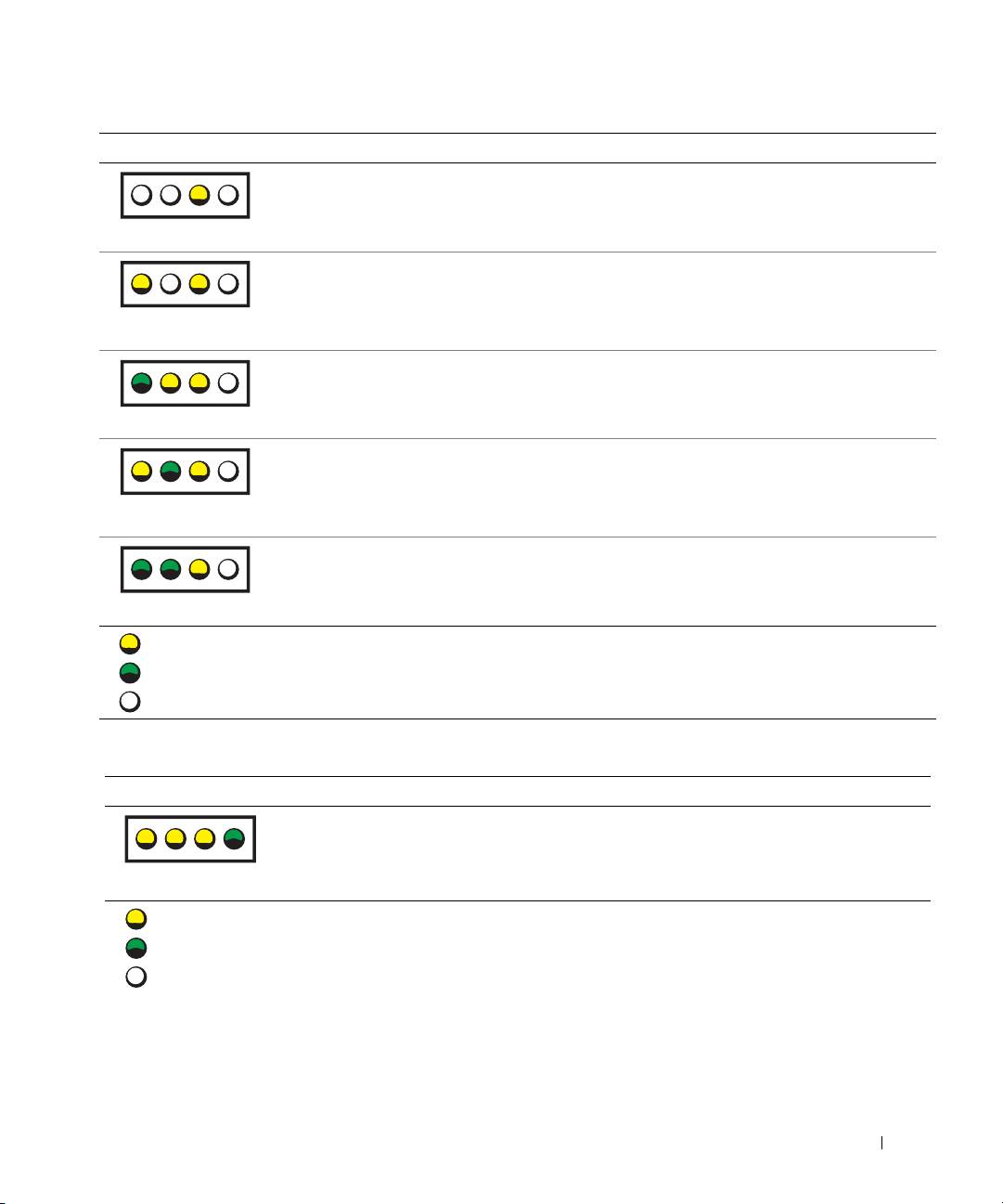
Light Pattern Problem Description Suggested Resolution
A possible system board failure has
Contact Dell for technical assistance.
occurred.
A B C D
A microprocessor and/or VRM
Perform the procedure in "Microprocessor Problems" in
mismatch exists.
your User’s Guide.
If the problem is still not resolved, contact Dell for
A B C D
technical assistance.
A possible VRM 0 failure has
Contact Dell for technical assistance.
occurred.
A B C D
A possible VRM 1 failure has
Perform the procedure in "Microprocessor Problems" in
occurred.
your User’s Guide.
If the problem is still not resolved, contact Dell for
A B C D
technical assistance.
A possible VRM 0 and VRM 1
Contact Dell for technical assistance.
failure has occurred.
A B C D
= yellow
= green
= off
Diagnostic Light Codes During POST
Light Pattern Problem Description Suggestion Resolution
A possible BIOS failure has
Run the BIOS Recovery utility, wait for recovery
occurred; the computer is
completion, and then restart the computer.
in the recovery mode.
A B C D
= yellow
= green
= off
Setup and Quick Reference Guide 37
