
Dell PowerEdge C5220: 4 Connecting the Keyboard, Mouse, and Monitor
4 Connecting the Keyboard, Mouse, and Monitor: Dell PowerEdge C5220
Table of contents
- Notes, Cautions, and Warnings
- CAUTION: Restricted Access Location Installation and Configuration Unpacking the System Installing the Tool-Less Rail Solution
- 1 2 3
- Installing the System Empty the System Chassis 1 2
- 3 4 5 6
- Installing the System Into the Rack
- Populate the System 1 2
- 3 PSU1 PSU2
- 4 Connecting the Keyboard, Mouse, and Monitor
- Connecting the Power Cables 1 2
- Complete the Operating System Setup Supported Operating Systems Other Information You May Need
- Technical Specifications Processor (Per System Board) Expansion Bus (Per System Board) Memory (Per System Board) Drives (Per System Board) Connectors (Per System Board) Video
- Power Physical Environmental
- Environmental (continued)
- Acoustics
4
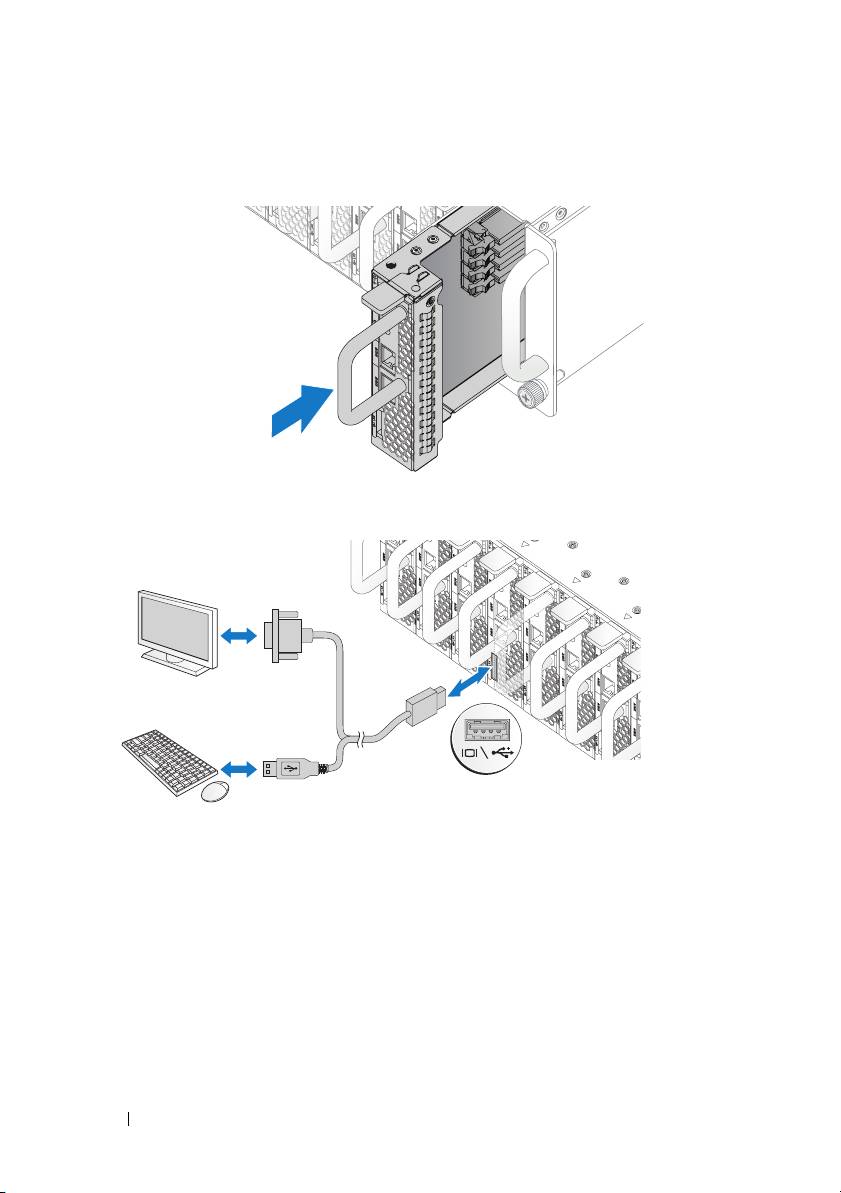
Push the sled into the system until flush with the case and the release latch
locks.
Connecting the Keyboard, Mouse, and Monitor
The connector on the front of your system has an icon indicating which cable
to plug in. Connect a keyboard, mouse, or monitor (optional).
10 Installation and Configuration
Top 10 manuals
100.00
NZXT HALE90 1000W99.99
Samsung SM-R38099.97
AEG BSB 18C99.97
Dell 2700W99.97
Smeg KSEC70X99.96
Beurer HDE 4099.96
Pyramida KH 50 v.299.96
MSI CSM-H81M-P3299.96
AEG HR 562799.95
Melissa 640-048