
Dell POWEREDGE M1000E: 1. Install the Pass-Through Module Figure 1-1. Removing the Pin Cover
1. Install the Pass-Through Module Figure 1-1. Removing the Pin Cover: Dell POWEREDGE M1000E
Table of contents
- Notes, Cautions, and Warnings
- 1. Install the Pass-Through Module Figure 1-1. Removing the Pin Cover
- Figure 1-2. Installing the Pass-Through Module 2. Attach a Fiber Optic Cable (Optional)
- 3. View Status LEDs Table 1-1. Port Status LED – Emulex Yellow LED Green LED State
- Table 1-1. Port Status LED – Emulex (continued) Yellow LED Green LED State Table 1-2. Port Status LED – QLogic Yellow LED Green LED State Table 1-3. Pass-Through Module Status LEDs Green LED Yellow/Blue LED State
- 4. Install Drivers 5. Having Problems? 6. Laser Safety
1. Install the Pass-Through Module
NOTE: Computer equipment contains static-sensitive components that may be
damaged during handling. Static precautions such as grounded wrist straps are
recommended during the installation process.
1
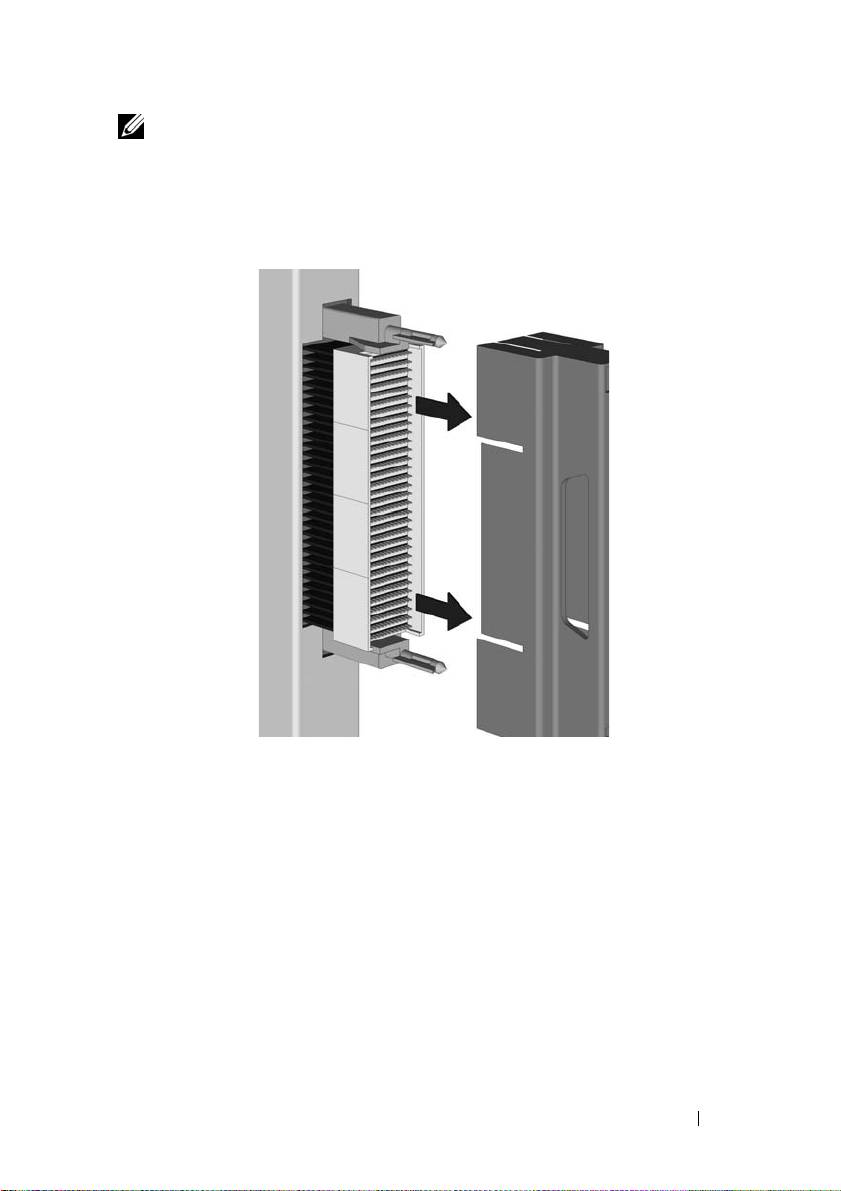
Remove the pin cover from the connector pins at the back of the pass-
through module, as shown in Figure 1-1, Removing the Pin Cover.
Figure 1-1. Removing the Pin Cover
2
Locate an empty module bay in the server.
3
If the selected bay contains an I/O module blank, remove it.
4
Make sure that the latching arm is in the unlatched position, and slide the
pass-through module into the bay until it stops.
FC8PT Pass-Through Module 5
Top 10 manuals
100.00
NZXT HALE90 1000W99.99
Samsung SM-R38099.97
AEG BSB 18C99.97
Dell 2700W99.97
Smeg KSEC70X99.96
Beurer HDE 4099.96
Pyramida KH 50 v.299.96
MSI CSM-H81M-P3299.96
AEG HR 562799.95
Melissa 640-048