
Beurer DS 81: G B Saving weighed items Saving the first measurement Saving other measurements Displaying added measured values Clear memory
G B Saving weighed items Saving the first measurement Saving other measurements Displaying added measured values Clear memory: Beurer DS 81
Table of contents
- 1 G ETTING TO KNOW YOUR INSTRUMENT Instrument functions 2 S AFETY INFORMATION
- Storage and care Batteries Repair Disposal
- 3 I NSTRUMENT DESCRIPTION Diet kitchen scales Initial display
- TART - UP Changing the weight unit Positioning scales 5 O Measuring item to be weighed Switching on scales Place item to be weighed on the scales and read the weight Weighing without a bowl: Weighing with a bowl: Weighing additional items (tare)
- Entering the foodstuffs code Reading off nutritional and energy values Switching off scales
- G B Saving weighed items Saving the first measurement Saving other measurements Displaying added measured values Clear memory
- 6 C HANGING BATTERIES 7 C LEANING AND MAINTENANCE 8 I N THE EVENT OF PROBLEMS
- 9 T ECHNICAL DETAILS
- 10 F OODSTUFFS LIST Abbreviations Definitions Milk and milk products 000 Ayran
- 059
- 146 Mutton,
- Fish, crustaceans and mol- luscs
- 386 Mohnstriezel
- 507
- 651 Macadamia Pulses Drinks
- 758 Weizenvollbier, Confectionary
- 864 Blackberry Soups and stews
- 961 Fried
27
G B Saving weighed items
You can save the weight, nutritional and en-
ergy values of the foodstuff currently being
measured. The scales automatically add up
the values of each measurement stored.
You can view the total weight, total nutritional
values and total energy values at any time.
You can, for example, save all the foodstuffs
which you have measured in one day and
retrieve them at the end of the day.
Note
The saved data is retained even if the
scales are switched on and off or if the
battery is changed.
1
Saving the first measurement
You have previously done a measurement and en-
tered the foodstuffs code.
〉
Press the memory button
M+
.
The display briefly shows the sigma symbol '
∑
'
', the
memory space (e.g.
01
) and the total weight and
switches back to weighing mode.
M
is then continu-
ously illuminated. Successful storing is signalled by a
long bleeping tone.
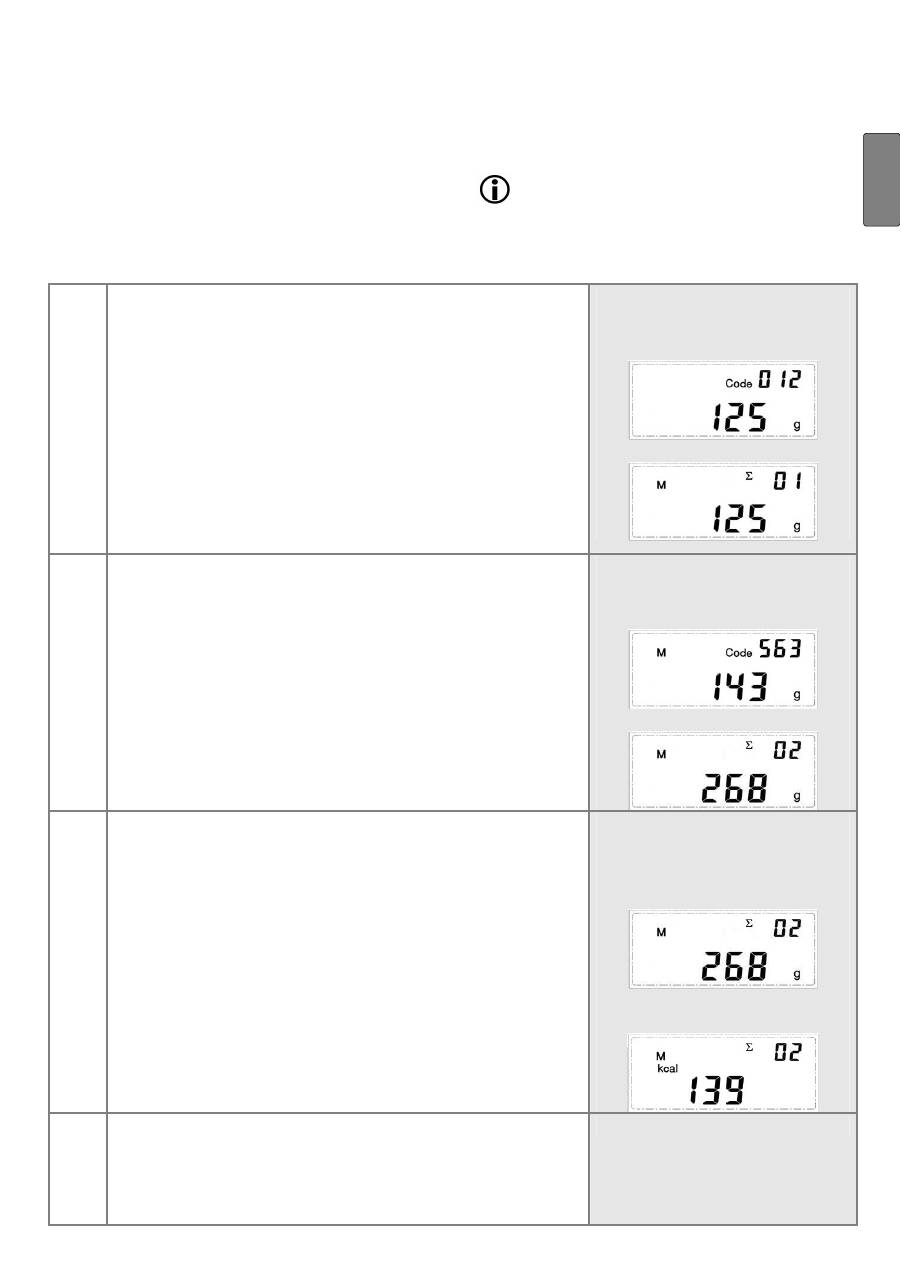
Example: weighing yoghurt
(code 012, weight 125 g, 62
kcal) …
and save.
2
Saving other measurements
Substitute the item to be weighed and repeat step 1.
Example: then weigh an
apple (code 563, weight 143
g, 77 kcal) …
and save.
3
Displaying added measured values
To retrieve the saved values, e.g. on a daily basis:
〉
Press the memory button
MR
.
The display briefly shows the sigma symbol '
∑
'
', the
number of memory spaces (e.g.
02
) and the total
weight stored.
〉
Then press the required function buttons consecu-
tively for the sum of the nutritional and energy val-
ues.
If you do not press any more button within 8 seconds,
the display indicates the weight again.
Example: The weight of the
yoghurt and the apple added
together is 268 g (125 g +
143 g).
The calories added together
are 139 kcal (62 + 77).
4
Clear memory
Clear the memory regularly, e.g. on a daily basis.
〉
Press the memory button
MC
.
The symbol
M
clears. The memory has been cleared.
